Избери език

Positive/Refused Drug and Alcohol Test Report (Fillable PDF)

  1. език Английски
  2. Държава Австралия
  3. Отдел Transport
  4. Дейност Safety Compliance
Positive/Refused Drug and Alcohol Test Report (Fillable PDF)

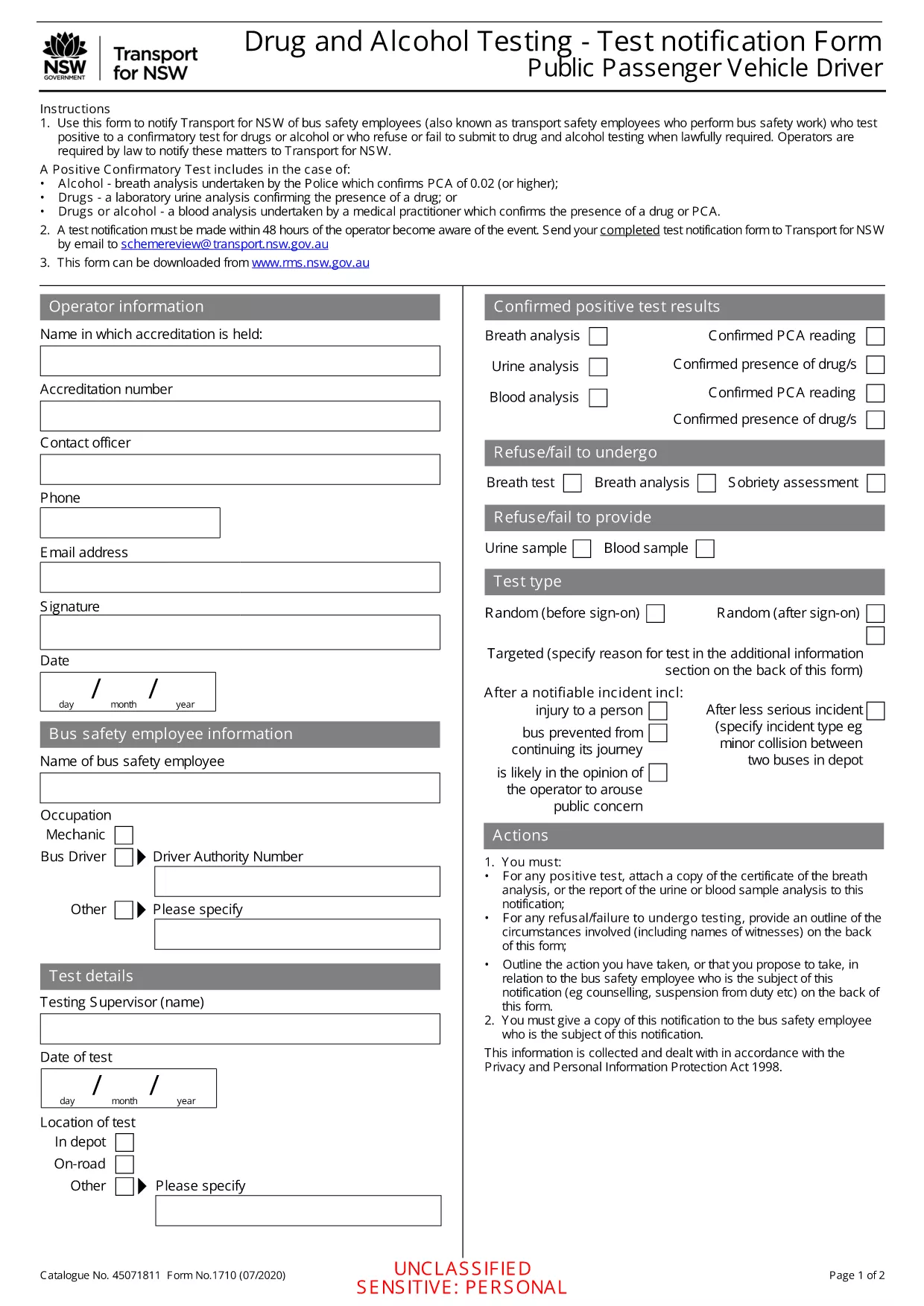
Employers, transport agencies, and safety managers often need to document a worker’s positive, refused, or failed drug/alcohol test. The Positive/Refused Drug and Alcohol Test Report is a mandatory notification form used across Australian jurisdictions, especially for public passenger vehicle operators.

When to Use This Test Report

This form is required whenever a driver or safety‑critical employee:

  • Tests positive for drugs or alcohol after a confirmatory analysis.
  • Refuses to submit a sample when lawfully required.
  • Fails to appear for a scheduled test without a valid excuse.

Submitting the report promptly helps maintain compliance with the National Heavy Vehicle Regulator (NHVR) and state transport regulations.

Key Sections of the Form

The fillable PDF is divided into clear sections:

  1. Employer & Employee Details – names, licence numbers, and contact information.
  2. Test Information – date, time, type of test, and laboratory results.
  3. Outcome – Positive, Refused, or Failed to Test.
  4. Follow‑up Actions – suspension dates, medical review, and notification dates.
  5. Signature & Declaration – authorised signatory acknowledgment.

How to Fill Out the Form Online

Instead of downloading and editing the PDF in a separate editor, simply click the "Fill out this form" button on this page. The Formize PDF Filler app will load instantly, allowing you to complete every field directly in your browser.

Common Mistakes & Tips

  • Missing licence numbers – double‑check the driver’s licence and vehicle registration numbers.
  • Incorrect test type – specify whether the test was urine, breath, or blood.
  • Skipping the signature – the form is invalid without an authorised signature.
  • Delays in submission – submit within 24 hours of the test result to stay compliant.

Follow these tips to ensure a smooth, error‑free submission.

ЧЗВ
  • What qualifies as a "refused" test?

    A refusal occurs when the employee declines to provide a sample after being lawfully directed to do so, or when they intentionally obstruct the collection process.

  • Do I need a laboratory report to submit this form?

    Yes. For a positive result, attach the confirmatory laboratory report. For a refusal, include a written statement of the employee’s refusal.

  • Can I edit the PDF after I download it?

    The form is fully fillable online via Formize. After downloading, you can still edit it with any standard PDF editor, but online completion is recommended for accuracy.

  • How long must I keep the completed report?

    Regulations require retention for at least 3 years, or longer if stipulated by your state’s transport authority.

  • Is the online filler secure?

    Formize uses SSL encryption and stores data only in your browser session. No information is transmitted to third parties unless you choose to email or upload the file.

  • What if I make an error after submitting?

    Contact your compliance officer immediately. You can submit a corrected form with a clear note indicating it supersedes the previous submission.

  • Do I need a digital signature?

    A typed name in the signature field is acceptable when the form is submitted electronically. For hard‑copy submissions, print and sign the document.

КАК ДА

Как да попълните drug test report PDF безплатно онлайн в 5 лесни стъпки:

  1. 1
    Click the Fill‑out Button
    On this page, click the "Fill out this form" button. The Formize PDF Filler will open in a new tab.
  2. 2
    Wait for the Filler to Load
    The app loads the fillable PDF automatically. No download or extra software is required.
  3. 3
    Enter All Required Information
    Complete each highlighted field with accurate employer, employee, and test details.
  4. 4
    Save and Download
    When finished, click "Save" to store a copy in your browser, then download the completed PDF for your records.
  5. 5
    Submit to the Authority
    Email or upload the saved PDF to the relevant transport authority as instructed in your organisation’s policy.
Приложение Formize PDF Filler
ОТНОСНО

drug test report PDF шаблон

С традиционния набор от функции за преглед и попълване на PDF документ, съчетан с предимствата на уеб приложение и адаптивно оформление, можете да завършите drug test report PDF за минути.

ХАРАКТЕРИСТИКА

PDF пълнител

Най-лесният начин да попълните drug test report PDF онлайн

  • Бързо попълнете drug test report PDF
    Търсите начин бързо да попълните drug test report PDF онлайн? С нашия онлайн безплатен инструмент за попълване на PDF формуляри ще знаете как да редактирате и попълвате този PDF документ за по-малко от минута.
  • Лесен за използване онлайн PDF редактор
    Писнало ви е да разпечатвате PDF файлове, за да можете да ги редактирате, преди да сканирате повторно и да ги изпратите обратно? Редактирайте PDF документи безплатно онлайн. Използвайте нашия онлайн pdf редактор, за да спестите време и хартия.
  • Страхотни инструменти, всички платформи
    Чудите се как да попълните drug test report PDF на Mac или може би как да използвате PDF пълнител безплатно? Нашите онлайн PDF инструменти работят на всички платформи.
  • Сигурно съхранение на файлове
    Завършените „drug test report PDF“ файлове се съхраняват в защитена база данни, управлявана от Amazon Cloud хостинг. Можете да изтриете вашите файлове от нашата система по всяко време. Във всеки случай тези файлове се изтриват автоматично след 24 часа.
  • Чат с drug test report PDF
    Разговаряйте с „drug test report PDF“ в Chatize, който е безплатен асистент за четене на PDF файлове. Задавайте въпроси и получавайте отговори от „drug test report PDF“. Просто щракнете върху бутона Чат с документ по-горе.

Изтриване на сесията за пълнене

Изтриване на избраната сесия за пълнене? В този случай вашият напредък в попълването на формуляра ще бъде загубен.

Изтриване на сесия за редактиране

Изтриване на избраната сесия за редактиране? В този случай вашият напредък в създаването и редактирането на формуляра ще бъде загубен.