Избери език

Driving Licence Renewal Application for Age 70

  1. Държава Австралия
  2. език Английски
  3. Дейност Driver Licensing
  4. Отдел Transport
Driving Licence Renewal Application for Age 70

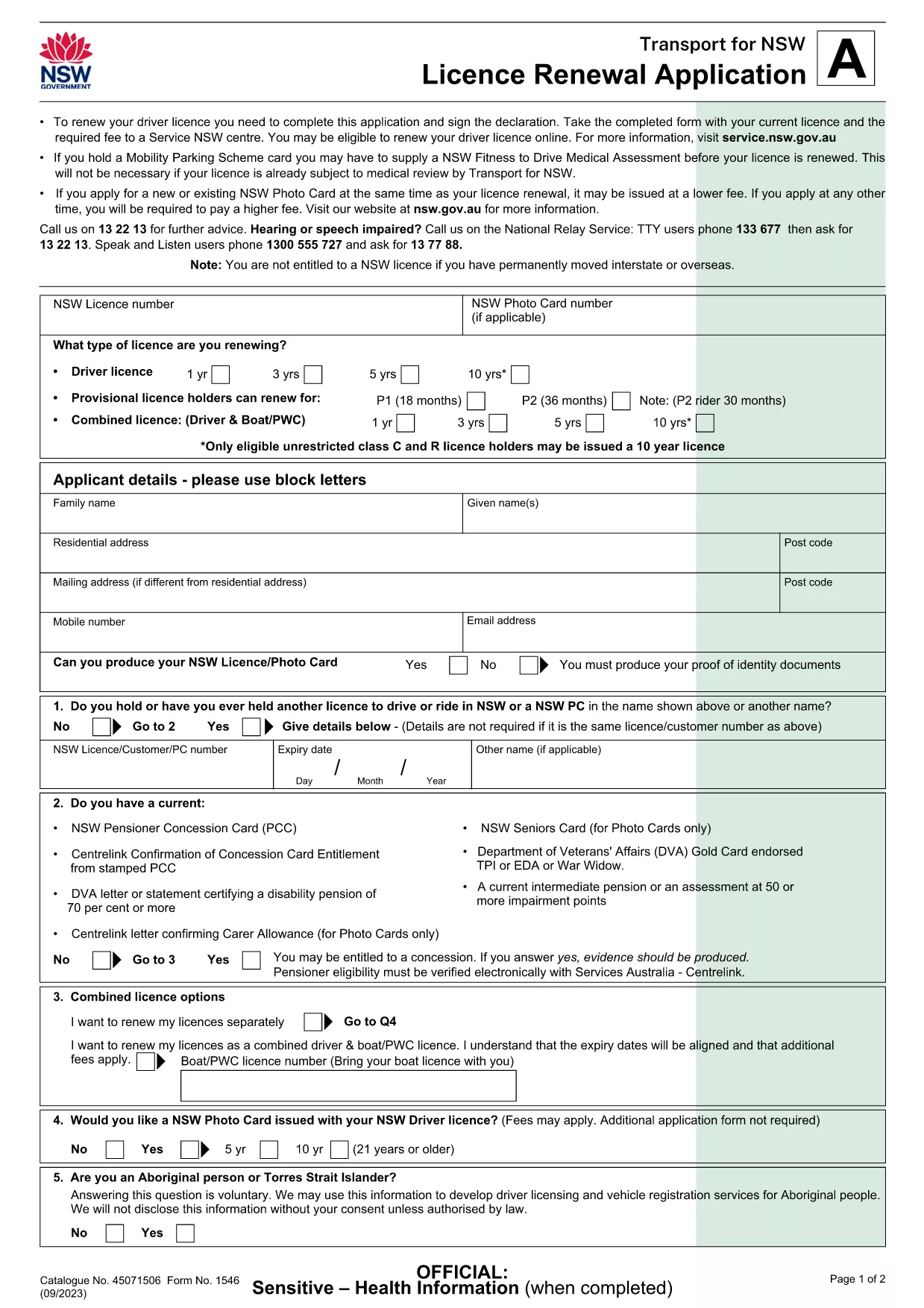
Turning 70 means it’s time to update your driver’s licence to meet the latest safety standards. The Licence Renewal Application (Form 1546) is a fillable PDF that lets you provide all required details from the comfort of home.

This page gives you everything you need – a direct download, an instant online filler, clear instructions, and answers to the most common questions.

Why Renew Your Licence at Age 70?

  • Legal requirement in many jurisdictions to re‑validate fitness to drive.
  • Update your photo and address to keep your record current.
  • Access any new concessions or senior driver programs.

Download & Fill the PDF Form

Click the Fill out this form button below. The Formize PDF Filler app will load the official Licence Renewal Application (PDF) directly in your browser, so you never need to install additional software.

Step‑by‑Step Guide to Complete the Form

Follow the simple steps in the How To section to finish your renewal quickly.

Common Mistakes to Avoid

  • Leaving mandatory fields blank – the filler will highlight them.
  • Using a low‑resolution photo – upload a clear, recent headshot.
  • Forgetting to sign the declaration – you can add a digital signature or print and sign.

Frequently Asked Questions

Scroll down for quick answers to the questions most drivers ask when renewing at 70.

ЧЗВ
  • Do I need to print the form after filling it online?

    Yes. The Service NSW centre requires a hard copy with your original signature and supporting documents.

  • Can I submit the form electronically?

    Currently the NSW government accepts only paper submissions for licence renewal, so you must print and deliver the form.

  • What identification documents do I need to bring?

    Bring your current driver’s licence, proof of residence (e.g., utility bill), and a recent passport‑style photo.

  • Is there an extra fee for renewing at age 70?

    The renewal fee is the standard rate for senior drivers in NSW; check the Service NSW website for the exact amount.

  • How long does the renewal process take?

    Processing at the centre usually takes 15‑30 minutes once you submit the completed form and payment.

  • What if I make a mistake on the form?

    If you notice an error before printing, simply go back to the Formize filler, correct the field, and re‑download the PDF.

  • Can I use a mobile device to fill the form?

    The Formize filler works best on a desktop or laptop. Mobile browsers may not display all fields correctly.

  • Do I need a separate medical certificate?

    If you have a medical condition that could affect driving, attach a Doctor’s Certificate with the form.

КАК ДА

Как да попълните renew driving licence at 70 безплатно онлайн в 6 лесни стъпки:

  1. 1
    Click the Fill‑Out Button
    Press the “Fill out this form” button on this page. The Formize PDF Filler will open the licence renewal PDF in a secure window.
  2. 2
    Wait for the Filler to Load
    The app loads the fillable fields automatically. This usually takes a few seconds depending on your connection.
  3. 3
    Enter Your Details
    Type your personal information, address, and any medical declarations directly into the highlighted fields.
  4. 4
    Add a Digital Signature (Optional)
    If you have a digital signature, click the signature field and follow the prompts. Otherwise, you can print later to sign.
  5. 5
    Save and Download
    When all fields are complete, click “Save” to download the completed PDF to your device.
  6. 6
    Print, Sign, and Submit
    Print the saved form, sign with a black or blue pen if required, and bring it together with your current licence and fee to the nearest Service NSW centre.
Приложение Formize PDF Filler
ОТНОСНО

renew driving licence at 70 шаблон

С традиционния набор от функции за преглед и попълване на PDF документ, съчетан с предимствата на уеб приложение и адаптивно оформление, можете да завършите renew driving licence at 70 за минути.

ХАРАКТЕРИСТИКА

PDF пълнител

Най-лесният начин да попълните renew driving licence at 70 онлайн

  • Бързо попълнете renew driving licence at 70
    Търсите начин бързо да попълните renew driving licence at 70 онлайн? С нашия онлайн безплатен инструмент за попълване на PDF формуляри ще знаете как да редактирате и попълвате този PDF документ за по-малко от минута.
  • Лесен за използване онлайн PDF редактор
    Писнало ви е да разпечатвате PDF файлове, за да можете да ги редактирате, преди да сканирате повторно и да ги изпратите обратно? Редактирайте PDF документи безплатно онлайн. Използвайте нашия онлайн pdf редактор, за да спестите време и хартия.
  • Страхотни инструменти, всички платформи
    Чудите се как да попълните renew driving licence at 70 на Mac или може би как да използвате PDF пълнител безплатно? Нашите онлайн PDF инструменти работят на всички платформи.
  • Сигурно съхранение на файлове
    Завършените „renew driving licence at 70“ файлове се съхраняват в защитена база данни, управлявана от Amazon Cloud хостинг. Можете да изтриете вашите файлове от нашата система по всяко време. Във всеки случай тези файлове се изтриват автоматично след 24 часа.
  • Чат с renew driving licence at 70
    Разговаряйте с „renew driving licence at 70“ в Chatize, който е безплатен асистент за четене на PDF файлове. Задавайте въпроси и получавайте отговори от „renew driving licence at 70“. Просто щракнете върху бутона Чат с документ по-горе.

Изтриване на сесията за пълнене

Изтриване на избраната сесия за пълнене? В този случай вашият напредък в попълването на формуляра ще бъде загубен.

Изтриване на сесия за редактиране

Изтриване на избраната сесия за редактиране? В този случай вашият напредък в създаването и редактирането на формуляра ще бъде загубен.