Избери език

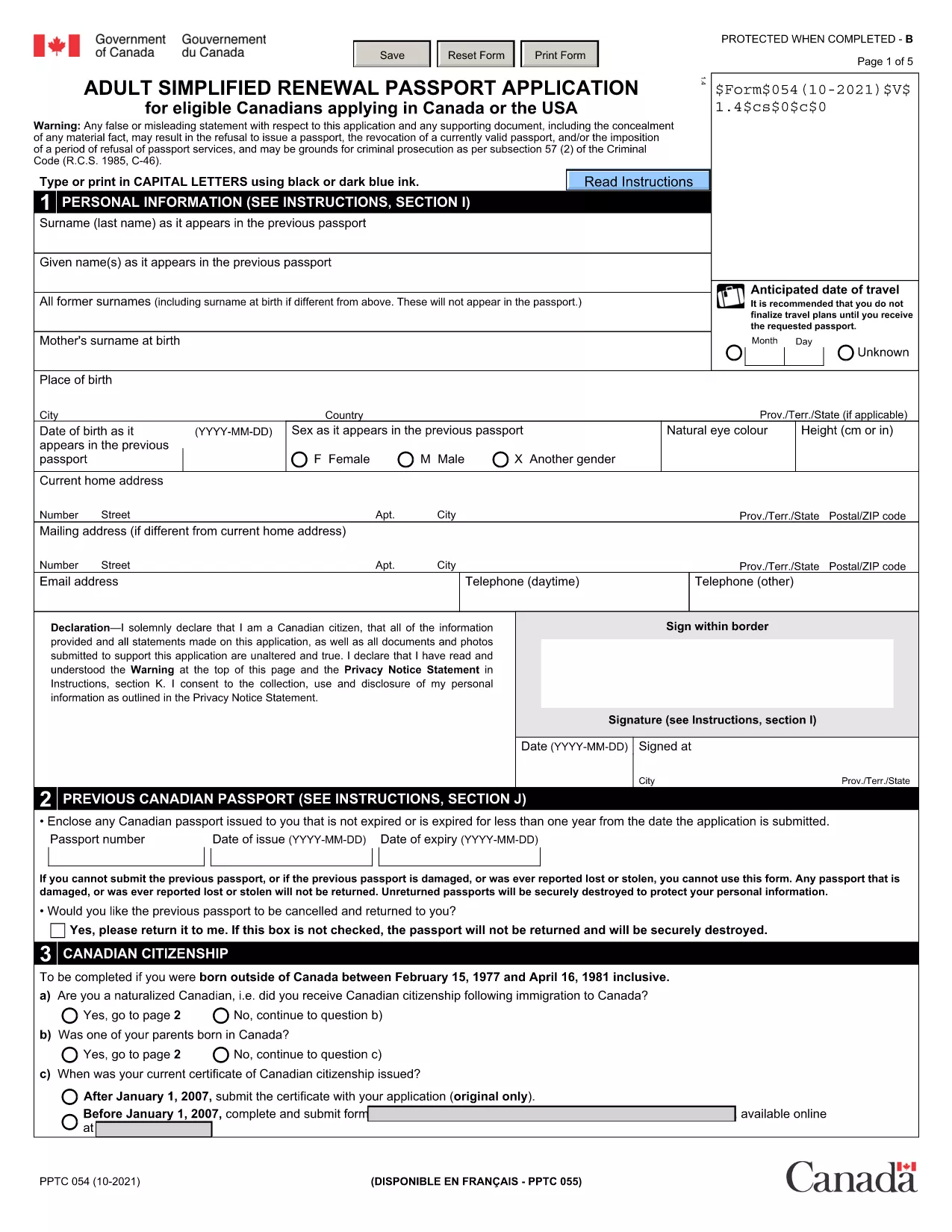
Fillable Canadian Passport Renewal Form (PPTC‑054)

  1. език Английски
  2. Държава Канада
  3. Отдел Immigration, Refugees and Citizenship Canada
  4. Дейност Passport Renewal
Fillable Canadian Passport Renewal Form (PPTC‑054)

Need to renew your Canadian passport quickly? The Adult Simplified Renewal Passport Application (form PPTC‑054) is the official, government‑approved document for eligible Canadians. With Formize you can open the fillable PDF directly in your browser, complete it, and download a signed copy—no extra software required.

What Is the PPTC‑054 Renewal Form?

PPTC‑054 is the streamlined renewal form used by Canadian citizens whose passports have expired or are about to expire. It collects personal details, travel history, and a guarantor’s signature, then forwards the information to Immigration, Refugees and Citizenship Canada (IRCC) for processing.

Who Can Use This Simplified Application?

  • Canadian adults (18 years or older) with a previously issued passport.
  • Applicants whose most recent passport is still valid or has expired within the last 12 months.
  • Those who meet the eligibility criteria listed on the form (no name change, no lost passport, etc.).

How to Complete the Form Online with Formize

Follow these three easy steps and you’ll have a completed, printable PDF in minutes:

  1. Click the "Fill out this form" button on this page.
  2. Wait a few seconds while the Formize PDF Filler app loads the fillable version of PPTC‑054.
  3. Enter your information, add a digital signature, and click Download to save the finished form.

Common Mistakes to Avoid

  • Leaving required fields blank – the form will not submit if any mandatory section is empty.
  • Using an invalid guarantor – the guarantor must meet the IRCC criteria (Canadian citizen, 18 + years old, known for at least 2 years).
  • Incorrect passport number format – double‑check the series of letters and numbers on your current passport.

Where to Submit Your Completed Application

After downloading the filled PDF, include it with your passport photos, payment receipt, and any supporting documents, then mail or deliver the package to the nearest Passport Canada Office or a participating Service Canada centre. For detailed mailing addresses, visit the IRCC website.

Ready to start? Click the button below and let Formize handle the heavy lifting.

ЧЗВ
  • Do I need to print the form before filling it out?

    No. With Formize you fill the PDF directly in your browser and download the completed version.

  • Can I use this form if my passport was lost or stolen?

    No. PPTC‑054 is only for standard renewals. Lost or stolen passports require a different application (PPTC 040).

  • How long does the renewal process take after I submit?

    Processing typically takes 10‑20 business days for standard service; express service may be faster for an additional fee.

  • What payment methods are accepted for the passport fee?

    Accepted methods include credit/debit cards, money orders, and certified checks. Check the IRCC website for the most current list.

  • Is the digital signature legally valid?

    Yes. Formize creates a compliant electronic signature that meets Canadian e‑signing standards for passport applications.

  • Can I save my progress and finish later?

    The Formize app allows you to download a partially completed PDF, which you can reopen later to finish.

  • Do I need a guarantor for this renewal?

    A guarantor is required unless you qualify for the “no‑guarantor” option listed on the form (e.g., certain diplomatic applicants).

  • Where can I find passport photos that meet IRCC standards?

    Use a professional photo studio that follows IRCC guidelines, or follow the online photo specifications on the IRCC website.

КАК ДА

Как да попълните Canadian passport renewal form безплатно онлайн в 3 лесни стъпки:

  1. 1
    Click the Fill‑out Button
    Press the “Fill out this form” button on the page to launch the Formize PDF Filler.
  2. 2
    Wait for the Filler to Load
    The fillable version of PPTC‑054 loads in a few seconds—no download required.
  3. 3
    Enter Your Details and Sign
    Complete each field, add your digital signature, then click Download to save the finished PDF.
Приложение Formize PDF Filler
ОТНОСНО

Canadian passport renewal form шаблон

С традиционния набор от функции за преглед и попълване на PDF документ, съчетан с предимствата на уеб приложение и адаптивно оформление, можете да завършите Canadian passport renewal form за минути.

ХАРАКТЕРИСТИКА

PDF пълнител

Най-лесният начин да попълните Canadian passport renewal form онлайн

  • Бързо попълнете Canadian passport renewal form
    Търсите начин бързо да попълните Canadian passport renewal form онлайн? С нашия онлайн безплатен инструмент за попълване на PDF формуляри ще знаете как да редактирате и попълвате този PDF документ за по-малко от минута.
  • Лесен за използване онлайн PDF редактор
    Писнало ви е да разпечатвате PDF файлове, за да можете да ги редактирате, преди да сканирате повторно и да ги изпратите обратно? Редактирайте PDF документи безплатно онлайн. Използвайте нашия онлайн pdf редактор, за да спестите време и хартия.
  • Страхотни инструменти, всички платформи
    Чудите се как да попълните Canadian passport renewal form на Mac или може би как да използвате PDF пълнител безплатно? Нашите онлайн PDF инструменти работят на всички платформи.
  • Сигурно съхранение на файлове
    Завършените „Canadian passport renewal form“ файлове се съхраняват в защитена база данни, управлявана от Amazon Cloud хостинг. Можете да изтриете вашите файлове от нашата система по всяко време. Във всеки случай тези файлове се изтриват автоматично след 24 часа.
  • Чат с Canadian passport renewal form
    Разговаряйте с „Canadian passport renewal form“ в Chatize, който е безплатен асистент за четене на PDF файлове. Задавайте въпроси и получавайте отговори от „Canadian passport renewal form“. Просто щракнете върху бутона Чат с документ по-горе.

Изтриване на сесията за пълнене

Изтриване на избраната сесия за пълнене? В този случай вашият напредък в попълването на формуляра ще бъде загубен.

Изтриване на сесия за редактиране

Изтриване на избраната сесия за редактиране? В този случай вашият напредък в създаването и редактирането на формуляра ще бъде загубен.