
Избери език

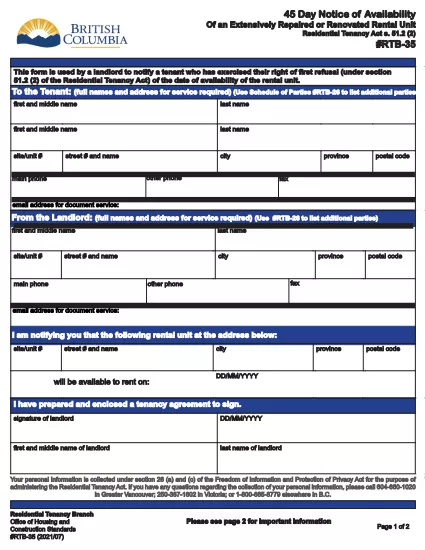
RTB‑35 45‑Day Notice of Availability (Fillable PDF)

  1. Държава Канада
  2. език Английски
  3. Дейност Наемане
  4. Отдел Residential Tenancy Branch
RTB‑35 45‑Day Notice of Availability (Fillable PDF)

The RTB‑35 is the official 45‑Day Notice of Availability required by British Columbia’s Residential Tenancy Act. Landlords must give tenants at least 45 days’ notice before a rental unit becomes available for a new tenancy. This form ensures the notice is clear, legally compliant, and ready to be filed.

What Is the RTB‑35 Form?

RTB‑35 is a standardized, government‑approved PDF used by landlords across the province. It captures the date the unit will be available, the reason for vacancy, and the landlord’s contact information. Because it is a fillable PDF, you can complete it directly in your browser without printing a paper copy first.

When and Why You Need This Notice

  • When you plan to end a tenancy because the unit will be re‑rented or taken off the market.
  • When you are selling the property or converting it to another use.
  • To comply with the Residential Tenancy Act and avoid disputes or penalties.

How to Complete the RTB‑35 Online

Follow the simple steps below. The Formize PDF Filler loads the fillable version instantly, so you never need to download a separate editor.

Common Mistakes to Avoid

  • Providing a date that is less than 45 days from the notice date.
  • Leaving the “Reason for Vacancy” field blank.
  • Forgetting to sign the form before submitting to the tenant.

Download the Fillable PDF

Click the button below to open the RTB‑35 form in the Formize PDF Filler. When the app loads, you can fill, save, and print the notice in minutes.

Fill out this form

ЧЗВ
  • What happens if I give less than 45 days’ notice?

    The notice will be considered invalid under the Residential Tenancy Act, and you may be required to continue the tenancy or face a dispute resolution claim.

  • Can I use a handwritten version of RTB‑35?

    Yes, but a fillable PDF is recommended because it reduces errors, ensures legibility, and creates a digital record.

  • Do I need to attach any supporting documents?

    Only if the reason for vacancy requires proof (e.g., a sale agreement). Otherwise, the RTB‑35 alone is sufficient.

  • Is the Formize PDF Filler free to use?

    Yes. You can fill, save, and download the form at no cost. No software installation is required.

  • Can I email the completed RTB‑35 to my tenant?

    Absolutely. Once you save the completed PDF, you can attach it to an email or upload it to a tenant portal.

  • Do I need to keep a copy of the notice?

    Keep a saved copy for your records for at least the length of the tenancy, as it may be requested during dispute resolution.

  • What if the tenant disputes the notice date?

    Provide the saved PDF with timestamps from the Formize app as evidence of when the notice was completed and sent.

КАК ДА

Как да попълните RTB-35 безплатно онлайн в 5 лесни стъпки:

  1. 1
    Open the Form
    Click the “Fill out this form” button above. The Formize PDF Filler app will load the RTB‑35 fillable PDF in a new tab.
  2. 2
    Enter Required Information
    Type the date the unit will be available, the reason for vacancy, and your contact details. All fields are interactive and save automatically.
  3. 3
    Review and Sign
    Check each section for accuracy, then add your electronic signature using the built‑in signature field.
  4. 4
    Save or Print
    When you’re finished, click “Save” to download a copy or “Print” to give a hard copy to your tenant.
  5. 5
    Submit to Tenant
    Deliver the completed notice by hand, email, or mail within the 45‑day window required by law.
Приложение Formize PDF Filler
ОТНОСНО

Формуляри за наемодатели и/или наематели, за да предложат действие, свързано с договори за наем.

RTB-35 е типът договори за жилищен наем, използвани от повечето частни наемодатели и жилищни асоциации.

Има редица въпроси, по които наемодателите или наемателите трябва да спазват определени правила, определени в разпоредбите. В някои случаи може да се наложи те да попълнят формуляр, наречен „предписан формуляр“, който предлага действие, което може да засегне другата страна по договора за наем.

Формулярите се наричат ​​предписани формуляри, тъй като формулировката в тях е внимателно изготвена, за да се гарантира, че лицето, което попълва формуляра, и лицето, на което се връчва, могат да разберат какво се предлага и какво могат да направят в отговор. Неизпълнението на правилния формуляр може да обезсили действието, което се предлага.

Не можете да променяте формулировката в тези формуляри, освен ако във формуляр не е посочено, че можете да го направите. Ако промените формулировката, формулярът може да бъде невалиден. Трябва също така да спазвате всички срокове за предизвестие, посочени във формуляра.

ХАРАКТЕРИСТИКА

PDF пълнител

Най-лесният начин да попълните RTB-35 онлайн

  • Бързо попълнете RTB-35
    Търсите начин бързо да попълните RTB-35 онлайн? С нашия онлайн безплатен инструмент за попълване на PDF формуляри ще знаете как да редактирате и попълвате този PDF документ за по-малко от минута.
  • Лесен за използване онлайн PDF редактор
    Писнало ви е да разпечатвате PDF файлове, за да можете да ги редактирате, преди да сканирате повторно и да ги изпратите обратно? Редактирайте PDF документи безплатно онлайн. Използвайте нашия онлайн pdf редактор, за да спестите време и хартия.
  • Страхотни инструменти, всички платформи
    Чудите се как да попълните RTB-35 на Mac или може би как да използвате PDF пълнител безплатно? Нашите онлайн PDF инструменти работят на всички платформи.
  • Сигурно съхранение на файлове
    Завършените „RTB-35“ файлове се съхраняват в защитена база данни, управлявана от Amazon Cloud хостинг. Можете да изтриете вашите файлове от нашата система по всяко време. Във всеки случай тези файлове се изтриват автоматично след 24 часа.
  • Чат с RTB-35
    Разговаряйте с „RTB-35“ в Chatize, който е безплатен асистент за четене на PDF файлове. Задавайте въпроси и получавайте отговори от „RTB-35“. Просто щракнете върху бутона Чат с документ по-горе.

Изтриване на сесията за пълнене

Изтриване на избраната сесия за пълнене? В този случай вашият напредък в попълването на формуляра ще бъде загубен.

Изтриване на сесия за редактиране

Изтриване на избраната сесия за редактиране? В този случай вашият напредък в създаването и редактирането на формуляра ще бъде загубен.