
Избери език

IRS Form 1045 – Fillable PDF for Tentative Refund

  1. Държава САЩ
  2. език Английски
  3. Дейност Данъци
  4. Отдел Служба за събиране на данъци
IRS Form 1045 – Fillable PDF for Tentative Refund

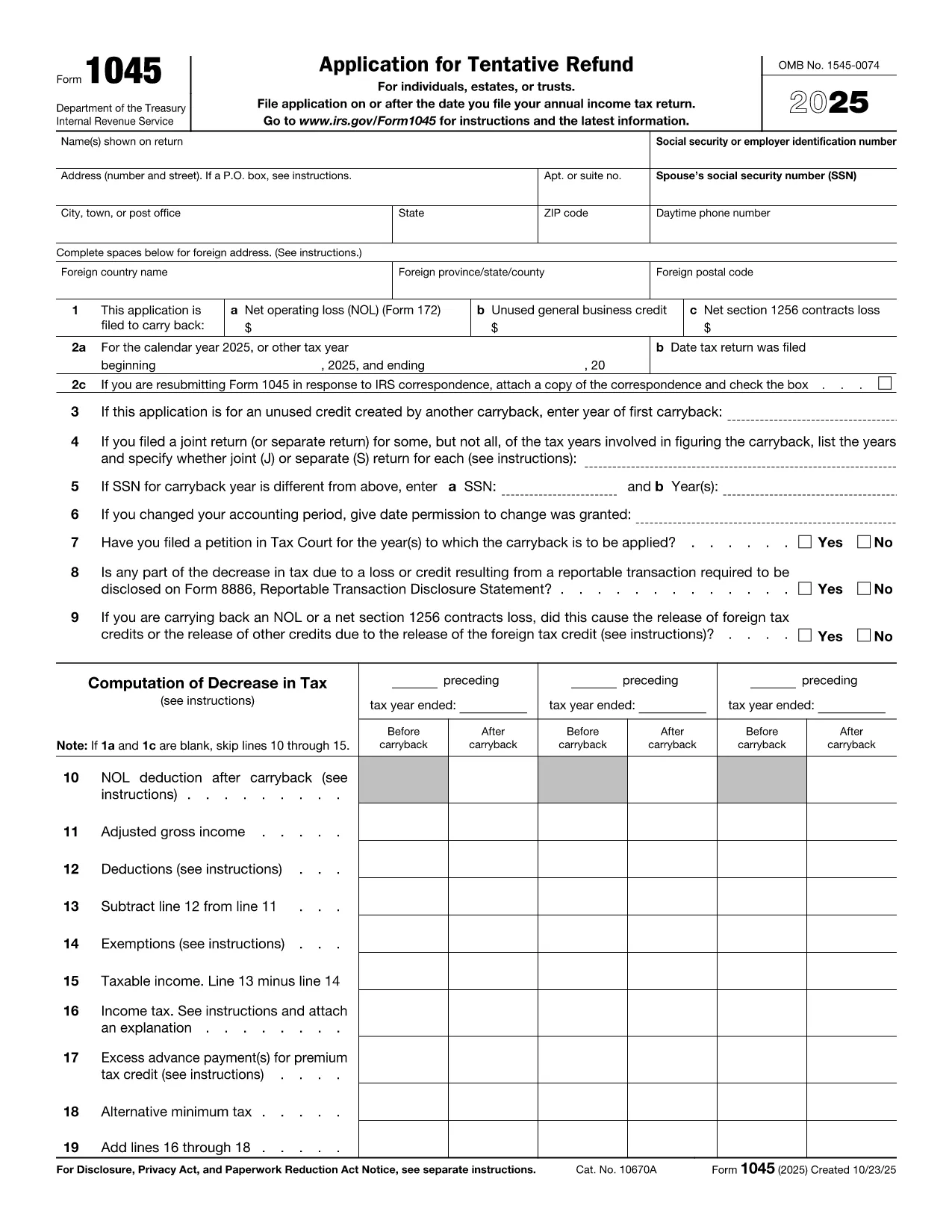
Form 1045, Application for Tentative Refund, lets individuals, estates, and trusts claim a fast refund when they have a net operating loss (NOL), an unused general business credit, or a Section 1256 contracts loss that can be carried back to a prior tax year. Instead of mailing a paper form, you can complete the official PDF instantly with Formize’s online PDF filler.

What Is Form 1045?

This two‑page IRS form is used to request a tentative refund before filing an amended return. It is ideal when you need to:

  • Carry back a net operating loss to a previous year.
  • Carry back an unused general business credit.
  • Carry back a net Section 1256 contracts loss.

How to Fill the Form Online with Formize

Formize turns the static PDF into a fully interactive, fillable document. Follow the simple steps below – no PDF editor required.

Common Mistakes to Avoid

  • Leaving required fields blank: Every line marked with an asterisk must be completed, otherwise the IRS will reject the application.
  • Mismatching tax years: Verify that the carry‑back year(s) you select match the year of the loss or credit.
  • Incorrect signatures: Both spouses must sign on joint returns; estates and trusts need the authorized representative’s signature.
  • Failing to attach supporting schedules: Attach Form 172 for NOL calculations, Form 3800 for business credits, and Form 6781 for Section 1256 losses.

Download the Fillable PDF

Click the button below to open the official IRS Form 1045 PDF in the Formize filler. The document is fully searchable, auto‑saves, and can be exported as a completed PDF ready for mailing.

Инструкции

ЧЗВ
  • Who can use Form 1045?

    Individuals, estates, and trusts that have a net operating loss, an unused general business credit, or a Section 1256 contracts loss that can be carried back to a prior tax year.

  • Do I need to file Form 1045 before filing an amended return?

    Yes. Form 1045 requests a tentative refund before you file an amended return (Form 1040‑X). It speeds up the refund process.

  • Can I file Form 1045 electronically?

    The IRS does not accept an electronic filing for Form 1045, but you can complete the PDF online with Formize, save it, and mail the printed copy.

  • How far back can I carry an NOL?

    Generally, you can carry an NOL back up to two years (or up to 20 years for certain farming losses) unless special relief applies.

  • What supporting documents are required?

    Attach Form 172 for NOL calculations, Form 3800 for unused general business credits, and Form 6781 plus Schedule D for Section 1256 losses.

  • Is there a filing fee for Form 1045?

    No. Form 1045 is free to file; you only pay any postage required to mail the completed form.

  • What if I make a mistake on the form?

    Correct the error, sign again, and resend the corrected form. The IRS may reject the submission if required fields are incomplete or inaccurate.

  • How long does it take to receive a tentative refund?

    The IRS typically processes a Form 1045 within 30 days, but processing times can vary based on workload.

КАК ДА

Как да попълните IRS Form 1045 безплатно онлайн в 5 лесни стъпки:

  1. 1
    Click the Fill‑out Button
    Press the “Fill out this form” button on the page. The Formize PDF Filler app will open the official Form 1045 PDF.
  2. 2
    Wait for the Filler to Load
    Give the app a few seconds to load all interactive fields. No download or extra software is required.
  3. 3
    Enter Your Information
    Complete each required field – taxpayer name, SSN, loss amounts, carry‑back years, and signatures. The filler validates entries in real time.
  4. 4
    Review and Save
    Double‑check all numbers, then click “Save” to generate a completed PDF. You can download, print, or email the file directly from Formize.
  5. 5
    Submit to the IRS
    Mail the completed Form 1045 to the address listed in the instructions, or submit it with any required supporting schedules.
Приложение Formize PDF Filler
ОТНОСНО

Данъчни формуляри

IRS Form 1045 е един от данъчните формуляри, които са документи, използвани за докладване на информация, свързана с данъци, на съответния данъчен орган. Има различни видове данъчни формуляри, включително федерални, щатски и местни данъчни формуляри, които могат да варират в зависимост от обстоятелствата и местоположението на данъкоплатеца.

ХАРАКТЕРИСТИКА

PDF пълнител

Най-лесният начин да попълните IRS Form 1045 онлайн

  • Бързо попълнете IRS Form 1045
    Търсите начин бързо да попълните IRS Form 1045 онлайн? С нашия онлайн безплатен инструмент за попълване на PDF формуляри ще знаете как да редактирате и попълвате този PDF документ за по-малко от минута.
  • Лесен за използване онлайн PDF редактор
    Писнало ви е да разпечатвате PDF файлове, за да можете да ги редактирате, преди да сканирате повторно и да ги изпратите обратно? Редактирайте PDF документи безплатно онлайн. Използвайте нашия онлайн pdf редактор, за да спестите време и хартия.
  • Страхотни инструменти, всички платформи
    Чудите се как да попълните IRS Form 1045 на Mac или може би как да използвате PDF пълнител безплатно? Нашите онлайн PDF инструменти работят на всички платформи.
  • Сигурно съхранение на файлове
    Завършените „IRS Form 1045“ файлове се съхраняват в защитена база данни, управлявана от Amazon Cloud хостинг. Можете да изтриете вашите файлове от нашата система по всяко време. Във всеки случай тези файлове се изтриват автоматично след 24 часа.
  • Чат с IRS Form 1045
    Разговаряйте с „IRS Form 1045“ в Chatize, който е безплатен асистент за четене на PDF файлове. Задавайте въпроси и получавайте отговори от „IRS Form 1045“. Просто щракнете върху бутона Чат с документ по-горе.

Изтриване на сесията за пълнене

Изтриване на избраната сесия за пълнене? В този случай вашият напредък в попълването на формуляра ще бъде загубен.

Изтриване на сесия за редактиране

Изтриване на избраната сесия за редактиране? В този случай вашият напредък в създаването и редактирането на формуляра ще бъде загубен.