
Избери език

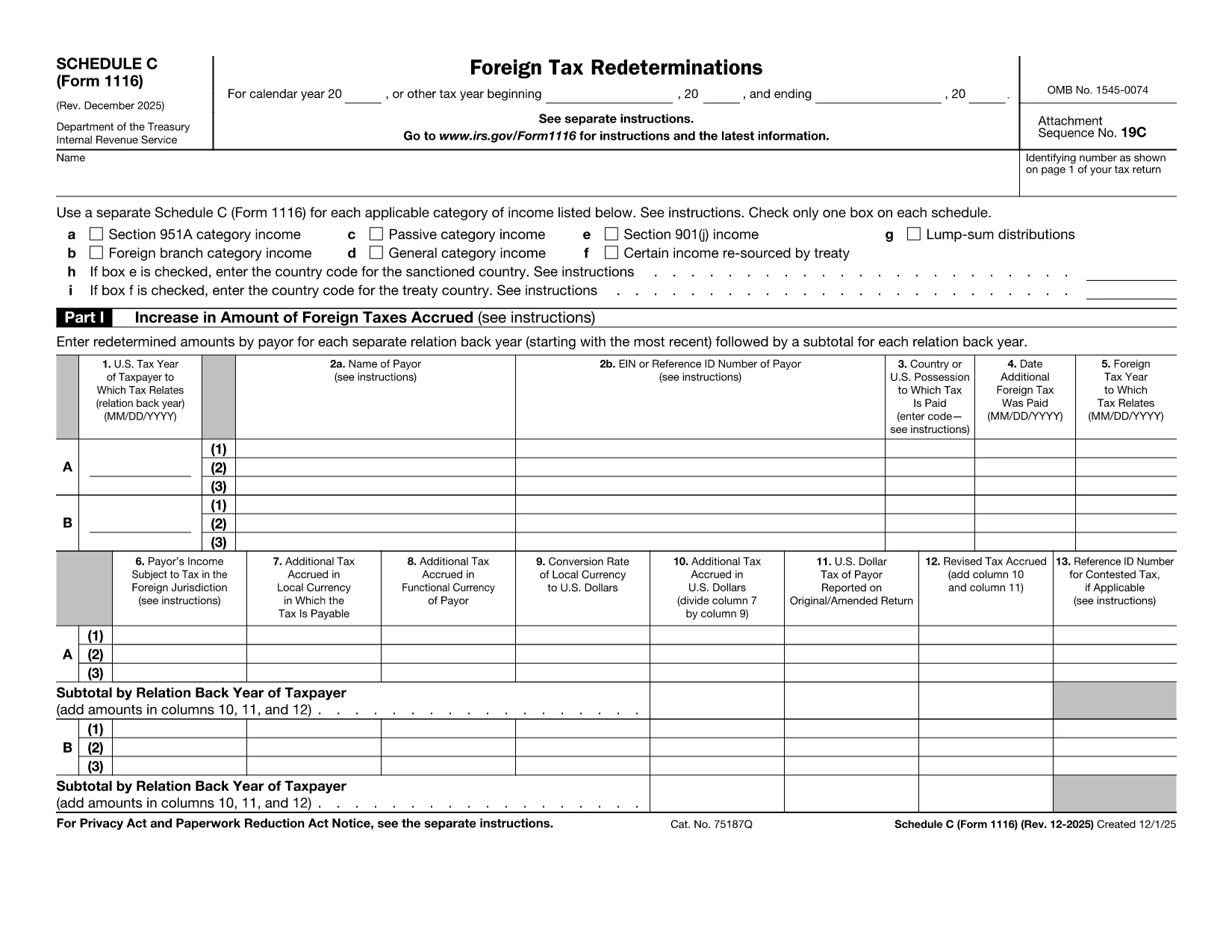
Form 1116 Schedule C – Fillable PDF for Foreign Tax Credit

  1. Държава САЩ
  2. език Английски
  3. Дейност Данъци
  4. Отдел Служба за събиране на данъци
Form 1116 Schedule C – Fillable PDF for Foreign Tax Credit

Form 1116 Schedule C is the supplemental worksheet used with the IRS Form 1116 to report foreign tax redeterminations and adjustments. Taxpayers who receive refunds, credits, or other changes to foreign taxes must complete this schedule to keep the Foreign Tax Credit accurate.

Our fillable PDF version is fully compatible with the Formize PDF Filler app, letting you fill, sign, and download the completed form without printing a single page.

What Is Form 1116 Schedule C?

Schedule C captures any redetermination of foreign tax amounts after the original Form 1116 was filed. Typical scenarios include:

  • Receiving a refund from a foreign government.
  • Amending a prior year foreign tax credit claim.
  • Adjusting foreign tax credits for an Alternative Minimum Tax (AMT) calculation.

How to Complete the Fillable PDF Online

Instead of downloading the PDF and opening a separate editor, simply click the "Fill out this form" button on this page. The Formize PDF Filler app will load, and you can:

  1. Enter your personal information and tax year.
  2. Provide the original foreign tax amount and the new corrected amount.
  3. Check the appropriate boxes for regular or AMT calculations.
  4. Save, preview, and download the completed Schedule C.

Common Mistakes to Avoid

  • Skipping the box for the correct tax year. Each Schedule C must match the year of the original Form 1116.
  • Leaving the "Refund" or "Additional Tax" fields blank. Even a $0 entry should be entered to avoid IRS processing delays.
  • Using the wrong Schedule version. The Schedule C for 2022‑2023 is the one linked below; older versions may be rejected.

Where to Find Help and Resources

For detailed instructions, see the IRS instructions that accompany Form 1116. If you need clarification on foreign tax credit rules, consult a qualified tax professional or refer to IRS Publication 514.

Инструкции

ЧЗВ
  • Do I need to file Schedule C with every Form 1116?

    Only file Schedule C when you have a foreign tax redetermination—such as a refund, credit, or AMT adjustment—after the original Form 1116 was submitted.

  • Can I use the same Schedule C for multiple tax years?

    No. Each Schedule C must correspond to the specific tax year of the original Form 1116. Use the version dated for that year.

  • Is the fillable PDF version legally acceptable?

    Yes. The IRS accepts electronically completed PDF worksheets as long as they are legible, signed (if required), and attached to the appropriate tax return.

  • What if I made an error after submitting the Schedule C?

    You can file an amended Schedule C along with an amended Form 1116 (Form 1040X) to correct any mistakes.

  • Do I need a tax professional to complete Schedule C?

    While many taxpayers can complete it themselves, complex foreign tax situations often benefit from professional guidance to ensure the credit is calculated correctly.

  • How long should I keep a copy of Schedule C?

    Retain the completed Schedule C and supporting documentation for at least seven years, the same period the IRS may audit foreign tax credit claims.

КАК ДА

Как да попълните Form 1116 Schedule C безплатно онлайн в 5 лесни стъпки:

  1. 1
    Open the Fillable Form
    Click the "Fill out this form" button on the page. The Formize PDF Filler app will launch in your browser.
  2. 2
    Enter Your Information
    Fill in the taxpayer name, SSN, tax year, and the original foreign tax amount as shown on your original Form 1116.
  3. 3
    Record the Redetermination
    Enter the corrected foreign tax amount, select whether it is a refund or additional tax, and indicate if the AMT version is required.
  4. 4
    Review and Save
    Use the preview feature to verify all entries, then click "Save & Download" to obtain the completed Schedule C PDF.
  5. 5
    Attach to Your Return
    Include the saved Schedule C with your amended Form 1116 when filing with the IRS.
Приложение Formize PDF Filler
ОТНОСНО

Данъчни формуляри

Form 1116 Schedule C е един от данъчните формуляри, които са документи, използвани за докладване на информация, свързана с данъци, на съответния данъчен орган. Има различни видове данъчни формуляри, включително федерални, щатски и местни данъчни формуляри, които могат да варират в зависимост от обстоятелствата и местоположението на данъкоплатеца.

ХАРАКТЕРИСТИКА

PDF пълнител

Най-лесният начин да попълните Form 1116 Schedule C онлайн

  • Бързо попълнете Form 1116 Schedule C
    Търсите начин бързо да попълните Form 1116 Schedule C онлайн? С нашия онлайн безплатен инструмент за попълване на PDF формуляри ще знаете как да редактирате и попълвате този PDF документ за по-малко от минута.
  • Лесен за използване онлайн PDF редактор
    Писнало ви е да разпечатвате PDF файлове, за да можете да ги редактирате, преди да сканирате повторно и да ги изпратите обратно? Редактирайте PDF документи безплатно онлайн. Използвайте нашия онлайн pdf редактор, за да спестите време и хартия.
  • Страхотни инструменти, всички платформи
    Чудите се как да попълните Form 1116 Schedule C на Mac или може би как да използвате PDF пълнител безплатно? Нашите онлайн PDF инструменти работят на всички платформи.
  • Сигурно съхранение на файлове
    Завършените „Form 1116 Schedule C“ файлове се съхраняват в защитена база данни, управлявана от Amazon Cloud хостинг. Можете да изтриете вашите файлове от нашата система по всяко време. Във всеки случай тези файлове се изтриват автоматично след 24 часа.
  • Чат с Form 1116 Schedule C
    Разговаряйте с „Form 1116 Schedule C“ в Chatize, който е безплатен асистент за четене на PDF файлове. Задавайте въпроси и получавайте отговори от „Form 1116 Schedule C“. Просто щракнете върху бутона Чат с документ по-горе.

Изтриване на сесията за пълнене

Изтриване на избраната сесия за пълнене? В този случай вашият напредък в попълването на формуляра ще бъде загубен.

Изтриване на сесия за редактиране

Изтриване на избраната сесия за редактиране? В този случай вашият напредък в създаването и редактирането на формуляра ще бъде загубен.