
Избери език

IRS Form 14453 – Penalty Computation Worksheet (Fillable Online)

  1. Държава САЩ
  2. език Английски
  3. Дейност Данъци
  4. Отдел Служба за събиране на данъци
IRS Form 14453 – Penalty Computation Worksheet (Fillable Online)

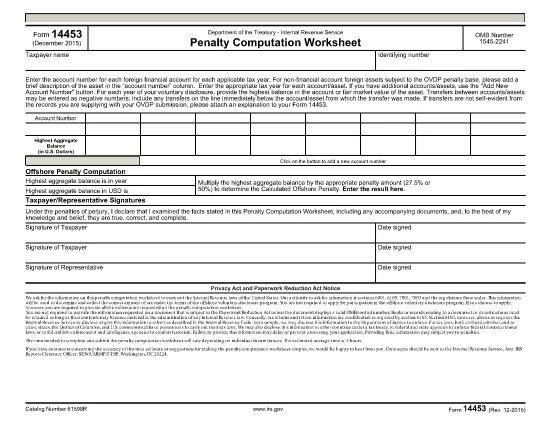
Form 14453 is the Penalty Computation Worksheet used by taxpayers who are participating in the IRS Offshore Voluntary Disclosure Program (OVDP) or similar offshore tax compliance initiatives. The worksheet helps calculate the aggregate balance of foreign accounts and the resulting penalty amount.

What Is Form 14453 and Who Needs It?

This form is required when you need to report the highest balance for each foreign financial account and let the IRS compute the offshore penalty. It is typically filed by U.S. persons with undisclosed foreign accounts, foreign trusts, or foreign corporations.

Key Sections of the Worksheet Explained

  • Account Information – List each foreign account, its highest balance, and the country of the account.
  • Aggregate Balance – The worksheet automatically adds the highest balances to give you a total aggregate balance.
  • Penalty Calculation – Based on the aggregate balance, the IRS applies the statutory penalty rate (usually 40%).
  • Signature & Date – Required to certify the accuracy of the information.

How to Complete Form 14453 with Formize

Instead of downloading the PDF and opening it in a PDF editor, simply click the "Fill out this form" button on this page. The Formize PDF Filler app will load in your browser, allowing you to complete the worksheet instantly.

Common Mistakes to Avoid

  • Entering the same balance for multiple accounts – each account must list its own highest balance.
  • Leaving negative numbers or blanks in the aggregate section – the form auto‑calculates, so leave those fields untouched.
  • Forgetting to sign the form – an unsigned worksheet will be rejected by the IRS.

Where to Find Additional IRS Guidance

Visit the IRS website for detailed instructions on the Offshore Voluntary Disclosure Program, penalty rates, and filing deadlines. You can also review related forms such as Form 14457 (OVDP Letter).

Ready to start? Click the button below and let Formize handle the rest.

ЧЗВ
  • Do I need to download Form 14453 before filling it out?

    No. With Formize you can fill the form directly in your browser. Just click the "Fill out this form" button and the app loads the PDF for you.

  • Can I edit the aggregate balance field?

    The aggregate balance is calculated automatically. Do not edit it manually; the worksheet will recalculate if you change any account balances.

  • Is Form 14453 required for every offshore account?

    Only if you are reporting undisclosed foreign accounts to the IRS under the Offshore Voluntary Disclosure Program or a similar compliance program.

  • What penalty rate is applied on the worksheet?

    The worksheet uses the statutory offshore penalty rate of 40% of the aggregate balance, unless the IRS provides a reduced rate based on reasonable cause.

  • Can I submit the filled form electronically?

    Yes. After completing the form in Formize, you can download the PDF and attach it to your electronic OVDP filing or mail it as part of a paper submission.

  • What if I make a mistake after submitting?

    You can download a new copy of the form, correct the error, and resubmit. Keep both versions for your records.

  • Is there a fee to use Formize for this form?

    Formize offers free filling for IRS forms like 14453. No hidden fees or subscriptions are required.

  • Do I need a PDF reader to view the completed form?

    No. The Formize app lets you view and edit the PDF in the browser. You can also open the final PDF with any standard PDF reader if you wish.

КАК ДА

Как да попълните Form 14453 безплатно онлайн в 5 лесни стъпки:

  1. 1
    Open the Fillable Form
    Click the "Fill out this form" button on the page. The Formize PDF Filler will launch directly in your browser.
  2. 2
    Enter Your Account Details
    Add each foreign account, its highest balance, and the country. The worksheet will automatically calculate the aggregate balance.
  3. 3
    Review the Penalty Calculation
    Check the auto‑generated penalty amount. Make sure all numbers are correct before proceeding.
  4. 4
    Sign and Submit
    Enter your signature and the date, then click "Submit". You can download a completed copy for your records.
  5. 5
    Save or Print
    After submission, save the PDF to your computer or print it to attach to your OVDP filing package.
Приложение Formize PDF Filler
ОТНОСНО

Данъчни формуляри

Form 14453 е един от данъчните формуляри, които са документи, използвани за докладване на информация, свързана с данъци, на съответния данъчен орган. Има различни видове данъчни формуляри, включително федерални, щатски и местни данъчни формуляри, които могат да варират в зависимост от обстоятелствата и местоположението на данъкоплатеца.

ХАРАКТЕРИСТИКА

PDF пълнител

Най-лесният начин да попълните Form 14453 онлайн

  • Бързо попълнете Form 14453
    Търсите начин бързо да попълните Form 14453 онлайн? С нашия онлайн безплатен инструмент за попълване на PDF формуляри ще знаете как да редактирате и попълвате този PDF документ за по-малко от минута.
  • Лесен за използване онлайн PDF редактор
    Писнало ви е да разпечатвате PDF файлове, за да можете да ги редактирате, преди да сканирате повторно и да ги изпратите обратно? Редактирайте PDF документи безплатно онлайн. Използвайте нашия онлайн pdf редактор, за да спестите време и хартия.
  • Страхотни инструменти, всички платформи
    Чудите се как да попълните Form 14453 на Mac или може би как да използвате PDF пълнител безплатно? Нашите онлайн PDF инструменти работят на всички платформи.
  • Сигурно съхранение на файлове
    Завършените „Form 14453“ файлове се съхраняват в защитена база данни, управлявана от Amazon Cloud хостинг. Можете да изтриете вашите файлове от нашата система по всяко време. Във всеки случай тези файлове се изтриват автоматично след 24 часа.
  • Чат с Form 14453
    Разговаряйте с „Form 14453“ в Chatize, който е безплатен асистент за четене на PDF файлове. Задавайте въпроси и получавайте отговори от „Form 14453“. Просто щракнете върху бутона Чат с документ по-горе.

Изтриване на сесията за пълнене

Изтриване на избраната сесия за пълнене? В този случай вашият напредък в попълването на формуляра ще бъде загубен.

Изтриване на сесия за редактиране

Изтриване на избраната сесия за редактиране? В този случай вашият напредък в създаването и редактирането на формуляра ще бъде загубен.