
Избери език

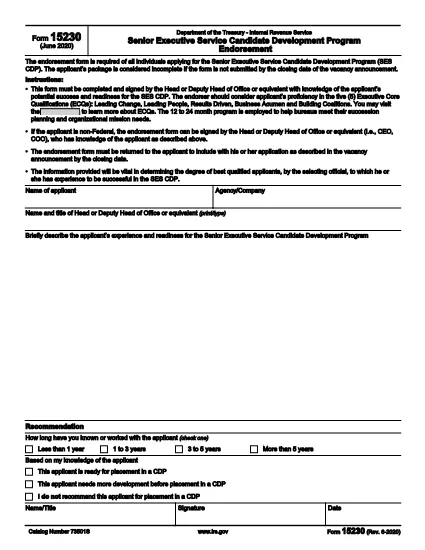
IRS Form 15230 – Mobility Statement (Fillable PDF)

  1. Държава САЩ
  2. език Английски
  3. Дейност Данъци
  4. Отдел Служба за събиране на данъци
IRS Form 15230 – Mobility Statement (Fillable PDF)

What Is Form 15230?

Form 15230, also known as the Mobility Statement for the Senior Executive Service Candidate Development Program (SES CDP), is an official IRS document used to capture a candidate’s willingness and ability to relocate for senior executive positions within the federal government. The form is required during the SES CDP application process and helps selecting officials assess mobility readiness.

How to Fill Out Form 15230 Online

Instead of printing, scanning, or manually editing the PDF, you can complete the form instantly with Formize’s built‑in PDF Filler. Follow these simple steps:

  1. Click the “Fill out this form” button on this page.
  2. Wait a few seconds while the Formize PDF Filler app loads the fillable version of Form 15230.
  3. Enter your personal information, current position, and mobility preferences directly in the browser.
  4. Use the signature field to e‑sign the form with a mouse, touch, or stylus.
  5. Review all entries for accuracy, then click Submit to download the completed PDF or save it to your cloud storage.

Common Mistakes to Avoid

  • Leaving required fields blank – the form will not accept submission if mandatory sections are empty.
  • Mismatching dates and locations – ensure the geographic areas you select match your actual willingness to relocate.
  • Using an outdated version – always start with the latest PDF (Rev. 6‑2020) provided by the IRS.
  • Signing with a scanned image – use the built‑in e‑signature tool for a legally binding signature.

Download the Official PDF

If you prefer to keep a copy of the original document, you can download the official IRS PDF directly from the link below. The file is the same version that Formize loads for online completion.

Download IRS Form 15230 (PDF)

FAQs About Form 15230

Below are answers to the most common questions candidates ask about this mobility statement.

ЧЗВ
  • What is the purpose of Form 15230?

    Form 15230 records a candidate’s willingness and ability to relocate for senior executive roles in the SES Candidate Development Program.

  • Do I need to print the PDF to fill it out?

    No. With Formize you can fill, sign, and save the form entirely online – no printing required.

  • Can I use a scanned signature?

    A scanned image is not legally binding. Use the e‑signature field in the Formize filler for a valid signature.

  • Which version of the form should I use?

    Always use the latest revision (Rev. 6‑2020). The link on this page points to the current IRS version.

  • What happens after I submit the form?

    You will receive a completed PDF that you can download or store in the cloud. Submit the file to your agency’s HR or SES CDP office as instructed.

  • Is Form 15230 required for all federal job applications?

    It is required only for candidates applying to the Senior Executive Service Candidate Development Program.

  • Where can I get help if I have questions about the form?

    Contact your agency’s human‑resources office or review the IRS instructions included in the PDF.

КАК ДА

Как да попълните Form 15230 безплатно онлайн в 5 лесни стъпки:

  1. 1
    Click the Fill‑out Button
    Press the “Fill out this form” button on the page to launch the Formize PDF Filler.
  2. 2
    Wait for the Filler to Load
    The app loads the fillable version of Form 15230 in a few seconds – no download required.
  3. 3
    Enter Your Information
    Complete all required fields: personal details, current position, and mobility preferences.
  4. 4
    Add Your Electronic Signature
    Use the built‑in signature tool to sign with a mouse, finger, or stylus.
  5. 5
    Review and Save
    Check the form for accuracy, then click Submit to download the completed PDF or save it to your cloud storage.
Приложение Formize PDF Filler
ОТНОСНО

Данъчни формуляри

Form 15230 е един от данъчните формуляри, които са документи, използвани за докладване на информация, свързана с данъци, на съответния данъчен орган. Има различни видове данъчни формуляри, включително федерални, щатски и местни данъчни формуляри, които могат да варират в зависимост от обстоятелствата и местоположението на данъкоплатеца.

ХАРАКТЕРИСТИКА

PDF пълнител

Най-лесният начин да попълните Form 15230 онлайн

  • Бързо попълнете Form 15230
    Търсите начин бързо да попълните Form 15230 онлайн? С нашия онлайн безплатен инструмент за попълване на PDF формуляри ще знаете как да редактирате и попълвате този PDF документ за по-малко от минута.
  • Лесен за използване онлайн PDF редактор
    Писнало ви е да разпечатвате PDF файлове, за да можете да ги редактирате, преди да сканирате повторно и да ги изпратите обратно? Редактирайте PDF документи безплатно онлайн. Използвайте нашия онлайн pdf редактор, за да спестите време и хартия.
  • Страхотни инструменти, всички платформи
    Чудите се как да попълните Form 15230 на Mac или може би как да използвате PDF пълнител безплатно? Нашите онлайн PDF инструменти работят на всички платформи.
  • Сигурно съхранение на файлове
    Завършените „Form 15230“ файлове се съхраняват в защитена база данни, управлявана от Amazon Cloud хостинг. Можете да изтриете вашите файлове от нашата система по всяко време. Във всеки случай тези файлове се изтриват автоматично след 24 часа.
  • Чат с Form 15230
    Разговаряйте с „Form 15230“ в Chatize, който е безплатен асистент за четене на PDF файлове. Задавайте въпроси и получавайте отговори от „Form 15230“. Просто щракнете върху бутона Чат с документ по-горе.

Изтриване на сесията за пълнене

Изтриване на избраната сесия за пълнене? В този случай вашият напредък в попълването на формуляра ще бъде загубен.

Изтриване на сесия за редактиране

Изтриване на избраната сесия за редактиране? В този случай вашият напредък в създаването и редактирането на формуляра ще бъде загубен.