Избери език

Form 5452 – Corporate Report of Nondividend Distributions (Fillable PDF)

  1. Държава САЩ
  2. език Английски
  3. Дейност Данъци
  4. Отдел Служба за събиране на данъци
Form 5452 – Corporate Report of Nondividend Distributions (Fillable PDF)

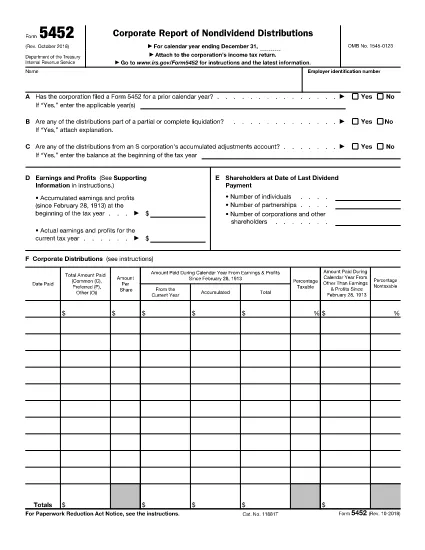
Form 5452, Corporate Report of Nondividend Distributions, is the IRS‑required document for corporations that distribute money or property to shareholders that does not qualify as a dividend. Using the fillable PDF version on Formize saves you time, eliminates manual entry errors, and keeps the form fully IRS‑compliant.

What Is Form 5452?

The form captures details about the corporation’s earnings and profits, accumulated adjustments, and the taxable versus nontaxable portions of each distribution. It is mandatory when a corporation makes nondividend distributions under IRC §301, §1368(c)(3), or §1371(e).

How to Complete the Fillable Form 5452 Online

Instead of downloading the PDF and opening a separate editor, simply click the "Fill out this form" button below. The Formize PDF Filler app loads instantly, letting you enter data directly in your browser.

  • Step 1: Click the button and wait for the secure Formize editor to appear.
  • Step 2: Fill in corporate name, EIN, and the distribution details in the highlighted fields.
  • Step 3: Use the built‑in calculator to split taxable and nontaxable amounts.
  • Step 4: Review the completed form for accuracy.
  • Step 5: Save, download, or e‑sign the PDF and attach it to your corporate tax return.

Common Mistakes to Avoid

Even experienced tax professionals slip up. Avoid these pitfalls:

  • Leaving the "Earnings and Profits" section blank – the IRS requires a precise figure.
  • Misclassifying a distribution as a dividend when it is nondividend.
  • Failing to attach supporting schedules for accumulated adjustments.
  • Submitting the form after the corporate tax return deadline, which can trigger penalties.

When and Where to File Form 5452

Form 5452 must be filed **concurrently** with the corporation’s income tax return (Form 1120, 1120‑S, etc.). Include the completed PDF with your electronic filing or attach a printed copy if you file on paper.

Key Definitions & Relevant IRS Sections

Nondividend Distribution: A payment to shareholders that does not meet the definition of a dividend under the Internal Revenue Code.

IRC §§301, 1368(c)(3), 1371(e): The statutory sections governing the treatment of nondividend distributions.

Using the fillable Form 5452 on Formize ensures every required field aligns with these sections, reducing audit risk.

ЧЗВ
  • Who must file Form 5452?

    Any corporation that makes a nondividend distribution to its shareholders under IRC §301, §1368(c)(3), or §1371(e) must file Form 5452 with its tax return.

  • Can I use the fillable PDF for paper filing?

    Yes. After completing the form online, download the PDF, print it, and attach it to your paper tax return.

  • Is there a filing deadline separate from the corporate tax return?

    No. Form 5452 is due at the same time as the corporation’s income tax return. Late filing can result in penalties.

  • What if I make a mistake after filing?

    Amend the original return (Form 1120‑X, 1120‑S‑X, etc.) and include a corrected Form 5452. Attach an explanation of the changes.

  • Do I need a professional to fill out Form 5452?

    While a tax professional can help, the fillable PDF on Formize guides you through each required field, making it manageable for most corporate accountants.

  • Is the Formize filler secure?

    Yes. All data is processed over encrypted HTTPS connections and is not stored on our servers after you download the completed PDF.

  • Can I save my progress and return later?

    The Formize editor allows you to save a draft locally on your computer and reopen it later for completion.

  • What sections of the IRS code does Form 5452 reference?

    Form 5452 primarily references IRC §301 (distributions), §1368(c)(3) (S‑corporation distributions), and §1371(e) (personal holding company distributions).

КАК ДА

Как да попълните Form 5452 безплатно онлайн в 5 лесни стъпки:

  1. 1
    Click the Fill‑out Button
    On this page, hit the “Fill out this form” button. The Formize PDF Filler loads in a secure browser window.
  2. 2
    Enter Corporate Information
    Type the corporation’s name, EIN, and the date of each nondividend distribution into the highlighted fields.
  3. 3
    Calculate Taxable Portions
    Use the built‑in calculator to separate taxable and nontaxable amounts for each distribution.
  4. 4
    Review & Validate
    Check every line for completeness. The filler will flag any missing required fields.
  5. 5
    Save, Download, or e‑Sign
    When satisfied, click “Save” to download a completed PDF, or use the e‑sign feature and attach the form to your tax return.
Приложение Formize PDF Filler
ОТНОСНО

Данъчни формуляри

Form 5452 е един от данъчните формуляри, които са документи, използвани за докладване на информация, свързана с данъци, на съответния данъчен орган. Има различни видове данъчни формуляри, включително федерални, щатски и местни данъчни формуляри, които могат да варират в зависимост от обстоятелствата и местоположението на данъкоплатеца.

ХАРАКТЕРИСТИКА

PDF пълнител

Най-лесният начин да попълните Form 5452 онлайн

  • Бързо попълнете Form 5452
    Търсите начин бързо да попълните Form 5452 онлайн? С нашия онлайн безплатен инструмент за попълване на PDF формуляри ще знаете как да редактирате и попълвате този PDF документ за по-малко от минута.
  • Лесен за използване онлайн PDF редактор
    Писнало ви е да разпечатвате PDF файлове, за да можете да ги редактирате, преди да сканирате повторно и да ги изпратите обратно? Редактирайте PDF документи безплатно онлайн. Използвайте нашия онлайн pdf редактор, за да спестите време и хартия.
  • Страхотни инструменти, всички платформи
    Чудите се как да попълните Form 5452 на Mac или може би как да използвате PDF пълнител безплатно? Нашите онлайн PDF инструменти работят на всички платформи.
  • Сигурно съхранение на файлове
    Завършените „Form 5452“ файлове се съхраняват в защитена база данни, управлявана от Amazon Cloud хостинг. Можете да изтриете вашите файлове от нашата система по всяко време. Във всеки случай тези файлове се изтриват автоматично след 24 часа.
  • Чат с Form 5452
    Разговаряйте с „Form 5452“ в Chatize, който е безплатен асистент за четене на PDF файлове. Задавайте въпроси и получавайте отговори от „Form 5452“. Просто щракнете върху бутона Чат с документ по-горе.

Изтриване на сесията за пълнене

Изтриване на избраната сесия за пълнене? В този случай вашият напредък в попълването на формуляра ще бъде загубен.

Изтриване на сесия за редактиране

Изтриване на избраната сесия за редактиране? В този случай вашият напредък в създаването и редактирането на формуляра ще бъде загубен.