
Избери език

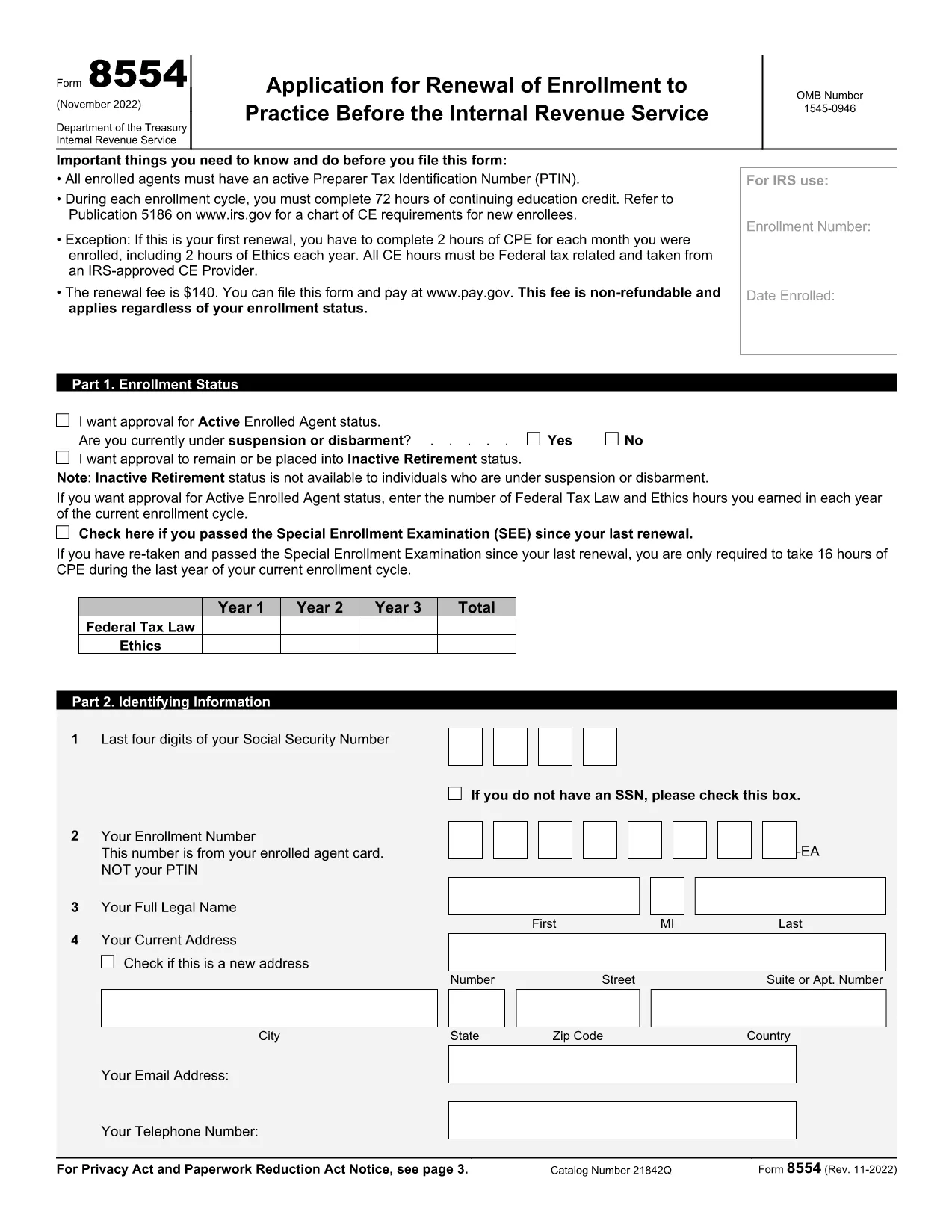
IRS Form 8554 – Fillable PDF Renewal for Enrolled Agents

  1. Държава САЩ
  2. език Английски
  3. Дейност Данъци
  4. Отдел Служба за събиране на данъци
IRS Form 8554 – Fillable PDF Renewal for Enrolled Agents

Form 8554, Application for Renewal of Enrollment to Practice Before the Internal Revenue Service, is required every three years for Enrolled Agents (EAs) and Enrolled Retirement Plan Agents (ERPAs) who want to keep their practice rights. Using Formize’s fillable PDF, you can complete the form online, save your work, and download a ready‑to‑submit version.

What Is IRS Form 8554?

The form verifies that you have met the continuing education (CE) requirements, hold an active PTIN, and have paid the renewal fee. It consists of three parts: enrollment status, identifying information, and the signature section.

How to Complete the Fillable Form

Follow these simple steps to finish Form 8554 directly in your browser:

  1. Click the Fill out this form button on the page.
  2. Formize’s PDF Filler loads the fillable version of Form 8554.
  3. Enter your personal details, select the appropriate enrollment status, and record your CE hours.
  4. Review the information, add your electronic signature, and click Submit to download the completed PDF.

Common Mistakes to Avoid

  • Incorrect PTIN status – Verify that your PTIN is active before submitting.
  • Missing CE hours – Ensure you have the required 72 hours (or the prorated amount for a first renewal).
  • Wrong enrollment status box – Choose Active, Inactive, or Retirement accurately.
  • Signature errors – Use the built‑in electronic signature tool; a handwritten signature on a printed copy will be rejected.

Submission Options and Fees

The renewal fee is $140 (non‑refundable). You can pay online through Pay.gov when you submit the form electronically, or you may mail a check with the printed PDF to the address listed in the instructions.

Download the Fillable PDF

Ready to start? Click the button below to open the fillable version of Form 8554 in the Formize PDF Filler app.

Fill out this form

ЧЗВ
  • Who must file IRS Form 8554?

    All Enrolled Agents (EAs) and Enrolled Retirement Plan Agents (ERPAs) must file Form 8554 every three years to maintain the right to practice before the IRS.

  • What is the renewal fee for Form 8554?

    The fee is $140 per renewal cycle, payable online through Pay.gov or by mailing a check with the completed form.

  • How many continuing education hours are required?

    You must complete 72 hours of CE in each three‑year cycle, including 16 hours of ethics. First‑time renewals have prorated requirements based on enrollment length.

  • Can I submit Form 8554 electronically?

    Yes. After completing the fillable PDF with Formize, you can upload the PDF to the IRS portal or submit it by mail with a payment.

  • What happens if I miss the renewal deadline?

    Your enrollment status becomes inactive, and you lose the ability to represent taxpayers until you submit a new Form 8554 and pay the fee.

  • Do I need to renew my PTIN separately?

    Your PTIN must be active at the time of filing Form 8554, but PTIN renewal is a separate process handled through the IRS e-Services portal.

  • Is there a penalty for incomplete CE hours?

    If you do not meet the CE requirement, the IRS will reject your renewal and you must complete the missing hours before resubmitting.

  • Can I request inactive retirement status on Form 8554?

    Yes. Select the “Inactive/Retirement” option in Part 1 if you wish to stop practicing but still maintain your enrollment for future reactivation.

КАК ДА

Как да попълните IRS Form 8554 безплатно онлайн в 5 лесни стъпки:

  1. 1
    Open the Fillable Form
    Click the “Fill out this form” button on the page. The Formize PDF Filler app will load the fillable version of Form 8554.
  2. 2
    Enter Your Information
    Complete each field—status, PTIN, CE hours, and personal details—using the on‑screen prompts.
  3. 3
    Add Your Signature
    Use the built‑in electronic signature tool to sign the form securely.
  4. 4
    Review and Save
    Check all entries for accuracy, then click “Save” to download the completed PDF to your device.
  5. 5
    Submit or Mail
    Pay the $140 fee online via Pay.gov or attach the PDF to a check and mail it to the IRS address provided in the instructions.
Приложение Formize PDF Filler
ОТНОСНО

Федерални данъчни формуляри

IRS Form 8554 е един от федералните данъчни формуляри, които са документи, използвани за отчитане и подаване на федерални данъци върху доходите в Службата за вътрешни приходи (IRS) в Съединените щати. Тези формуляри се използват от физически лица, фирми и организации за отчитане на техния доход, удръжки и друга подходяща информация, необходима за изчисляване на техните федерални данъчни задължения.

Най-често използваният федерален данъчен формуляр е формуляр 1040, който се използва от отделни данъкоплатци за отчитане на техния данък върху личните доходи. Други често използвани формуляри включват формуляр 1065 за партньорства, Формуляр 1120 за корпорации и Формуляр 990 за освободени от данъци организации.

Федералните данъчни формуляри обикновено изискват от данъкоплатците да докладват различни източници на доходи, като заплати, заплати и бакшиши, както и доходи от инвестиции, имоти под наем и други източници. Формулярите също така позволяват на данъкоплатците да поискат удръжки и кредити за различни разходи, като благотворителни вноски, ипотечни лихви и разходи за здравеопазване.

Важно е да подадете федерални данъчни формуляри точно и навреме, тъй като ако не го направите, това може да доведе до неустойки и лихви от IRS.

ХАРАКТЕРИСТИКА

PDF пълнител

Най-лесният начин да попълните IRS Form 8554 онлайн

  • Бързо попълнете IRS Form 8554
    Търсите начин бързо да попълните IRS Form 8554 онлайн? С нашия онлайн безплатен инструмент за попълване на PDF формуляри ще знаете как да редактирате и попълвате този PDF документ за по-малко от минута.
  • Лесен за използване онлайн PDF редактор
    Писнало ви е да разпечатвате PDF файлове, за да можете да ги редактирате, преди да сканирате повторно и да ги изпратите обратно? Редактирайте PDF документи безплатно онлайн. Използвайте нашия онлайн pdf редактор, за да спестите време и хартия.
  • Страхотни инструменти, всички платформи
    Чудите се как да попълните IRS Form 8554 на Mac или може би как да използвате PDF пълнител безплатно? Нашите онлайн PDF инструменти работят на всички платформи.
  • Сигурно съхранение на файлове
    Завършените „IRS Form 8554“ файлове се съхраняват в защитена база данни, управлявана от Amazon Cloud хостинг. Можете да изтриете вашите файлове от нашата система по всяко време. Във всеки случай тези файлове се изтриват автоматично след 24 часа.
  • Чат с IRS Form 8554
    Разговаряйте с „IRS Form 8554“ в Chatize, който е безплатен асистент за четене на PDF файлове. Задавайте въпроси и получавайте отговори от „IRS Form 8554“. Просто щракнете върху бутона Чат с документ по-горе.

Изтриване на сесията за пълнене

Изтриване на избраната сесия за пълнене? В този случай вашият напредък в попълването на формуляра ще бъде загубен.

Изтриване на сесия за редактиране

Изтриване на избраната сесия за редактиране? В този случай вашият напредък в създаването и редактирането на формуляра ще бъде загубен.