
Избери език

IRS Form 8948 – Preparer Explanation for Not Filing Electronically (Fillable PDF)

  1. Държава САЩ
  2. език Английски
  3. Дейност Данъци
  4. Отдел Служба за събиране на данъци
IRS Form 8948 – Preparer Explanation for Not Filing Electronically (Fillable PDF)

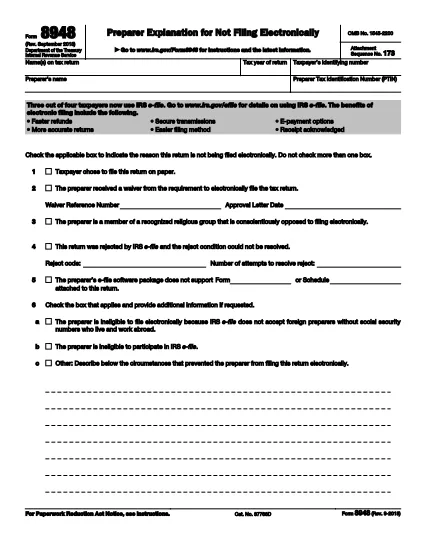
Form 8948, officially titled Preparer Explanation for Not Filing Electronically, is a one‑page IRS form that tax preparers must attach to a paper‑filed return when the electronic filing requirement cannot be met. The form provides a brief, standardized explanation for the paper‑filing exception.

What Is Form 8948?

The form captures basic taxpayer information, the preparer’s PTIN, and the specific reason why the return is being filed on paper instead of through the IRS e‑file system. It is required for most paid preparers who are otherwise obligated to e‑file.

When and Why Is Form 8948 Required?

  • The preparer received an approved e‑file hardship waiver.
  • The taxpayer elected to file a paper return.
  • The preparer’s software does not support a required schedule or form.
  • The preparer faced repeated, unresolvable e‑file rejections.
  • Religious or other qualifying exemptions prevent electronic filing.

If none of these exceptions apply, the preparer must file the return electronically.

How to Complete Form 8948 Online

With Formize you can fill out Form 8948 directly in your browser—no PDF editor needed. Follow these simple steps:

  1. Click the "Fill out this form" button on this page.
  2. The Formize PDF Filler app loads instantly.
  3. Select each highlighted field and type the required data (taxpayer name, SSN/TIN, tax year, preparer PTIN, and the applicable reason).
  4. Use the drop‑down menus to choose the correct exemption code.
  5. Review the completed form, add an electronic signature if required, and click Submit or Download for your records.

Common Mistakes to Avoid

  • Leaving the reason box unchecked: The IRS will reject the return.
  • Using the taxpayer’s choice box incorrectly: Form 8948 is not a "taxpayer choice" statement.
  • Missing the preparer’s PTIN: Every paid preparer must include a valid PTIN.
  • Incorrect tax year: Verify the year matches the return you are filing.

Download & Print Options

If you prefer a hard‑copy version, you can download the official PDF below. The file is the same document used by the IRS and is fully fillable when opened in a PDF editor.

Download IRS Form 8948 (PDF)

ЧЗВ
  • Who must file Form 8948?

    Any paid tax preparer who is required to e‑file but cannot do so for an approved reason must attach Form 8948 to the paper return.

  • Can I use Form 8948 for a personal return I file myself?

    No. Form 8948 is only for paid preparers. Individual taxpayers who choose to file on paper do not need this form.

  • What is the difference between the "taxpayer chose paper" box and the "hardship waiver" box?

    The taxpayer‑chosen box indicates the client elected a paper return, which is not a valid reason under IRS rules. The hardship waiver box is used when the preparer has an approved waiver from the IRS.

  • Do I need to mail Form 8948 separately?

    No. Form 8948 must be attached to the front of the paper return before mailing it to the IRS.

  • Is an electronic signature accepted on Form 8948?

    Yes. The IRS allows an electronic signature when the form is completed using a certified e‑signature solution like Formize.

  • Where can I find the official PDF for Form 8948?

    The official, up‑to‑date PDF is available from the IRS at https://www.irs.gov/pub/irs-pdf/f8948.pdf.

  • What should I do if I select the wrong reason on Form 8948?

    Correct the mistake before attaching the form. An incorrect reason can cause the entire return to be rejected by the IRS.

КАК ДА

Как да попълните Form 8948 безплатно онлайн в 4 лесни стъпки:

  1. 1
    Open the Fillable Form
    Click the "Fill out this form" button on the page to launch the Formize PDF Filler.
  2. 2
    Enter Your Information
    Select each highlighted field and type the required data – taxpayer name, SSN/TIN, tax year, preparer PTIN, and the reason for paper filing.
  3. 3
    Review and Sign
    Check all entries for accuracy, add an electronic signature if needed, and confirm the selected exemption code.
  4. 4
    Save or Submit
    Click "Download" to save a copy for your records or "Submit" to attach the form to your paper return.
Приложение Formize PDF Filler
ОТНОСНО

Федерални данъчни формуляри

Form 8948 е един от федералните данъчни формуляри, които са документи, използвани за отчитане и подаване на федерални данъци върху доходите в Службата за вътрешни приходи (IRS) в Съединените щати. Тези формуляри се използват от физически лица, фирми и организации за отчитане на техния доход, удръжки и друга подходяща информация, необходима за изчисляване на техните федерални данъчни задължения.

Най-често използваният федерален данъчен формуляр е формуляр 1040, който се използва от отделни данъкоплатци за отчитане на техния данък върху личните доходи. Други често използвани формуляри включват формуляр 1065 за партньорства, Формуляр 1120 за корпорации и Формуляр 990 за освободени от данъци организации.

Федералните данъчни формуляри обикновено изискват от данъкоплатците да докладват различни източници на доходи, като заплати, заплати и бакшиши, както и доходи от инвестиции, имоти под наем и други източници. Формулярите също така позволяват на данъкоплатците да поискат удръжки и кредити за различни разходи, като благотворителни вноски, ипотечни лихви и разходи за здравеопазване.

Важно е да подадете федерални данъчни формуляри точно и навреме, тъй като ако не го направите, това може да доведе до неустойки и лихви от IRS.

ХАРАКТЕРИСТИКА

PDF пълнител

Най-лесният начин да попълните Form 8948 онлайн

  • Бързо попълнете Form 8948
    Търсите начин бързо да попълните Form 8948 онлайн? С нашия онлайн безплатен инструмент за попълване на PDF формуляри ще знаете как да редактирате и попълвате този PDF документ за по-малко от минута.
  • Лесен за използване онлайн PDF редактор
    Писнало ви е да разпечатвате PDF файлове, за да можете да ги редактирате, преди да сканирате повторно и да ги изпратите обратно? Редактирайте PDF документи безплатно онлайн. Използвайте нашия онлайн pdf редактор, за да спестите време и хартия.
  • Страхотни инструменти, всички платформи
    Чудите се как да попълните Form 8948 на Mac или може би как да използвате PDF пълнител безплатно? Нашите онлайн PDF инструменти работят на всички платформи.
  • Сигурно съхранение на файлове
    Завършените „Form 8948“ файлове се съхраняват в защитена база данни, управлявана от Amazon Cloud хостинг. Можете да изтриете вашите файлове от нашата система по всяко време. Във всеки случай тези файлове се изтриват автоматично след 24 часа.
  • Чат с Form 8948
    Разговаряйте с „Form 8948“ в Chatize, който е безплатен асистент за четене на PDF файлове. Задавайте въпроси и получавайте отговори от „Form 8948“. Просто щракнете върху бутона Чат с документ по-горе.

Изтриване на сесията за пълнене

Изтриване на избраната сесия за пълнене? В този случай вашият напредък в попълването на формуляра ще бъде загубен.

Изтриване на сесия за редактиране

Изтриване на избраната сесия за редактиране? В този случай вашият напредък в създаването и редактирането на формуляра ще бъде загубен.