

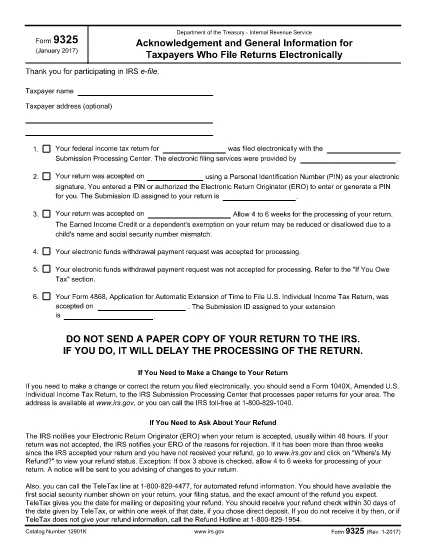

Формуляри на Службата за вътрешни приходи (IRS).
Form 9325 е един от официалните данъчни формуляри, използвани в Съединените щати за отчитане на доходи, искане на удръжки и кредити, изчисляване на данъчни задължения и изпълнение на други задължения, свързани с данъци. IRS е федералната агенция, която отговаря за администрирането и прилагането на законите за вътрешните приходи в Съединените щати.
Ето няколко примера за формуляри на Службата за вътрешни приходи:
Формуляр 1040: Това е основният формуляр за индивидуална данъчна декларация, използван от повечето данъкоплатци. Използва се за отчитане на различни видове доходи, искане на удръжки и кредити, изчисляване на данъчни задължения и определяне дали данъкоплатецът дължи допълнителен данък или има право на възстановяване.
Формуляр 1099: Има различни варианти на формуляр 1099, като например 1099-MISC, 1099-INT, 1099-DIV и т.н. Тези формуляри се използват за отчитане на доходи, получени от лица или фирми от различни източници, различни от заетост, като например самостоятелна заетост доход, доход от лихви, доход от дивиденти и доход от наем.
Формуляр W-2: Този формуляр се използва от работодателите за отчитане на изплатените заплати на служителите и данъците удържани от заплатите им. Служителите използват информацията във формуляр W-2, за да попълнят индивидуалните си данъчни декларации.
Формуляр 941: Работодателите използват този формуляр, за да докладват данъци върху заетостта, включително удържан федерален данък върху доходите, данък за социално осигуряване и данък Medicare за своите служители.
Формуляр 1065: Този формуляр се използва от партньорства за отчитане на техния доход, удръжки и данъчни задължения. Самите партньорства не плащат данък върху дохода; вместо това партньорите отчитат своя дял от доходите на партньорството в своите индивидуални данъчни декларации.
Формуляр 1120: Това е формулярът за корпоративна данъчна декларация, използван от корпорациите C за отчитане на техните приходи, удръжки и данъчни задължения.
Формуляр 990: Този формуляр се използва от освободени от данъци организации, като нестопански и благотворителни организации, за докладват своята финансова информация, дейности и спазване на данъчните закони.
Формуляр 8862: Този формуляр се използва от данъкоплатци, които преди са поискали данъчен кредит върху спечеления доход (EITC) но беше забранен и сега искам да го поискам отново.
Това са само няколко примера от многобройните формуляри на IRS, които съществуват за изпълнение на различни данъчни задължения. Конкретните формуляри, необходими за физическо лице или бизнес, зависят от техните уникални обстоятелства, източници на доходи и удръжки. Препоръчително е да се консултирате с официалния уебсайт на Службата за вътрешни приходи (www.irs.gov) или да потърсите професионален данъчен съвет, за да получите точна и актуална информация относно конкретната IRS формуляри, подходящи за вашата данъчна ситуация.