
Избери език

IRS Form 990 Schedule D – Fillable PDF

  1. Държава САЩ
  2. език Английски
  3. Дейност Данъци
  4. Отдел Служба за събиране на данъци
IRS Form 990 Schedule D – Fillable PDF

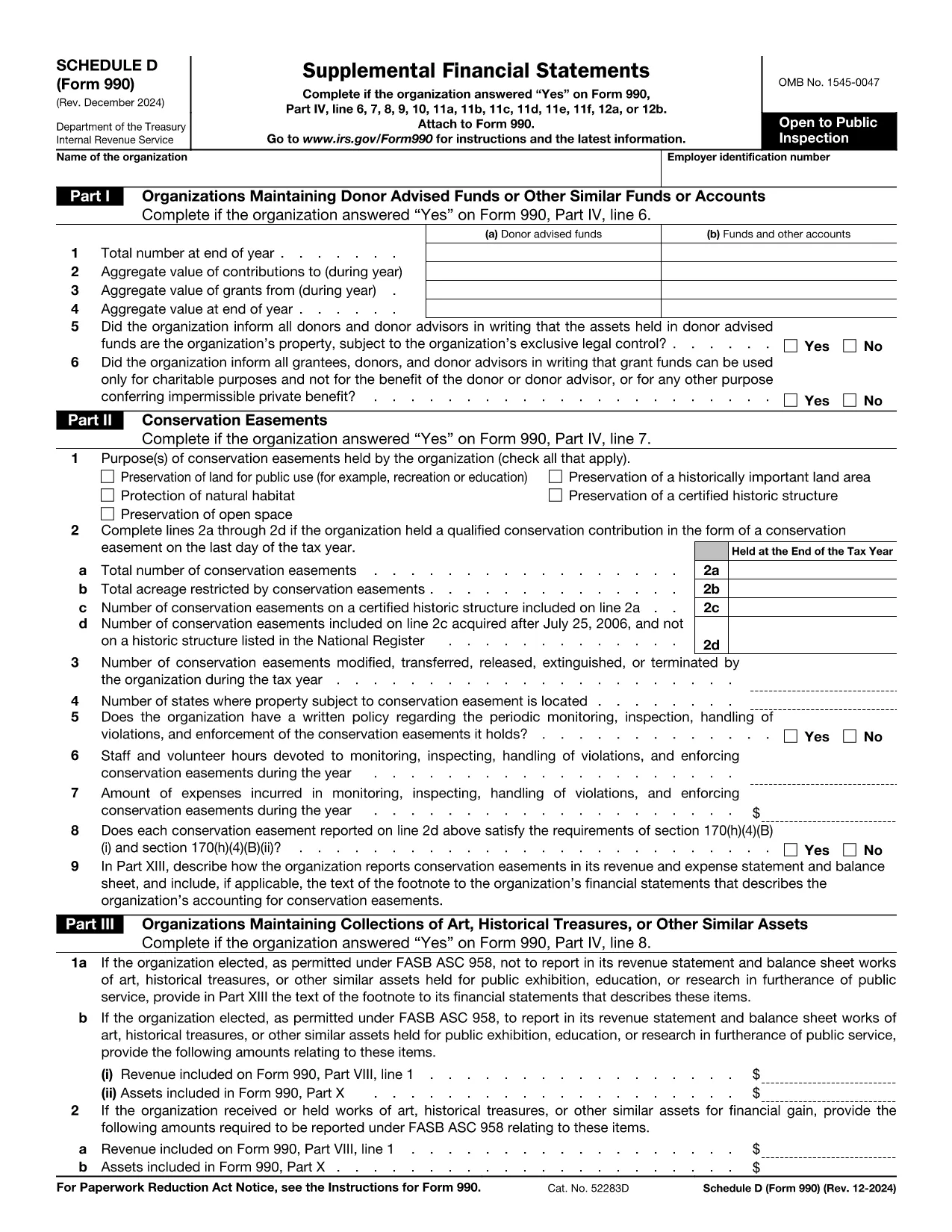
Schedule D is the supplemental attachment to the IRS Form 990 that tax‑exempt organizations use to disclose detailed information about donor‑advised funds, conservation easements, art collections, and other special assets. Getting the correct, up‑to‑date fillable PDF and completing it accurately is essential for compliance.

What Is Schedule D (Form 990)?

Schedule D (Form 990) provides the Internal Revenue Service with supplemental financial statements. It covers:

  • Donor‑advised funds and similar accounts
  • Conservation easements
  • Collections of art, historical treasures, or other valuable assets
  • Endowment, escrow, and custodial arrangements

How to Fill Schedule D Directly on Formize

Instead of downloading the PDF and opening a separate editor, simply click the "Fill out this form" button on this page. The Formize PDF Filler app will load in your browser, letting you complete every field online.

Common Mistakes to Avoid

  • Skipping Part I questions – the IRS cross‑checks these answers with the main Form 990.
  • Incorrect EIN formatting – use nine digits without dashes.
  • Leaving supplemental narrative sections blank when the schedule asks for explanations.
  • Not signing the form – the digital signature is required before submission.

Download the Official Fillable PDF

If you prefer to work offline, you can download the official Schedule D PDF directly from the IRS:

Download Form 990 Schedule D (PDF)

Frequently Asked Questions

Below are the most common questions nonprofit professionals ask about Schedule D.

Инструкции

ЧЗВ
  • Do I need Schedule D if I file Form 990‑EZ?

    No. Schedule D is only required when filing the full Form 990. Organizations filing Form 990‑EZ or Form 990‑N do not attach Schedule D.

  • What types of assets must be reported on Schedule D?

    Donor‑advised funds, conservation easements, art or historical collections, endowment funds, and any escrow or custodial arrangements must be disclosed.

  • Can I edit the PDF after I download it?

    Yes, but the easiest method is to use the Formize online filler, which saves changes automatically and provides a secure digital signature.

  • How long do I have to keep a copy of Schedule D?

    Nonprofit organizations must retain a copy of all filed schedules for at least three years from the filing date.

  • What are the penalties for not filing Schedule D when required?

    Failure to file can result in monetary penalties and may jeopardize the organization’s tax‑exempt status.

  • Is there a fee to use the Formize PDF Filler?

    Formize provides free access to fill out Schedule D online; no hidden fees are charged for the basic filling and download features.

  • Where should I mail the completed Schedule D?

    Schedule D is filed together with the main Form 990 at the address listed in the Form 990 instructions for your filing type.

КАК ДА

Как да попълните Form 990 Schedule D безплатно онлайн в 5 лесни стъпки:

  1. 1
    Click the Fill‑out Button
    Press the bright “Fill out this form” button on this page to launch the Formize PDF Filler.
  2. 2
    Wait for the Filler to Load
    The web‑based filler loads in seconds. No download or installation is required.
  3. 3
    Enter All Required Information
    Complete each section—organization name, EIN, and all Part I‑XIII questions—using the on‑screen fields.
  4. 4
    Review and Add a Digital Signature
    Use the built‑in signature tool to sign the form electronically. Review for accuracy before saving.
  5. 5
    Save, Download, or Submit
    When you’re done, click “Save” to store a copy, “Download” to get the completed PDF, or follow your organization’s submission process.
Приложение Formize PDF Filler
ОТНОСНО

Данъчни формуляри

Form 990 Schedule D е един от данъчните формуляри, които са документи, използвани за докладване на информация, свързана с данъци, на съответния данъчен орган. Има различни видове данъчни формуляри, включително федерални, щатски и местни данъчни формуляри, които могат да варират в зависимост от обстоятелствата и местоположението на данъкоплатеца.

ХАРАКТЕРИСТИКА

PDF пълнител

Най-лесният начин да попълните Form 990 Schedule D онлайн

  • Бързо попълнете Form 990 Schedule D
    Търсите начин бързо да попълните Form 990 Schedule D онлайн? С нашия онлайн безплатен инструмент за попълване на PDF формуляри ще знаете как да редактирате и попълвате този PDF документ за по-малко от минута.
  • Лесен за използване онлайн PDF редактор
    Писнало ви е да разпечатвате PDF файлове, за да можете да ги редактирате, преди да сканирате повторно и да ги изпратите обратно? Редактирайте PDF документи безплатно онлайн. Използвайте нашия онлайн pdf редактор, за да спестите време и хартия.
  • Страхотни инструменти, всички платформи
    Чудите се как да попълните Form 990 Schedule D на Mac или може би как да използвате PDF пълнител безплатно? Нашите онлайн PDF инструменти работят на всички платформи.
  • Сигурно съхранение на файлове
    Завършените „Form 990 Schedule D“ файлове се съхраняват в защитена база данни, управлявана от Amazon Cloud хостинг. Можете да изтриете вашите файлове от нашата система по всяко време. Във всеки случай тези файлове се изтриват автоматично след 24 часа.
  • Чат с Form 990 Schedule D
    Разговаряйте с „Form 990 Schedule D“ в Chatize, който е безплатен асистент за четене на PDF файлове. Задавайте въпроси и получавайте отговори от „Form 990 Schedule D“. Просто щракнете върху бутона Чат с документ по-горе.

Изтриване на сесията за пълнене

Изтриване на избраната сесия за пълнене? В този случай вашият напредък в попълването на формуляра ще бъде загубен.

Изтриване на сесия за редактиране

Изтриване на избраната сесия за редактиране? В този случай вашият напредък в създаването и редактирането на формуляра ще бъде загубен.