
Избери език

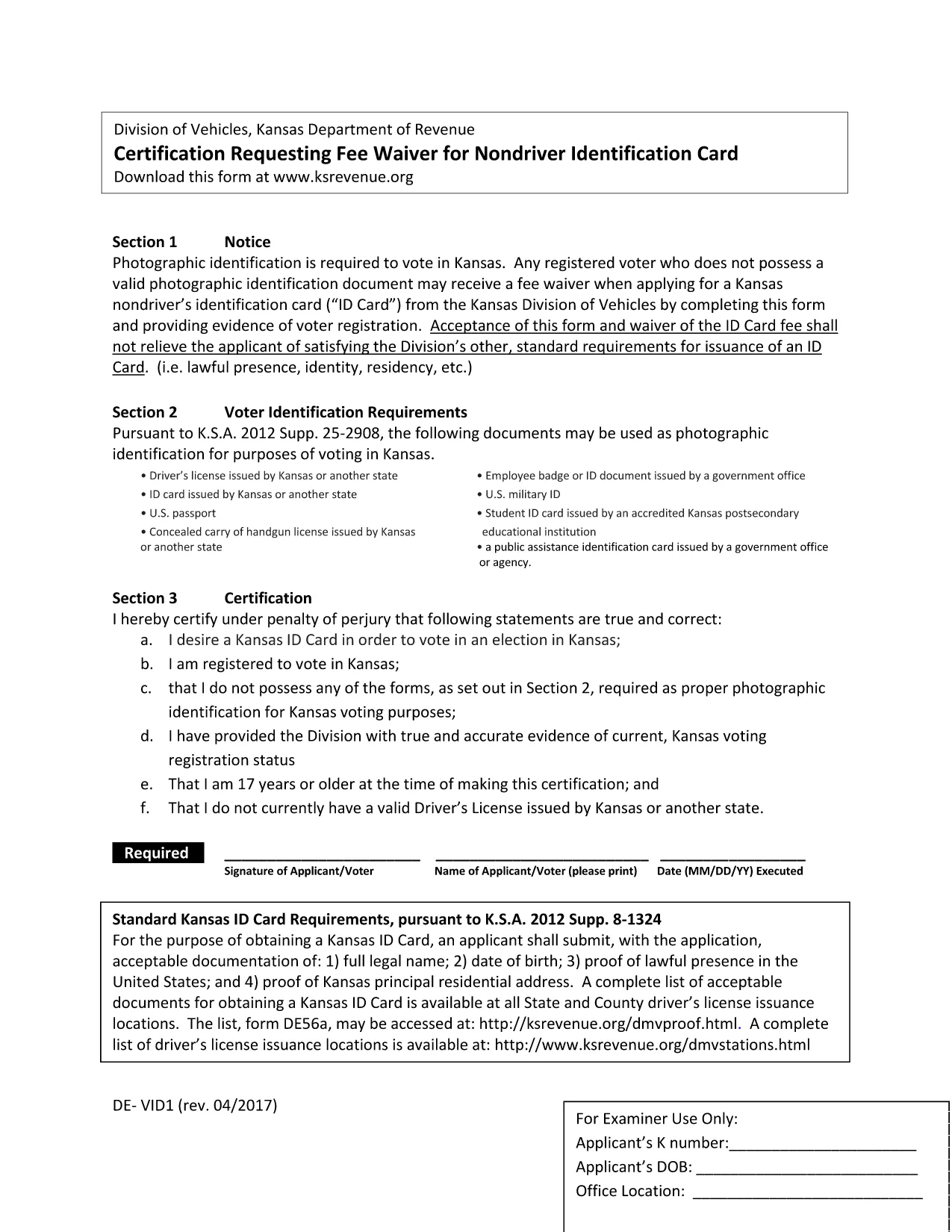
Certification Requesting Fee Waiver for Kansas Non‑Driver ID (Form DE‑VID1)

  1. език Английски
  2. Държава САЩ
  3. Дейност Регистрация на превозно средство
  4. Отдел Department of Motor Vehicles
Certification Requesting Fee Waiver for Kansas Non‑Driver ID (Form DE‑VID1)

What Is the DE‑VID1 Form?

The Kansas DE‑VID1 is the official certification used to request a fee waiver when applying for a non‑driver identification card. This form is required by the Kansas Division of Vehicles (DOV) for anyone who qualifies for a reduced‑cost ID, such as eligible voters without a valid photo ID.

How to Complete the Form Online with Formize

Instead of printing, scanning, or editing the PDF in a separate program, you can fill out the DE‑VID1 directly on our site using the Formize PDF Filler app. The process is fast, secure, and saves you a trip to the DMV.

  • Step 1: Click the Fill out this form button below.
  • Step 2: Wait a few seconds while the Formize PDF Filler loads.
  • Step 3: Enter your personal information, voter‑registration details, and any supporting documentation notes.
  • Step 4: Review the completed form for accuracy.
  • Step 5: Click Submit to download the filled PDF or send it directly to your local DOV office.

All fields are interactive, and required fields are highlighted in red for easy identification.

Common Mistakes to Avoid

Even a small error can delay your fee‑waiver request. Make sure you:

  • Enter your name exactly as it appears on your voter registration.
  • Provide a current mailing address – PO boxes are not accepted for ID issuance.
  • Include a valid Kansas voter‑registration number or a copy of your voter registration card.
  • Sign the form electronically before downloading or printing.

Following these tips will help the DOV process your waiver quickly.

Where to Submit the Completed Form

After you have filled and saved the PDF, you can:

  • Mail it to your nearest Kansas Division of Vehicles office.
  • Bring a printed copy to a DOV service center.
  • Upload it through the Kansas DOV online portal if you have an account.

Check the official Kansas DOV website for the latest submission options.

ЧЗВ
  • Who is eligible for a fee waiver on a Kansas non‑driver ID?

    Eligible individuals include Kansas voters who lack a valid photo ID, seniors, low‑income residents, and persons with documented disabilities.

  • Do I need to attach a copy of my voter registration?

    Yes. The form requires you to provide your voter‑registration number and, if possible, a copy of the registration card as supporting evidence.

  • Can I submit the DE‑VID1 form electronically?

    You can fill the form online with Formize, then download the completed PDF. Some DOV offices accept electronic uploads through the Kansas DOV portal.

  • How long does the fee‑waiver approval take?

    Processing typically takes 5‑10 business days after the DOV receives a complete and accurate form.

  • What should I do if I make a mistake after downloading the PDF?

    Open the saved PDF again in Formize, correct the error, re‑sign, and re‑download the updated version before submitting.

  • Is there a cost to use the Formize PDF Filler?

    No. Formize provides a free, secure way to fill out the DE‑VID1 form online.

  • Do I need a Kansas address to apply for the fee waiver?

    Yes. The mailing address on the form must be a physical Kansas residence; PO boxes are not accepted for ID issuance.

КАК ДА

Как да попълните DE-VID1 безплатно онлайн в 5 лесни стъпки:

  1. 1
    Open the Fillable Form
    Click the "Fill out this form" button on the page. The Formize PDF Filler will open in a new tab.
  2. 2
    Load the Formize PDF Filler
    Wait a few seconds while the app loads the DE‑VID1 PDF. All fields become interactive.
  3. 3
    Enter Your Information
    Complete each required field: personal details, voter registration number, and fee‑waiver justification.
  4. 4
    Review and Sign
    Double‑check for errors, then use the built‑in e‑signature tool to sign the form.
  5. 5
    Download or Submit
    Save the filled PDF to your device or submit it directly to the Kansas DOV via mail or online portal.
Приложение Formize PDF Filler
ОТНОСНО

Формуляри за регистрация на превозни средства

Ако притежавате или наемате моторно превозно средство, ремарке или лодка, трябва да изпълните определени задължения, за да поддържате превозното си средство законно регистрирано и безопасно.

DE-VID1 е един от формулярите за регистрация на превозно средство, които са документи, които се използват за регистриране на моторно превозно средство в съответния държавен или провинциален орган. Тези формуляри обикновено се изискват, когато човек закупи ново или употребявано превозно средство или когато се премести в нов щат или провинция с превозно средство.

Точните изисквания и формуляри, необходими за регистрация на превозно средство, могат да варират в зависимост от местоположението, но като цяло процесът включва предоставяне на информация за превозното средство, собственика и всякакви права върху превозното средство.

След като формулярите за регистрация и таксите бъдат изпратени, държавният или провинциален орган ще издаде свидетелство за регистрация или регистрационен номер на собственика на превозното средство. Тази регистрация позволява превозното средство да се използва законно по обществени пътища и магистрали.

ХАРАКТЕРИСТИКА

PDF пълнител

Най-лесният начин да попълните DE-VID1 онлайн

  • Бързо попълнете DE-VID1
    Търсите начин бързо да попълните DE-VID1 онлайн? С нашия онлайн безплатен инструмент за попълване на PDF формуляри ще знаете как да редактирате и попълвате този PDF документ за по-малко от минута.
  • Лесен за използване онлайн PDF редактор
    Писнало ви е да разпечатвате PDF файлове, за да можете да ги редактирате, преди да сканирате повторно и да ги изпратите обратно? Редактирайте PDF документи безплатно онлайн. Използвайте нашия онлайн pdf редактор, за да спестите време и хартия.
  • Страхотни инструменти, всички платформи
    Чудите се как да попълните DE-VID1 на Mac или може би как да използвате PDF пълнител безплатно? Нашите онлайн PDF инструменти работят на всички платформи.
  • Сигурно съхранение на файлове
    Завършените „DE-VID1“ файлове се съхраняват в защитена база данни, управлявана от Amazon Cloud хостинг. Можете да изтриете вашите файлове от нашата система по всяко време. Във всеки случай тези файлове се изтриват автоматично след 24 часа.
  • Чат с DE-VID1
    Разговаряйте с „DE-VID1“ в Chatize, който е безплатен асистент за четене на PDF файлове. Задавайте въпроси и получавайте отговори от „DE-VID1“. Просто щракнете върху бутона Чат с документ по-горе.

Изтриване на сесията за пълнене

Изтриване на избраната сесия за пълнене? В този случай вашият напредък в попълването на формуляра ще бъде загубен.

Изтриване на сесия за редактиране

Изтриване на избраната сесия за редактиране? В този случай вашият напредък в създаването и редактирането на формуляра ще бъде загубен.