Избери език

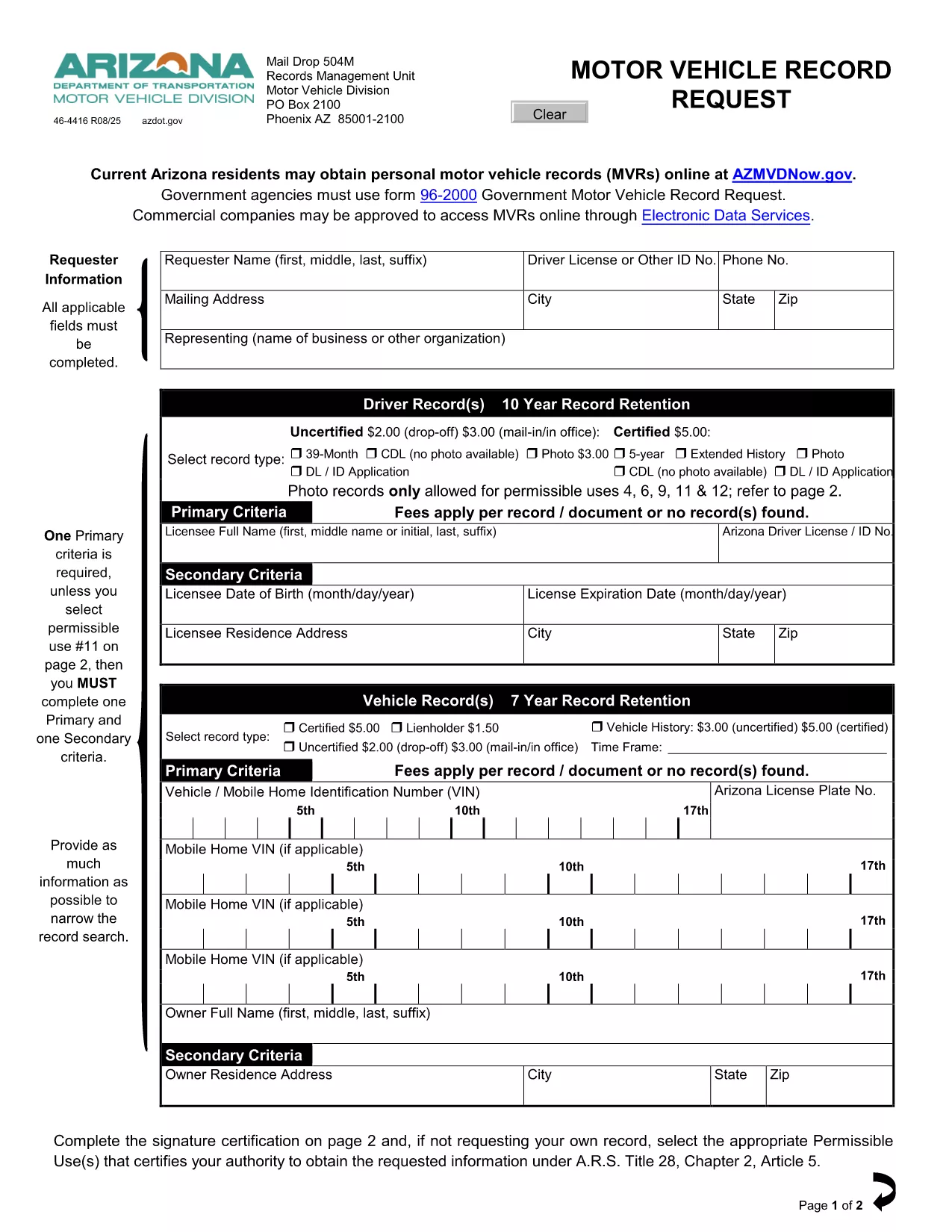
Driving Record Request Form – Fillable PDF

  1. език Английски
  2. Държава САЩ
  3. Дейност Driving Records
  4. Отдел Department of Motor Vehicles
Driving Record Request Form – Fillable PDF

A driving record (also called a Motor Vehicle Record or MVR) is the official summary of a driver’s licensing history, traffic violations, suspensions, and accidents. Employers, insurance companies, and individuals often need a certified copy for background checks, insurance quotes, or personal review.

This page provides the exact fillable PDF used by many state motor vehicle departments. Instead of printing, signing, and mailing the paper form, you can complete it instantly in your browser with Formize’s PDF Filler app.

The form complies with the Federal Driver’s Privacy Protection Act (DPPA) and lists all permissible uses, ensuring your request is legally valid.

Below you’ll find step‑by‑step instructions, tips to avoid common errors, and answers to the most frequently asked questions about driving record requests.

ЧЗВ
  • What is a permissible use for a driving record?

    Permissible uses include employment screening, insurance underwriting, court orders, and personal review. The form lists all approved purposes per DPPA.

  • Do I need a notarized signature?

    For most states, a notarized signature is required only for certified copies. The fillable PDF lets you add a digital signature; you can still mail the form for notarization if needed.

  • How long does it take to receive the record?

    Processing time varies by state—typically 5‑10 business days for mailed requests and 2‑3 days for electronic submissions where available.

  • Can I request a record for someone else?

    Only if you have a documented permissible use and the person’s written consent. The form includes a consent section you must complete.

  • Is there a fee for the request?

    Yes. Most states charge a small fee (e.g., $3 for an uncertified three‑year record, $5 for a certified five‑year record). Check the form’s fee schedule for exact amounts.

  • What if I make a mistake on the form?

    With Formize you can edit any field before saving. If you’ve already submitted a paper copy, you’ll need to request a new form or contact the DMV for corrections.

  • Do I need to provide my Social Security number?

    Only the last four digits are required for identity verification. The form explains exactly what information is mandatory.

КАК ДА

Как да попълните driving record request безплатно онлайн в 4 лесни стъпки:

  1. 1
    Click the Fill‑out Button
    On this page, click the bright “Fill out this form” button. The Formize PDF Filler app will open in a new tab.
  2. 2
    Wait for the Formize PDF Filler to Load
    The app loads the fillable PDF instantly. You’ll see all fields highlighted and ready for input.
  3. 3
    Enter Your Information
    Type directly into each field—name, driver’s license number, address, and the purpose of the request. The app validates dates and formats for you.
  4. 4
    Save, Print, or Submit
    When you’re done, click “Save PDF” to download a completed copy, or print it for mailing. No extra software or printer driver is required.
Приложение Formize PDF Filler
ОТНОСНО

driving record request шаблон

С традиционния набор от функции за преглед и попълване на PDF документ, съчетан с предимствата на уеб приложение и адаптивно оформление, можете да завършите driving record request за минути.

ХАРАКТЕРИСТИКА

PDF пълнител

Най-лесният начин да попълните driving record request онлайн

  • Бързо попълнете driving record request
    Търсите начин бързо да попълните driving record request онлайн? С нашия онлайн безплатен инструмент за попълване на PDF формуляри ще знаете как да редактирате и попълвате този PDF документ за по-малко от минута.
  • Лесен за използване онлайн PDF редактор
    Писнало ви е да разпечатвате PDF файлове, за да можете да ги редактирате, преди да сканирате повторно и да ги изпратите обратно? Редактирайте PDF документи безплатно онлайн. Използвайте нашия онлайн pdf редактор, за да спестите време и хартия.
  • Страхотни инструменти, всички платформи
    Чудите се как да попълните driving record request на Mac или може би как да използвате PDF пълнител безплатно? Нашите онлайн PDF инструменти работят на всички платформи.
  • Сигурно съхранение на файлове
    Завършените „driving record request“ файлове се съхраняват в защитена база данни, управлявана от Amazon Cloud хостинг. Можете да изтриете вашите файлове от нашата система по всяко време. Във всеки случай тези файлове се изтриват автоматично след 24 часа.
  • Чат с driving record request
    Разговаряйте с „driving record request“ в Chatize, който е безплатен асистент за четене на PDF файлове. Задавайте въпроси и получавайте отговори от „driving record request“. Просто щракнете върху бутона Чат с документ по-горе.

Изтриване на сесията за пълнене

Изтриване на избраната сесия за пълнене? В този случай вашият напредък в попълването на формуляра ще бъде загубен.

Изтриване на сесия за редактиране

Изтриване на избраната сесия за редактиране? В този случай вашият напредък в създаването и редактирането на формуляра ще бъде загубен.