Избери език

Driver Medical Evaluation Form (DS‑326) – Fillable PDF

  1. Държава САЩ
  2. език Английски
  3. Дейност Vehicle Licensing
  4. Отдел DMV
Driver Medical Evaluation Form (DS‑326) – Fillable PDF

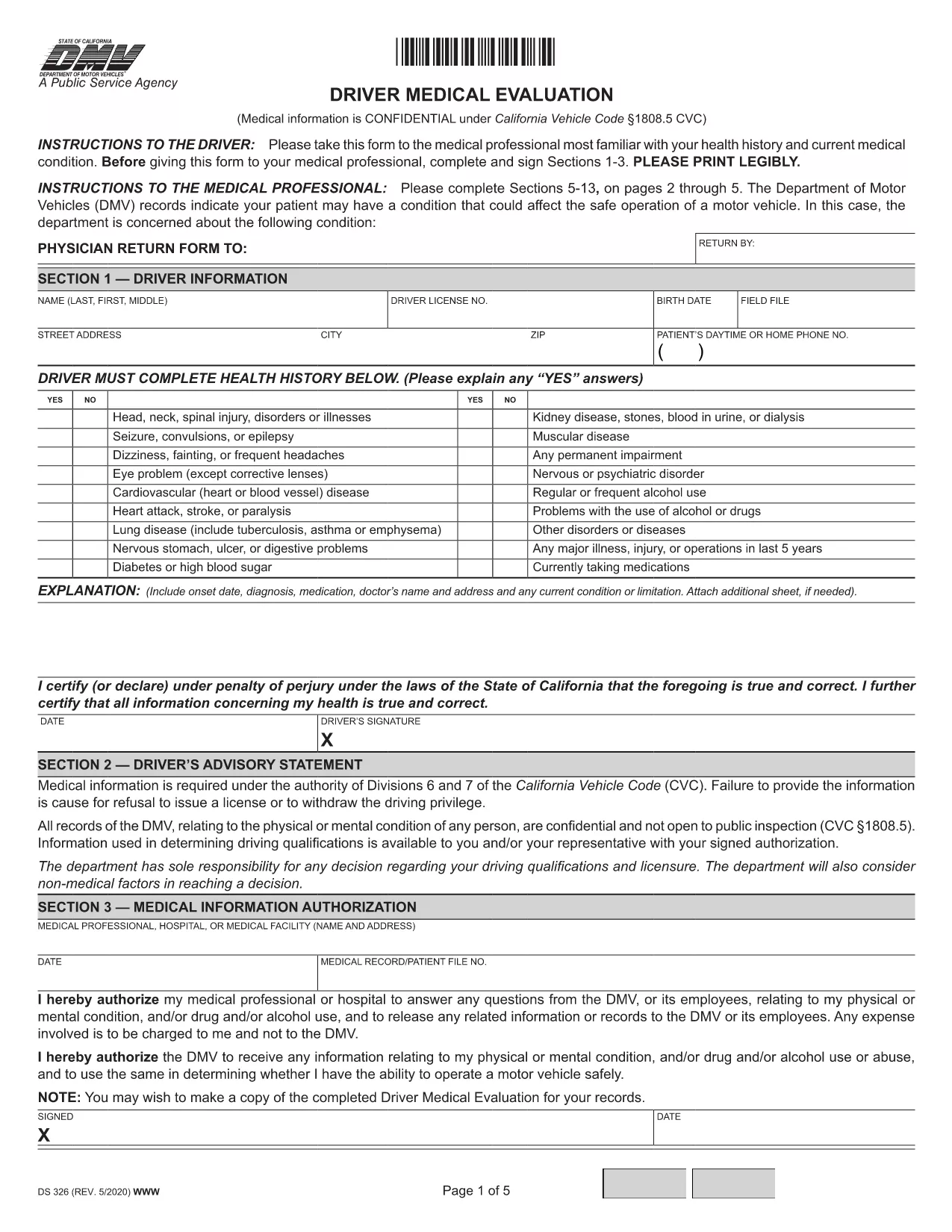
The Driver Medical Evaluation (form DS‑326) is required by the California Department of Motor Vehicles (DMV) for drivers who need to prove medical fitness for a license or permit. This fillable PDF lets you complete the health history, medical information authorization, and physician certification without printing or scanning.

What Is the Driver Medical Evaluation Form?

DS‑326 collects critical data about a driver’s vision, cardiovascular health, neurological conditions, and any medication that may affect safe operation of a vehicle. The DMV uses this information to decide whether to issue, renew, or restrict a driver’s license.

How to Complete the Fillable PDF Online

Instead of downloading the file and opening it in a PDF editor, simply click the "Fill out this form" button on this page. The Formize PDF Filler app will load in your browser, allowing you to type directly into each field, add signatures, and save your progress.

Common Mistakes to Avoid

  • Leaving the health‑history sections blank – every question must be answered, even if the answer is "None".
  • Forgetting the physician’s signature and license number – the form is invalid without a completed certification.
  • Submitting an outdated version – always use the latest DS‑326 PDF provided here.

Where to Submit the Completed Form

After you finish, you can download the completed PDF and mail it to your local DMV office, or upload it through the DMV’s online portal if you have an account. Keep a copy for your records.

Need more help? Review the FAQs below or follow the step‑by‑step guide in the "How to" section.

ЧЗВ
  • Who needs to fill out DS‑326?

    Any driver applying for a commercial license, a medical waiver, or a license renewal where the DMV requires proof of medical fitness must complete DS‑326.

  • Can I fill out the form on a mobile device?

    Yes. The Formize PDF Filler works on smartphones and tablets, but using a larger screen makes data entry easier.

  • What if my physician refuses to sign?

    The DMV requires a qualified medical professional’s certification. If a physician declines, you must find another licensed provider who can evaluate your fitness.

  • How long is the DS‑326 valid?

    The evaluation is typically valid for one year from the date of the physician’s signature, unless the DMV issues a different validity period.

  • Do I need to attach supporting medical records?

    Attach any relevant test results or specialist reports that the physician references in the certification section.

  • Is there a fee to submit the form?

    There is no fee for the DS‑326 itself, but the DMV may charge processing fees for license issuance or renewal.

  • Can I save my progress and finish later?

    Yes. The Formize filler allows you to save a draft locally and reopen it later to complete the remaining fields.

  • What should I do if I make a mistake after submitting?

    Contact your local DMV office promptly. They may require a new, corrected DS‑326 or allow you to submit an amendment form.

КАК ДА

Как да попълните driver medical evaluation безплатно онлайн в 5 лесни стъпки:

  1. 1
    Click the Fill‑out Button
    Press the "Fill out this form" button on the page to launch the Formize PDF Filler.
  2. 2
    Wait for the Filler to Load
    The online filler loads in a few seconds; no download or installation is required.
  3. 3
    Enter All Required Information
    Complete each section—personal details, health history, and physician certification—using your keyboard.
  4. 4
    Add Your Signature
    Use the built‑in signature field to sign electronically; you can also type your name if allowed.
  5. 5
    Save or Submit the Form
    Download the finished PDF for mailing, or upload it directly to the DMV portal if you have an account.
Приложение Formize PDF Filler
ОТНОСНО

driver medical evaluation шаблон

С традиционния набор от функции за преглед и попълване на PDF документ, съчетан с предимствата на уеб приложение и адаптивно оформление, можете да завършите driver medical evaluation за минути.

ХАРАКТЕРИСТИКА

PDF пълнител

Най-лесният начин да попълните driver medical evaluation онлайн

  • Бързо попълнете driver medical evaluation
    Търсите начин бързо да попълните driver medical evaluation онлайн? С нашия онлайн безплатен инструмент за попълване на PDF формуляри ще знаете как да редактирате и попълвате този PDF документ за по-малко от минута.
  • Лесен за използване онлайн PDF редактор
    Писнало ви е да разпечатвате PDF файлове, за да можете да ги редактирате, преди да сканирате повторно и да ги изпратите обратно? Редактирайте PDF документи безплатно онлайн. Използвайте нашия онлайн pdf редактор, за да спестите време и хартия.
  • Страхотни инструменти, всички платформи
    Чудите се как да попълните driver medical evaluation на Mac или може би как да използвате PDF пълнител безплатно? Нашите онлайн PDF инструменти работят на всички платформи.
  • Сигурно съхранение на файлове
    Завършените „driver medical evaluation“ файлове се съхраняват в защитена база данни, управлявана от Amazon Cloud хостинг. Можете да изтриете вашите файлове от нашата система по всяко време. Във всеки случай тези файлове се изтриват автоматично след 24 часа.
  • Чат с driver medical evaluation
    Разговаряйте с „driver medical evaluation“ в Chatize, който е безплатен асистент за четене на PDF файлове. Задавайте въпроси и получавайте отговори от „driver medical evaluation“. Просто щракнете върху бутона Чат с документ по-горе.

Изтриване на сесията за пълнене

Изтриване на избраната сесия за пълнене? В този случай вашият напредък в попълването на формуляра ще бъде загубен.

Изтриване на сесия за редактиране

Изтриване на избраната сесия за редактиране? В този случай вашият напредък в създаването и редактирането на формуляра ще бъде загубен.