
Избери език

Pennsylvania DL-82 Out‑of‑State Address & Photo Exemption Form (Fillable PDF)

  1. език Английски
  2. Държава САЩ
  3. Дейност Шофьорска книжка
  4. състояние Пенсилвания
Pennsylvania DL-82 Out‑of‑State Address & Photo Exemption Form (Fillable PDF)

What Is the DL-82 Form?

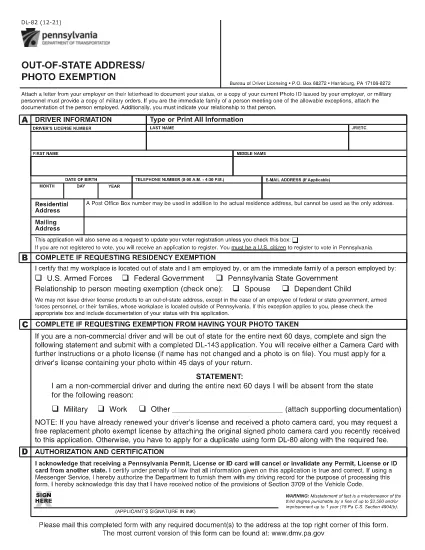
The DL-82 is the Pennsylvania Department of Transportation (PennDOT) form used to request an out‑of‑state address and photo exemption for a driver’s license. It allows military members, federal or state employees, and their immediate families to keep a valid PA license while stationed outside the Commonwealth.

Who Is Eligible for the Exemption?

  • U.S. Armed Forces personnel stationed outside Pennsylvania
  • Federal, state, or local government employees working out of state
  • Immediate family members of the above qualifying applicants
  • Non‑commercial drivers who need a photo exemption while away from Pennsylvania

How to Complete the DL-82 Online with Formize

Instead of downloading the PDF and editing it manually, simply click the “Fill out this form” button on this page. The Formize PDF Filler app will load in your browser, letting you:

  1. Enter your driver’s license number, name, and date of birth.
  2. Select the appropriate exemption check‑boxes.
  3. Upload supporting documents (military orders, employment verification, etc.).
  4. Apply an electronic signature.
  5. Save, print, or submit the completed form directly from the app.

Common Mistakes to Avoid

  • Leaving required fields blank – the form will be rejected.
  • Using an outdated version of the DL-82 – always use the latest PDF linked below.
  • Failing to attach proof of military or employment status.
  • Signing with a handwritten image instead of the built‑in e‑signature tool.

Where to Submit Your Completed Form

After completing the form, you can:

  • Mail it to the PennDOT Bureau of Driver Licensing, Harrisburg, PA.
  • Deliver it in person at any Pennsylvania DMV office.
  • If your employer’s human‑resources department accepts electronic submissions, you may forward the PDF directly.

Processing typically takes 7‑10 business days. Keep a copy of the submitted PDF for your records.

ЧЗВ
  • What is the purpose of the DL-82 form?

    It allows qualified individuals to request an exemption from providing a new address and photo on their Pennsylvania driver’s license while they are stationed or employed out of state.

  • Can I submit the DL-82 electronically?

    Yes. With Formize you can fill, sign, and download the completed PDF. You still need to mail or deliver the printed form to PennDOT unless your agency accepts electronic copies.

  • How long is the exemption valid?

    The exemption is typically valid for one year, after which you must submit a new DL-82 if you remain out of state.

  • Do I need to provide a new photo if I move back to Pennsylvania?

    When you return to Pennsylvania and renew your license, you must provide a current photo. The DL-82 exemption only applies while you are out of state.

  • What supporting documents are required?

    Proof of military orders, federal or state employment letters, or a spouse’s employment verification if you are a family member. Attach clear copies when you upload them in Formize.

  • Is there a fee to file the DL-82?

    There is no separate fee for the exemption itself, but standard driver’s license renewal or replacement fees still apply.

КАК ДА

Как да попълните DL-82 безплатно онлайн в 4 лесни стъпки:

  1. 1
    Open the Fillable Form
    Click the “Fill out this form” button on the page. The Formize PDF Filler will launch in a new tab.
  2. 2
    Enter Your Information
    Fill in your driver’s license number, name, date of birth, and select the exemption boxes that apply to you.
  3. 3
    Upload Supporting Documents
    Use the upload field to attach military orders, employment verification letters, or any other required proof.
  4. 4
    Sign and Submit
    Add your electronic signature, review all entries, then click “Save” or “Print” to finalize. You can mail the PDF or keep a digital copy.
Приложение Formize PDF Filler
ОТНОСНО

Формуляри за кандидатстване за шофьорска книжка

В повечето държави е задължително да имате шофьорска книжка, преди да можете да тръгнете на път. Получаването на шофьорска книжка е важен момент за всеки, който иска да шофира кола.

DL-82 е един от формулярите за кандидатстване за шофьорска книжка, които са документи, използвани за събиране на информация от хора, които искат да кандидатстват за шофьорска книжка. Обикновено съдържа полета за името на кандидата, датата на раждане, идентификационния номер, информацията за контакт, както и историята и опита на шофьорската му книжка.

ХАРАКТЕРИСТИКА

PDF пълнител

Най-лесният начин да попълните DL-82 онлайн

  • Бързо попълнете DL-82
    Търсите начин бързо да попълните DL-82 онлайн? С нашия онлайн безплатен инструмент за попълване на PDF формуляри ще знаете как да редактирате и попълвате този PDF документ за по-малко от минута.
  • Лесен за използване онлайн PDF редактор
    Писнало ви е да разпечатвате PDF файлове, за да можете да ги редактирате, преди да сканирате повторно и да ги изпратите обратно? Редактирайте PDF документи безплатно онлайн. Използвайте нашия онлайн pdf редактор, за да спестите време и хартия.
  • Страхотни инструменти, всички платформи
    Чудите се как да попълните DL-82 на Mac или може би как да използвате PDF пълнител безплатно? Нашите онлайн PDF инструменти работят на всички платформи.
  • Сигурно съхранение на файлове
    Завършените „DL-82“ файлове се съхраняват в защитена база данни, управлявана от Amazon Cloud хостинг. Можете да изтриете вашите файлове от нашата система по всяко време. Във всеки случай тези файлове се изтриват автоматично след 24 часа.
  • Чат с DL-82
    Разговаряйте с „DL-82“ в Chatize, който е безплатен асистент за четене на PDF файлове. Задавайте въпроси и получавайте отговори от „DL-82“. Просто щракнете върху бутона Чат с документ по-горе.

Изтриване на сесията за пълнене

Изтриване на избраната сесия за пълнене? В този случай вашият напредък в попълването на формуляра ще бъде загубен.

Изтриване на сесия за редактиране

Изтриване на избраната сесия за редактиране? В този случай вашият напредък в създаването и редактирането на формуляра ще бъде загубен.