Избери език

Youth Empowerment Services Application Form (Fillable PDF)

  1. Държава САЩ
  2. език Английски
  3. Отдел Health and Human Services
  4. Дейност Youth Empowerment
Youth Empowerment Services Application Form (Fillable PDF)

Looking for a quick, paper‑less way to apply for Youth Empowerment Services (YES) in Texas? The official YES Waiver Verification Form (Form 2809) is now available as a fillable PDF on Formize. You can complete the entire application online, save a copy for your records, and submit it without ever printing a single page.

This page explains everything you need to know about the form, the sections you’ll encounter, and best practices to avoid common errors.

What Is the Youth Empowerment Application?

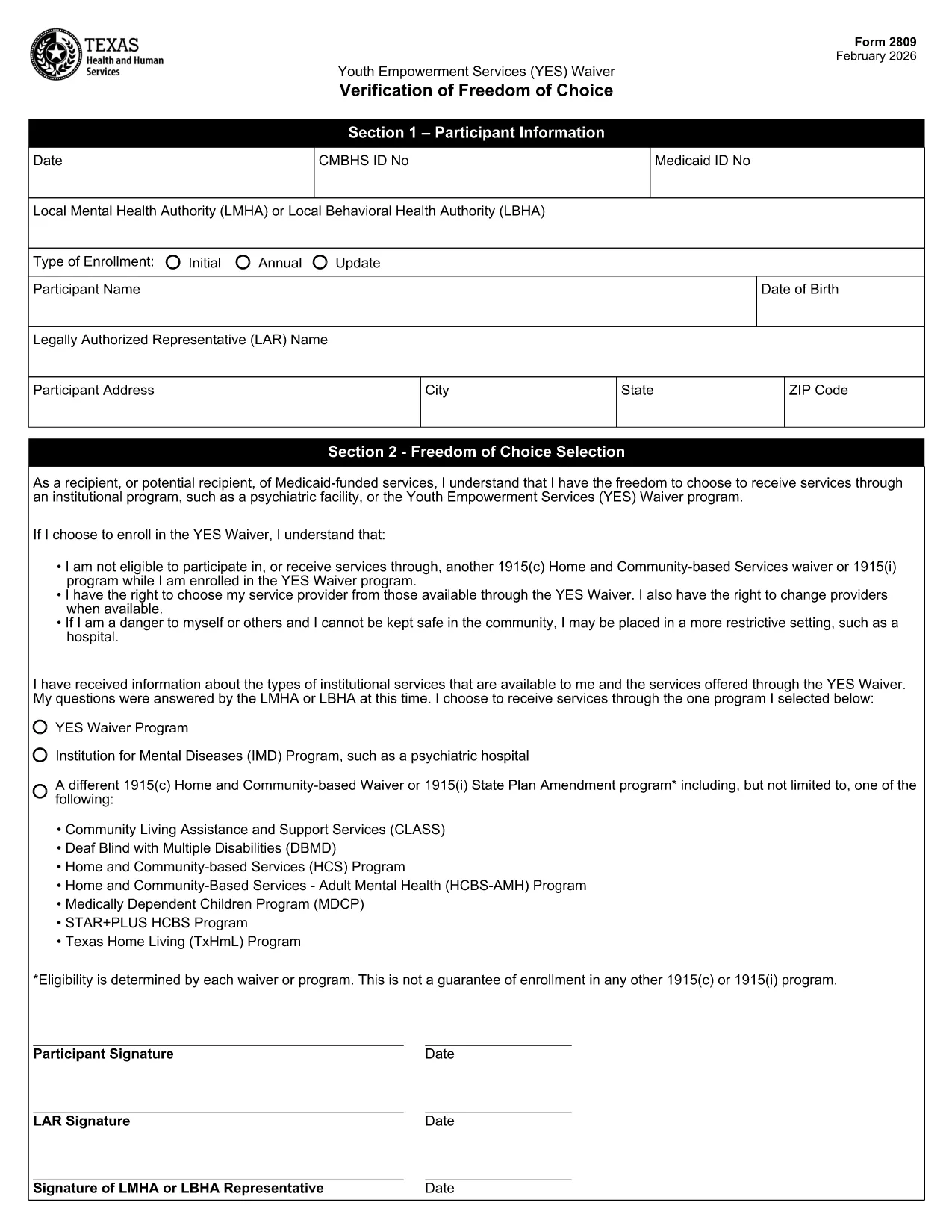
The Youth Empowerment Services (YES) Waiver Verification is used by local mental health authorities (LMHA) or local behavioral health authorities (LBHA) to document a participant’s choice to receive community‑based services instead of institutional care. It serves as the official application for eligibility and enrollment in the YES program.

How to Fill the Form Online

Instead of downloading the PDF and opening it in a separate editor, simply click the "Fill out this form" button on this page. The Formize PDF Filler app will load automatically, allowing you to type directly into each field.

Key Sections & Required Information

  • Date & IDs: Enter the current date, CMBHS ID, and Medicaid ID.
  • Participant Details: Full name, date of birth, and contact address.
  • Legal Authorized Representative (LAR): Name and signature of the LAR.
  • Choice of Service: Select the YES Waiver program or an alternative option.
  • Signatures: Participant (or X mark), LAR, and LMHA/LBHA representative.

Common Mistakes to Avoid

  • Leaving required fields blank – the form will not save until every mandatory field is completed.
  • Using an illegible signature – type your name or use the built‑in signature tool for a clear, printable mark.
  • Choosing the wrong enrollment type (Initial vs. Annual) – verify the purpose of your submission before selecting.
  • Entering outdated ID numbers – double‑check your CMBHS and Medicaid numbers with your provider.

Download & Print Options

If you still prefer a hard copy, you can download the completed PDF after filling it out and print it using any standard printer. The file remains fully editable until you finalize and save the document.

Ready to start? Click the button below, fill out the form in seconds, and take the next step toward youth empowerment.

ЧЗВ
  • Is the Youth Empowerment Services form free to use?

    Yes. The fillable PDF is provided at no cost, and Formize lets you complete it online for free.

  • Can I edit the form after I’ve saved it?

    As long as you keep the file in its original fillable format, you can reopen it in Formize and make changes.

  • Do I need Adobe Reader to fill out the form?

    No. Formize’s web‑based PDF filler works in any modern browser without additional software.

  • What happens if I make a mistake in a required field?

    The Formize validator will highlight missing or incorrect entries, preventing you from saving until they’re corrected.

  • How do I submit the completed form to the authorities?

    Download the finished PDF and follow the submission instructions from your LMHA or LBHA—usually via secure email or a physical drop‑off.

  • Is my personal information safe when using Formize?

    Formize uses SSL encryption for all data transmitted between your browser and our servers, ensuring your information remains private.

  • Can I print a hard copy after filling it out online?

    Absolutely. After saving, click the download button and print the PDF like any standard document.

  • Do I need a Texas address to use this form?

    The YES Waiver Verification is specific to Texas youth empowerment programs, so a Texas residency or enrollment through a Texas authority is required.

КАК ДА

Как да попълните youth empowerment application безплатно онлайн в 4 лесни стъпки:

  1. 1
    Open the Fillable Form
    Click the "Fill out this form" button on the page. The Formize PDF Filler loads in your browser.
  2. 2
    Complete All Required Fields
    Enter dates, IDs, participant details, and select the appropriate enrollment type. Use the signature tool for signatures.
  3. 3
    Save and Download
    When you finish, click "Save". You can download the completed PDF for your records or print it if needed.
  4. 4
    Submit the Application
    Send the saved PDF to your local mental health authority (LMHA) or behavioral health authority (LBHA) as instructed.
Приложение Formize PDF Filler
ОТНОСНО

youth empowerment application шаблон

С традиционния набор от функции за преглед и попълване на PDF документ, съчетан с предимствата на уеб приложение и адаптивно оформление, можете да завършите youth empowerment application за минути.

ХАРАКТЕРИСТИКА

PDF пълнител

Най-лесният начин да попълните youth empowerment application онлайн

  • Бързо попълнете youth empowerment application
    Търсите начин бързо да попълните youth empowerment application онлайн? С нашия онлайн безплатен инструмент за попълване на PDF формуляри ще знаете как да редактирате и попълвате този PDF документ за по-малко от минута.
  • Лесен за използване онлайн PDF редактор
    Писнало ви е да разпечатвате PDF файлове, за да можете да ги редактирате, преди да сканирате повторно и да ги изпратите обратно? Редактирайте PDF документи безплатно онлайн. Използвайте нашия онлайн pdf редактор, за да спестите време и хартия.
  • Страхотни инструменти, всички платформи
    Чудите се как да попълните youth empowerment application на Mac или може би как да използвате PDF пълнител безплатно? Нашите онлайн PDF инструменти работят на всички платформи.
  • Сигурно съхранение на файлове
    Завършените „youth empowerment application“ файлове се съхраняват в защитена база данни, управлявана от Amazon Cloud хостинг. Можете да изтриете вашите файлове от нашата система по всяко време. Във всеки случай тези файлове се изтриват автоматично след 24 часа.
  • Чат с youth empowerment application
    Разговаряйте с „youth empowerment application“ в Chatize, който е безплатен асистент за четене на PDF файлове. Задавайте въпроси и получавайте отговори от „youth empowerment application“. Просто щракнете върху бутона Чат с документ по-горе.

Изтриване на сесията за пълнене

Изтриване на избраната сесия за пълнене? В този случай вашият напредък в попълването на формуляра ще бъде загубен.

Изтриване на сесия за редактиране

Изтриване на избраната сесия за редактиране? В този случай вашият напредък в създаването и редактирането на формуляра ще бъде загубен.