Избери език

Application for Yesterday Absent – Fillable PDF Form

  1. език Английски
  2. Държава САЩ
  3. Отдел Human Resources
  4. Дейност Employee Management
Application for Yesterday Absent – Fillable PDF Form

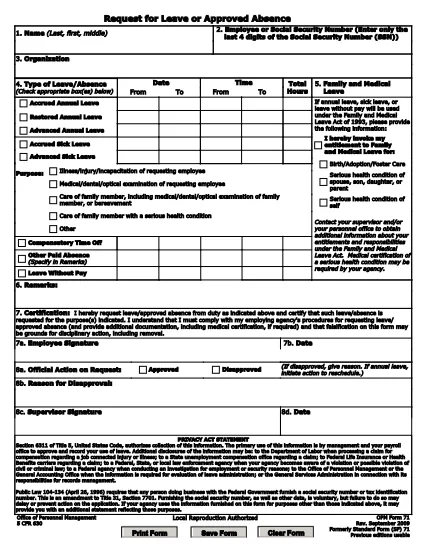
When you missed work or school yesterday and need official documentation, the Application for Yesterday Absent is the right tool. This fillable PDF lets you quickly request a one‑day absence, provide a reason, and obtain the necessary approvals—all without printing or scanning.

Why You Need a Yesterday Absence Application

Employers and educational institutions often require a written request for any unplanned absence. Submitting a completed form demonstrates professionalism, helps payroll process correctly, and keeps HR records accurate.

How to Fill Out the Yesterday Absence Form Online

With Formize’s built‑in PDF filler, you can complete the form in seconds:

  1. Click the "Fill out this form" button on the page.
  2. Wait for the Formize PDF Filler app to load.
  3. Enter your personal information (name, employee ID, department).
  4. Select the date of absence – the form defaults to yesterday’s date.
  5. Provide a brief reason (e.g., medical, family emergency).
  6. Add your electronic signature and, if required, your supervisor’s signature.
  7. Submit the form directly from the app or download a copy for your records.

Common Mistakes to Avoid

  • Leaving fields blank: Every required field must be filled, otherwise the form will be rejected.
  • Incorrect date: Double‑check that the date shown is indeed yesterday’s date.
  • Unclear reason: Use concise language and, if needed, attach supporting documentation.
  • Missing signature: Both employee and supervisor signatures are mandatory for approval.

Download the Fillable PDF

If you prefer to work offline, you can download the original fillable PDF from the link below and open it with any PDF editor that supports form fields.

Download Yesterday Absence Application (PDF)

Frequently Asked Questions

Find quick answers to the most common queries about this form below.

ЧЗВ
  • Do I need a manager’s signature for a one‑day absence?

    Yes. Most organizations require both the employee’s and the manager’s signatures to approve any unplanned leave.

  • Can I edit the form after I submit it?

    Once submitted, the form is locked. If you need changes, request a new form and follow the same steps.

  • Is the PDF truly fillable on any device?

    The form is built with standard PDF form fields, so it works on desktop, tablet, and mobile browsers via Formize.

  • What if I don’t have an internet connection?

    Download the PDF from the link provided, fill it out offline with a PDF editor, then email or upload it once you’re back online.

  • How long does it take for HR to process the request?

    Processing time varies by organization, but most HR departments acknowledge receipt within 24 hours.

  • Can I attach supporting documents (e.g., doctor’s note)?

    Yes. After completing the form, use the upload feature in the Formize app or attach files when you email the PDF.

КАК ДА

Как да попълните yesterday absent application безплатно онлайн в 7 лесни стъпки:

  1. 1
    Click the Fill Out Button
    Press the "Fill out this form" button on the page to launch Formize’s online PDF editor.
  2. 2
    Wait for the Filler to Load
    The Formize PDF Filler app loads in a few seconds – you’ll see the form fields become editable.
  3. 3
    Enter Your Information
    Fill in your name, employee ID, department, and any other required personal details.
  4. 4
    Select Yesterday’s Date
    The date field defaults to yesterday; verify it’s correct before proceeding.
  5. 5
    Provide a Reason
    Write a brief, clear explanation for the absence (e.g., medical appointment, family emergency).
  6. 6
    Add Your Signature
    Use the e‑signature field to sign electronically, then have your supervisor sign if required.
  7. 7
    Submit or Download
    Click "Submit" to send the form directly to your HR portal, or download a copy for your records.
Приложение Formize PDF Filler
ОТНОСНО

yesterday absent application шаблон

С традиционния набор от функции за преглед и попълване на PDF документ, съчетан с предимствата на уеб приложение и адаптивно оформление, можете да завършите yesterday absent application за минути.

ХАРАКТЕРИСТИКА

PDF пълнител

Най-лесният начин да попълните yesterday absent application онлайн

  • Бързо попълнете yesterday absent application
    Търсите начин бързо да попълните yesterday absent application онлайн? С нашия онлайн безплатен инструмент за попълване на PDF формуляри ще знаете как да редактирате и попълвате този PDF документ за по-малко от минута.
  • Лесен за използване онлайн PDF редактор
    Писнало ви е да разпечатвате PDF файлове, за да можете да ги редактирате, преди да сканирате повторно и да ги изпратите обратно? Редактирайте PDF документи безплатно онлайн. Използвайте нашия онлайн pdf редактор, за да спестите време и хартия.
  • Страхотни инструменти, всички платформи
    Чудите се как да попълните yesterday absent application на Mac или може би как да използвате PDF пълнител безплатно? Нашите онлайн PDF инструменти работят на всички платформи.
  • Сигурно съхранение на файлове
    Завършените „yesterday absent application“ файлове се съхраняват в защитена база данни, управлявана от Amazon Cloud хостинг. Можете да изтриете вашите файлове от нашата система по всяко време. Във всеки случай тези файлове се изтриват автоматично след 24 часа.
  • Чат с yesterday absent application
    Разговаряйте с „yesterday absent application“ в Chatize, който е безплатен асистент за четене на PDF файлове. Задавайте въпроси и получавайте отговори от „yesterday absent application“. Просто щракнете върху бутона Чат с документ по-горе.

Изтриване на сесията за пълнене

Изтриване на избраната сесия за пълнене? В този случай вашият напредък в попълването на формуляра ще бъде загубен.

Изтриване на сесия за редактиране

Изтриване на избраната сесия за редактиране? В този случай вашият напредък в създаването и редактирането на формуляра ще бъде загубен.