
Избери език

IRS Power of Attorney (Form 2848) – Fillable PDF

  1. Държава САЩ
  2. език Английски
  3. Дейност Данъци
  4. Отдел IRS
IRS Power of Attorney (Form 2848) – Fillable PDF

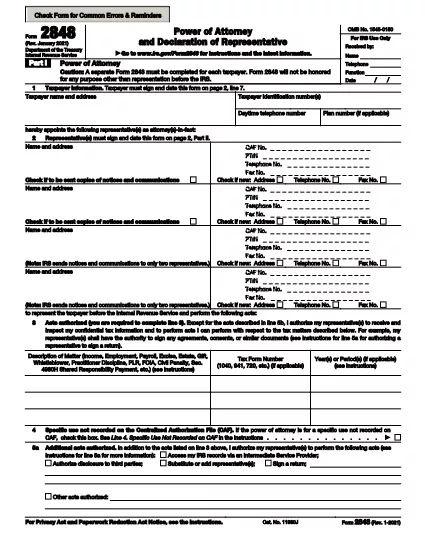
Need a reliable legal form PDF for granting someone authority to act on your tax matters? The IRS Power of Attorney (Form 2848) is the official document you need. With Formize’s Fillable PDF technology you can complete the form directly in your browser—no extra software required.

Why Use a Fillable Power of Attorney Form

Traditional paper forms are prone to errors, require printing, and take time to process. A fillable PDF streamlines the entire workflow: you can type, save, and print the exact information you entered, ensuring legibility and compliance with IRS standards.

Key Sections of Form 2848 Explained

The form is divided into clear sections:

  • Taxpayer Information – Name, address, and Social Security Number.
  • Representative(s) – Details of the person(s) you are authorizing.
  • Tax Matters – Specific tax years or periods and the type of tax.
  • Signature – Your signature and date, plus any required dual signatures.

How to Fill Out the Form Online

Instead of downloading the PDF and opening it in a separate editor, simply click the "Fill out this form" button on this page. The Formize PDF Filler app will load in seconds, presenting an intuitive interface that mirrors the original IRS layout.

Common Mistakes to Avoid

  • Leaving the Tax Matters section blank – the IRS needs specific years.
  • Using an illegible signature – the fillable field captures a clean, printable signature image.
  • Forgetting to include all authorized representatives – each must be listed separately.

Where to Submit Your Completed Form

After you’ve filled, reviewed, and saved the PDF, you can either:

  • Print and mail it to the appropriate IRS office (address provided on the form), or
  • Upload it securely through the IRS e‑services portal if you have an authorized account.

Need more help? Review the official IRS instructions linked at the bottom of the form.

ЧЗВ
  • What is IRS Form 2848 used for?

    Form 2848 authorizes a designated individual to represent you before the IRS, allowing them to receive confidential tax information and act on your behalf.

  • Can I sign the fillable PDF electronically?

    Yes. The Formize filler includes a secure e‑signature field that complies with IRS guidelines for electronic signatures.

  • Do I need to print the form after filling it online?

    Printing is recommended for mailing, but you can also submit the completed PDF electronically through the IRS’s online portal.

  • Is there a cost to use the Formize PDF filler?

    No. The fillable version of Form 2848 is provided free of charge on Formize.

  • What if I make a mistake after saving?

    Simply reopen the saved PDF in the Formize filler, correct the error, and save a new version.

  • How do I know which IRS office to send the form to?

    The address for submission is listed on the last page of the form and in the official IRS instructions linked at the bottom.

  • Can I authorize more than one representative?

    Yes. Form 2848 allows multiple representatives; each must be listed with their own contact information and signature.

  • Is the fillable PDF version the same as the paper version?

    The fillable PDF mirrors the exact layout and content of the official paper form, ensuring full compliance with IRS requirements.

КАК ДА

Как да попълните Power of Attorney PDF безплатно онлайн в 5 лесни стъпки:

  1. 1
    Click the Fillable Form Button
    Press the "Fill out this form" button on this page. The Formize PDF Filler app will appear in a new window.
  2. 2
    Wait for the Form to Load
    The app loads the IRS Form 2848 instantly. All fields are interactive and ready for input.
  3. 3
    Enter Your Information
    Complete each section—taxpayer details, representative(s), tax matters, and signatures—using your keyboard.
  4. 4
    Review and Save
    Use the built‑in preview to double‑check entries. Click "Save" to download a completed PDF to your device.
  5. 5
    Print or Submit Electronically
    Print the saved PDF for mailing, or upload it through the IRS e‑services portal if you have access.
Приложение Formize PDF Filler
ОТНОСНО

Данъчни формуляри

Power of Attorney PDF е един от данъчните формуляри, които са документи, използвани за докладване на информация, свързана с данъци, на съответния данъчен орган. Има различни видове данъчни формуляри, включително федерални, щатски и местни данъчни формуляри, които могат да варират в зависимост от обстоятелствата и местоположението на данъкоплатеца.

ХАРАКТЕРИСТИКА

PDF пълнител

Най-лесният начин да попълните Power of Attorney PDF онлайн

  • Бързо попълнете Power of Attorney PDF
    Търсите начин бързо да попълните Power of Attorney PDF онлайн? С нашия онлайн безплатен инструмент за попълване на PDF формуляри ще знаете как да редактирате и попълвате този PDF документ за по-малко от минута.
  • Лесен за използване онлайн PDF редактор
    Писнало ви е да разпечатвате PDF файлове, за да можете да ги редактирате, преди да сканирате повторно и да ги изпратите обратно? Редактирайте PDF документи безплатно онлайн. Използвайте нашия онлайн pdf редактор, за да спестите време и хартия.
  • Страхотни инструменти, всички платформи
    Чудите се как да попълните Power of Attorney PDF на Mac или може би как да използвате PDF пълнител безплатно? Нашите онлайн PDF инструменти работят на всички платформи.
  • Сигурно съхранение на файлове
    Завършените „Power of Attorney PDF“ файлове се съхраняват в защитена база данни, управлявана от Amazon Cloud хостинг. Можете да изтриете вашите файлове от нашата система по всяко време. Във всеки случай тези файлове се изтриват автоматично след 24 часа.
  • Чат с Power of Attorney PDF
    Разговаряйте с „Power of Attorney PDF“ в Chatize, който е безплатен асистент за четене на PDF файлове. Задавайте въпроси и получавайте отговори от „Power of Attorney PDF“. Просто щракнете върху бутона Чат с документ по-горе.

Изтриване на сесията за пълнене

Изтриване на избраната сесия за пълнене? В този случай вашият напредък в попълването на формуляра ще бъде загубен.

Изтриване на сесия за редактиране

Изтриване на избраната сесия за редактиране? В този случай вашият напредък в създаването и редактирането на формуляра ще бъде загубен.