Избери език

Application Form Kaise Likhen – Complete Guide & Fillable PDF

  1. език Английски
  2. Държава САЩ
  3. Дейност Employment
  4. Отдел Labor Department
Application Form Kaise Likhen – Complete Guide & Fillable PDF

Writing an application form ("application form kaise likhen") can feel overwhelming, especially when you need a professional layout and the ability to edit it later. Using a fillable PDF eliminates the guesswork – you get a ready‑made template, clear fields, and the option to save or print instantly.

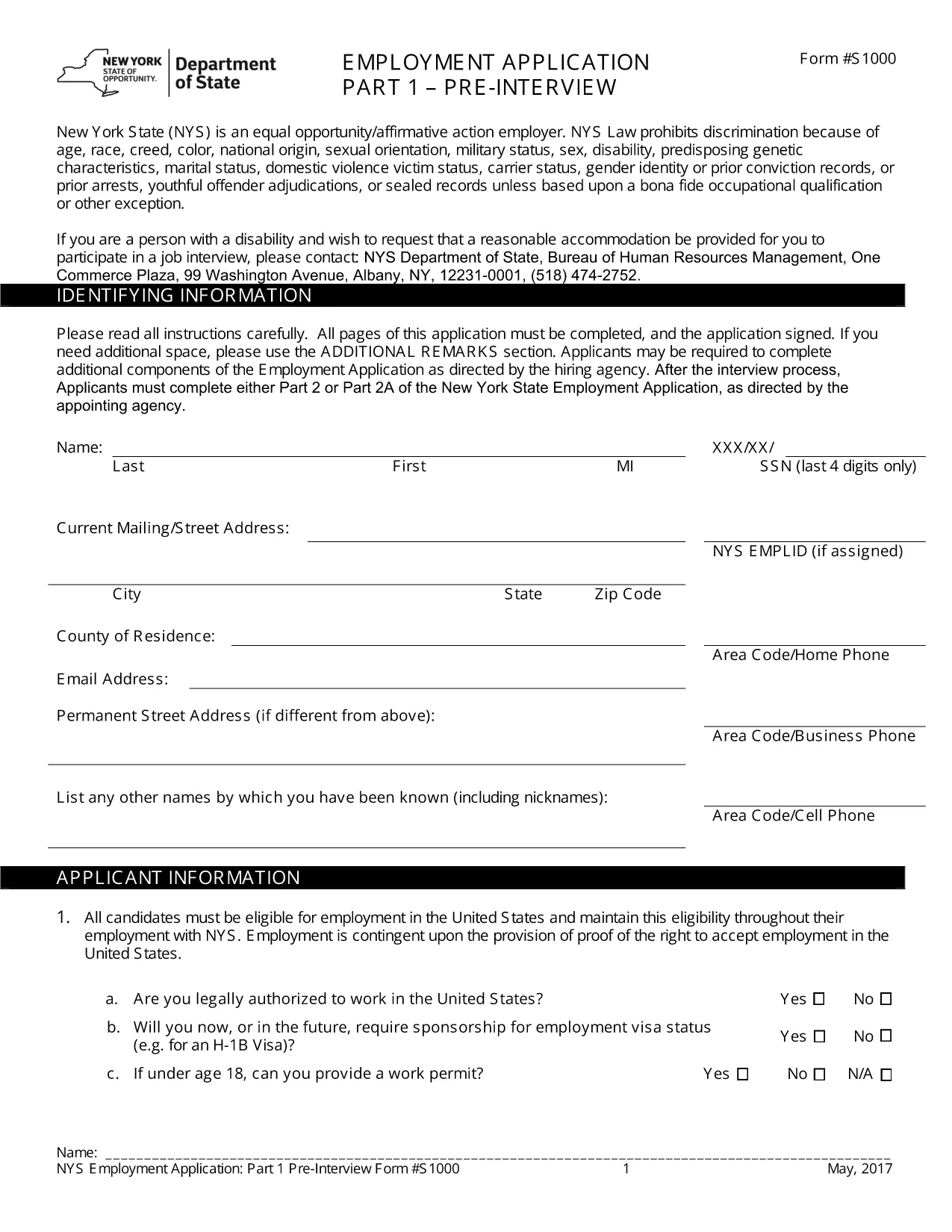
The PDF we provide is a standard Employment Application Form used across many U.S. companies. Although the form is in English, the same structure works for any type of application you need to create – job, scholarship, or government request. Follow the instructions below to complete it online, without downloading a separate editor.

Why a Fillable PDF Makes Writing Application Forms Easy

Pre‑designed layout: All required sections (personal details, work history, references) are already organized.

Editable fields: Click any box, type your answer, and move on. No printing, scanning, or re‑typing.

e‑Signature support: Add a legally binding signature directly in the browser.

Step‑by‑Step: Fill Out the Application Form Online

Use the Formize PDF Filler that appears when you click the button below. No extra software is needed.

Common Mistakes & Tips for a Perfect Application

1. Skipping required fields – The form highlights empty mandatory sections in red.

2. Typos in names or dates – Double‑check spelling before saving.

3. Incorrect contact information – Verify phone numbers and email addresses; employers often use these to contact you.

By following these tips, your application will look polished and professional, increasing your chances of success.

ЧЗВ
  • Do I need to download any software to fill the form?

    No. The Formize PDF Filler runs completely in your web browser, so you can fill the form on any device.

  • Can I save the form and finish it later?

    Yes. Use the "Save" button to download a copy of the partially completed PDF and reopen it later in Formize.

  • Is the form suitable for Hindi applications?

    The template is in English, but you can type Hindi text using any standard keyboard or input method.

  • What if I make a mistake after submitting?

    Contact the organization that received your form. Most accept a corrected PDF if you explain the error.

  • Is my personal data safe while using Formize?

    Formize uses SSL encryption and does not store your data after the session ends, ensuring privacy and security.

КАК ДА

Как да попълните application form kaise likhen безплатно онлайн в 4 лесни стъпки:

  1. 1
    Open the Fillable Form
    Click the "Fill out this form" button on the page. The Formize PDF Filler will load in a new tab.
  2. 2
    Enter Your Information
    Tap each field, type your details (name, address, work history, etc.), and use the Tab key to move to the next section.
  3. 3
    Add Your e‑Signature
    When you reach the signature box, select "Add Signature" and draw or type your name.
  4. 4
    Review & Save
    Click "Review" to ensure all required fields are completed, then choose "Save" to download a copy or "Submit" to share.
Приложение Formize PDF Filler
ОТНОСНО

application form kaise likhen шаблон

С традиционния набор от функции за преглед и попълване на PDF документ, съчетан с предимствата на уеб приложение и адаптивно оформление, можете да завършите application form kaise likhen за минути.

ХАРАКТЕРИСТИКА

PDF пълнител

Най-лесният начин да попълните application form kaise likhen онлайн

  • Бързо попълнете application form kaise likhen
    Търсите начин бързо да попълните application form kaise likhen онлайн? С нашия онлайн безплатен инструмент за попълване на PDF формуляри ще знаете как да редактирате и попълвате този PDF документ за по-малко от минута.
  • Лесен за използване онлайн PDF редактор
    Писнало ви е да разпечатвате PDF файлове, за да можете да ги редактирате, преди да сканирате повторно и да ги изпратите обратно? Редактирайте PDF документи безплатно онлайн. Използвайте нашия онлайн pdf редактор, за да спестите време и хартия.
  • Страхотни инструменти, всички платформи
    Чудите се как да попълните application form kaise likhen на Mac или може би как да използвате PDF пълнител безплатно? Нашите онлайн PDF инструменти работят на всички платформи.
  • Сигурно съхранение на файлове
    Завършените „application form kaise likhen“ файлове се съхраняват в защитена база данни, управлявана от Amazon Cloud хостинг. Можете да изтриете вашите файлове от нашата система по всяко време. Във всеки случай тези файлове се изтриват автоматично след 24 часа.
  • Чат с application form kaise likhen
    Разговаряйте с „application form kaise likhen“ в Chatize, който е безплатен асистент за четене на PDF файлове. Задавайте въпроси и получавайте отговори от „application form kaise likhen“. Просто щракнете върху бутона Чат с документ по-горе.

Изтриване на сесията за пълнене

Изтриване на избраната сесия за пълнене? В този случай вашият напредък в попълването на формуляра ще бъде загубен.

Изтриване на сесия за редактиране

Изтриване на избраната сесия за редактиране? В този случай вашият напредък в създаването и редактирането на формуляра ще бъде загубен.