
Избери език

DS-5504 Fillable PDF – Name Change, Data Correction & Limited Passport Replacement

  1. език Английски
  2. Държава САЩ
  3. Дейност Паспорт
DS-5504 Fillable PDF – Name Change, Data Correction & Limited Passport Replacement

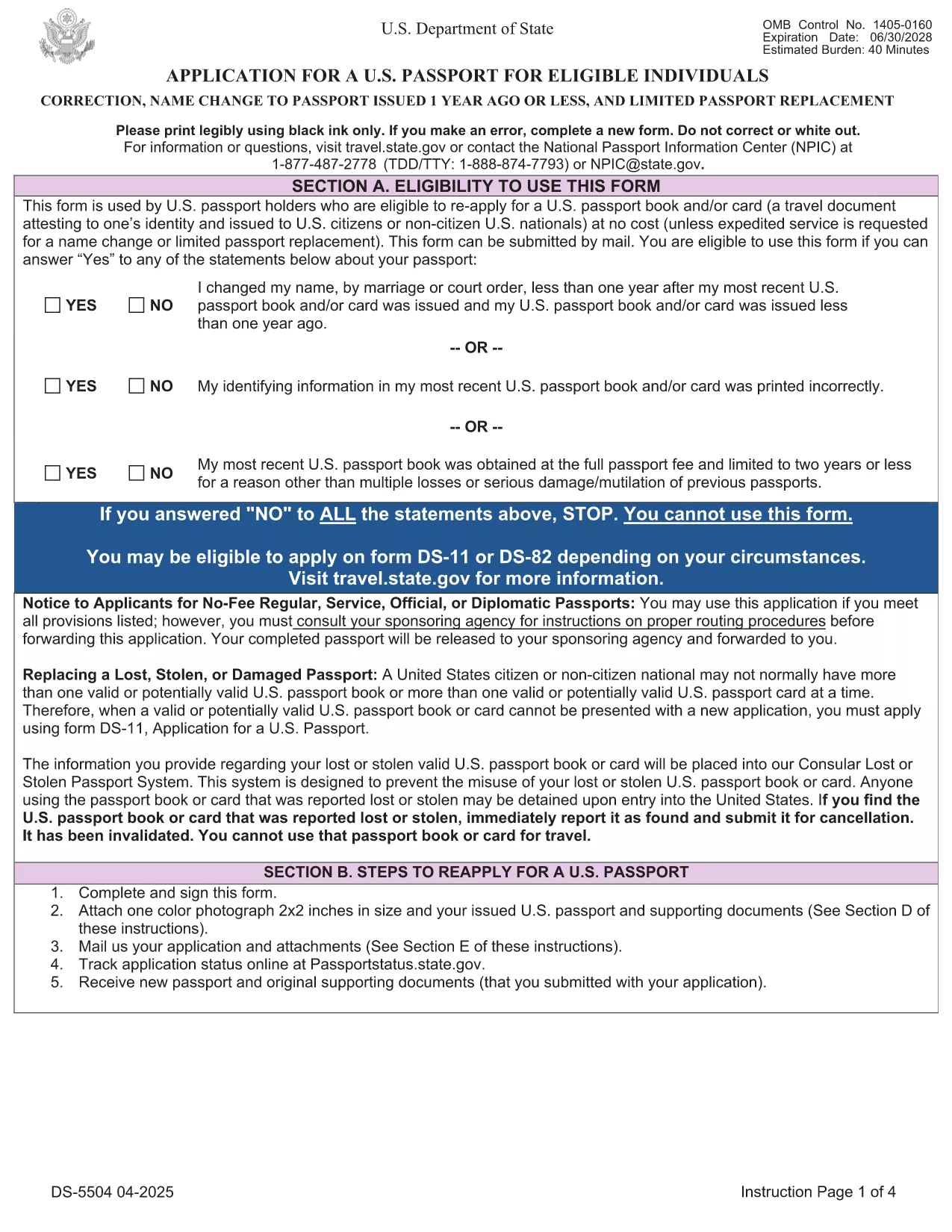
The DS-5504 is the official U.S. Department of State application used when you need to change the name on a passport, correct a printing error, or replace a limited‑validity passport. With Formize’s fillable PDF tool you can complete the form online, avoid manual errors, and print a clean copy ready for submission.

What Is the DS-5504 Form?

DS-5504 is designed for three specific situations:

  • Name change – if your legal name changed within one year of your last passport issuance.
  • Data correction – to fix a typo or incorrect personal information on an existing passport.
  • Limited passport replacement – when a temporary or limited‑validity passport expires or is damaged.

How to Fill Out DS-5504 with Formize

Instead of downloading the PDF and opening a separate editor, simply click the “Fill out this form” button on this page. The Formize PDF Filler app loads in your browser, letting you:

  1. Enter personal details directly into interactive fields.
  2. Upload a passport‑style photo.
  3. Save a draft and return later if needed.
  4. Download the completed, printable PDF with one click.

Common Mistakes to Avoid

  • Using a name change older than one year – the form will be rejected.
  • Leaving the signature line blank or signing on the wrong page.
  • Submitting an incorrect passport number or expiration date.
  • Forgetting to attach the required supporting documents (photo, legal name‑change proof, etc.).

Required Supporting Documents

Depending on your request, you will need to include:

  • Current valid U.S. passport (or limited‑validity passport).
  • One recent color passport photo (2" x 2").
  • Legal name‑change documentation (marriage certificate, court order) – if applicable.
  • Proof of the printing error (e.g., a copy of the original passport showing the mistake).

Where to Submit Your Completed Form

After printing, mail the DS-5504 package to the address listed in the form’s instructions or bring it to a regional passport agency. The application is free of charge; expedited processing is available for a fee.

Need help? Review the official DS‑5504 PDF for detailed instructions.

ЧЗВ
  • Can I use DS-5504 for a name change after one year?

    No. The DS‑5504 is only valid for name changes that occurred within one year of your most recent passport issuance. For older changes, use form DS‑82.

  • Is there a fee to file DS-5504?

    The DS‑5504 application itself is free. Fees only apply if you request expedited processing or need a new passport book.

  • Do I need a photo for a data‑correction request?

    Yes. All DS‑5504 submissions require one recent color passport photo, even if you are only correcting printed information.

  • Can I submit the completed form electronically?

    The State Department currently requires a printed, signed PDF with supporting documents. Electronic submission is not accepted for DS‑5504.

  • What if my limited‑validity passport is still valid?

    You can use DS‑5504 to replace a limited‑validity passport that is damaged, lost, or you simply need a full‑validity book. Include the limited passport and a written explanation.

  • How long does processing take?

    Regular processing usually takes 6‑8 weeks. Expedited service (for a fee) can reduce the time to 2‑3 weeks.

  • Can I use Formize on a mobile device?

    Yes. The Formize PDF Filler works on most modern smartphones and tablets, letting you fill out DS‑5504 on the go.

КАК ДА

Как да попълните DS-5504 безплатно онлайн в 5 лесни стъпки:

  1. 1
    Open the Fillable Form
    Click the "Fill out this form" button on the page. The Formize PDF Filler loads instantly in your browser.
  2. 2
    Enter Your Information
    Complete each interactive field – personal details, passport number, reason for the request, and upload your passport‑style photo.
  3. 3
    Review & Sign
    Double‑check all entries for accuracy, then add your electronic signature in the designated box.
  4. 4
    Download & Print
    Save the completed PDF, print a clean copy on white paper, and attach any required supporting documents.
  5. 5
    Submit to the State Department
    Mail or deliver the package to the address specified in the form instructions, or schedule an appointment at a passport agency.
Приложение Formize PDF Filler
ОТНОСНО

Формуляри за паспорти

DS-5504 е един от формулярите за паспорт, които са документи, използвани за кандидатстване за паспорт, който е документ за пътуване, който удостоверява самоличността и националността на притежателя и му позволява да пътува в чужбина. Паспортните формуляри могат да варират в зависимост от държавата, която издава паспорта, но обикновено съдържат лична информация за кандидата, като име, дата на раждане и място на раждане, както и информация за родителите на кандидата и всички предишни паспорти или документи за пътуване .

В Съединените щати двата най-често срещани паспортни формуляра са DS-11 и DS-82. Формулярът DS-11 се използва за кандидатстващи за първи път, непълнолетни или лица, които не отговарят на условията за използване на формуляра DS-82. Формулярът DS-82 се използва за подновяване на паспорти по пощата за отговарящи на условията кандидати. И двата формуляра изискват от кандидата да предостави лична информация и подкрепяща документация, като паспортна снимка и доказателство за гражданство.

Други държави може да имат различни паспортни формуляри и изисквания, но основният процес обикновено включва попълване на заявление за паспорт, предоставяне на подкрепяща документация и присъствие на интервю с паспортен служител в правителствено съоръжение или посолство. Важно е да се отбележи, че процесът на кандидатстване за паспорт може да отнеме няколко седмици или дори месеци, така че се препоръчва да кандидатствате доста по-рано от всяко планирано пътуване.

ХАРАКТЕРИСТИКА

PDF пълнител

Най-лесният начин да попълните DS-5504 онлайн

  • Бързо попълнете DS-5504
    Търсите начин бързо да попълните DS-5504 онлайн? С нашия онлайн безплатен инструмент за попълване на PDF формуляри ще знаете как да редактирате и попълвате този PDF документ за по-малко от минута.
  • Лесен за използване онлайн PDF редактор
    Писнало ви е да разпечатвате PDF файлове, за да можете да ги редактирате, преди да сканирате повторно и да ги изпратите обратно? Редактирайте PDF документи безплатно онлайн. Използвайте нашия онлайн pdf редактор, за да спестите време и хартия.
  • Страхотни инструменти, всички платформи
    Чудите се как да попълните DS-5504 на Mac или може би как да използвате PDF пълнител безплатно? Нашите онлайн PDF инструменти работят на всички платформи.
  • Сигурно съхранение на файлове
    Завършените „DS-5504“ файлове се съхраняват в защитена база данни, управлявана от Amazon Cloud хостинг. Можете да изтриете вашите файлове от нашата система по всяко време. Във всеки случай тези файлове се изтриват автоматично след 24 часа.
  • Чат с DS-5504
    Разговаряйте с „DS-5504“ в Chatize, който е безплатен асистент за четене на PDF файлове. Задавайте въпроси и получавайте отговори от „DS-5504“. Просто щракнете върху бутона Чат с документ по-горе.

Изтриване на сесията за пълнене

Изтриване на избраната сесия за пълнене? В този случай вашият напредък в попълването на формуляра ще бъде загубен.

Изтриване на сесия за редактиране

Изтриване на избраната сесия за редактиране? В този случай вашият напредък в създаването и редактирането на формуляра ще бъде загубен.