Избери език

Form 15D – Direct Deposit of Benefits (Fillable PDF)

  1. Държава САЩ
  2. език Английски
  3. Дейност Retirement Benefits
  4. Отдел Retirement
Form 15D – Direct Deposit of Benefits (Fillable PDF)

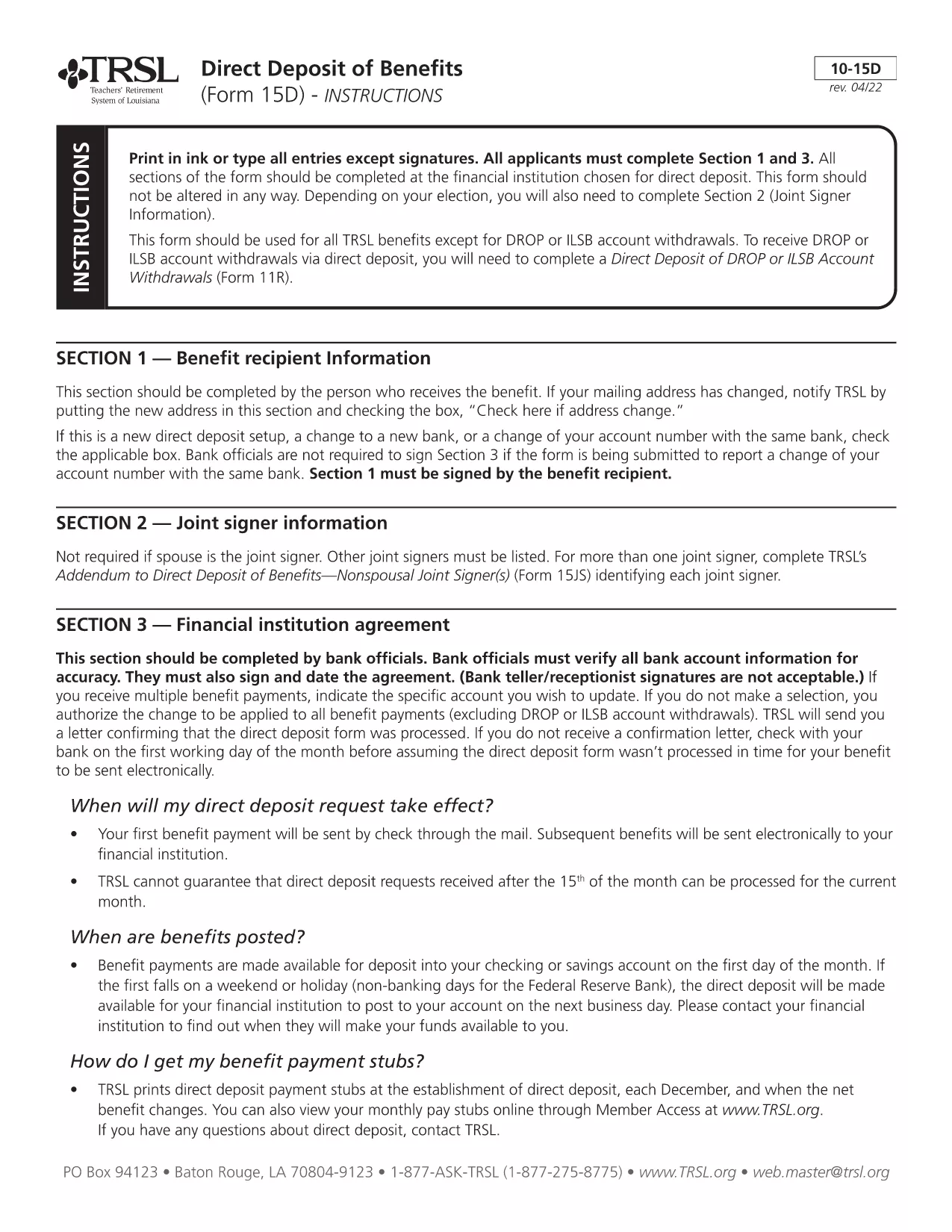
Form 15D is the official "Direct Deposit of Benefits" form used by the Teachers' Retirement System of Louisiana (TRSL). It allows retirees to have their monthly pension, annuity, or other retirement payments deposited directly into a bank account of their choice.

Using a fillable PDF version saves you time, reduces errors, and eliminates the need for printing, scanning, or mailing paper copies. Our Formize platform loads the PDF in the browser, lets you type directly into each field, and saves a completed copy that you can submit electronically.

  • Fast processing: Forms received by the 15th of the month are usually processed for the next month’s payment.
  • Secure handling: Your banking information stays encrypted while you work in the browser.
  • Editable anytime: Save the partially‑filled form and return later to finish.

Below you’ll find step‑by‑step instructions, tips to avoid common errors, and answers to the most frequently asked questions.

ЧЗВ
  • Do I need Adobe Acrobat to fill out Form 15D?

    No. The Formize PDF Filler works in any modern browser, so you don’t need Acrobat or any extra software.

  • Can I change my bank account after submitting Form 15D?

    Yes. Submit a new, updated Form 15D with the revised routing and account numbers. TRSL processes updates the same way as the original form.

  • What if I make a mistake while filling out the form?

    You can clear any field by selecting it and pressing Delete, or use the "Reset" button to start over before saving.

  • Is the information I enter secure?

    All data is encrypted in transit (HTTPS) and never stored on our servers after you download the completed PDF.

  • When will my direct‑deposit start after I submit Form 15D?

    TRSL typically processes forms received by the 15th of the month for the following month’s payment. Allow a few business days for verification.

КАК ДА

Как да попълните Form 15D безплатно онлайн в 4 лесни стъпки:

  1. 1
    Step 1 – Click the Fill‑out button
    On this page, click the blue "Fill out this form" button. The Formize PDF Filler will open in a new tab.
  2. 2
    Step 2 – Wait for the Formize PDF Filler to load
    The filler loads the fillable version of Form 15D directly from the secure server. This usually takes a few seconds.
  3. 3
    Step 3 – Enter your banking information
    Type your bank name, routing number, and account number into the highlighted fields. Double‑check each number for accuracy.
  4. 4
    Step 4 – Review, save, and submit
    Use the built‑in preview to verify all entries. Click "Save" to download a copy for your records, then follow TRSL’s submission instructions (mail or upload to the TRSL portal).
Приложение Formize PDF Filler
ОТНОСНО

Form 15D шаблон

С традиционния набор от функции за преглед и попълване на PDF документ, съчетан с предимствата на уеб приложение и адаптивно оформление, можете да завършите Form 15D за минути.

ХАРАКТЕРИСТИКА

PDF пълнител

Най-лесният начин да попълните Form 15D онлайн

  • Бързо попълнете Form 15D
    Търсите начин бързо да попълните Form 15D онлайн? С нашия онлайн безплатен инструмент за попълване на PDF формуляри ще знаете как да редактирате и попълвате този PDF документ за по-малко от минута.
  • Лесен за използване онлайн PDF редактор
    Писнало ви е да разпечатвате PDF файлове, за да можете да ги редактирате, преди да сканирате повторно и да ги изпратите обратно? Редактирайте PDF документи безплатно онлайн. Използвайте нашия онлайн pdf редактор, за да спестите време и хартия.
  • Страхотни инструменти, всички платформи
    Чудите се как да попълните Form 15D на Mac или може би как да използвате PDF пълнител безплатно? Нашите онлайн PDF инструменти работят на всички платформи.
  • Сигурно съхранение на файлове
    Завършените „Form 15D“ файлове се съхраняват в защитена база данни, управлявана от Amazon Cloud хостинг. Можете да изтриете вашите файлове от нашата система по всяко време. Във всеки случай тези файлове се изтриват автоматично след 24 часа.
  • Чат с Form 15D
    Разговаряйте с „Form 15D“ в Chatize, който е безплатен асистент за четене на PDF файлове. Задавайте въпроси и получавайте отговори от „Form 15D“. Просто щракнете върху бутона Чат с документ по-горе.

Изтриване на сесията за пълнене

Изтриване на избраната сесия за пълнене? В този случай вашият напредък в попълването на формуляра ще бъде загубен.

Изтриване на сесия за редактиране

Изтриване на избраната сесия за редактиране? В този случай вашият напредък в създаването и редактирането на формуляра ще бъде загубен.