Избери език

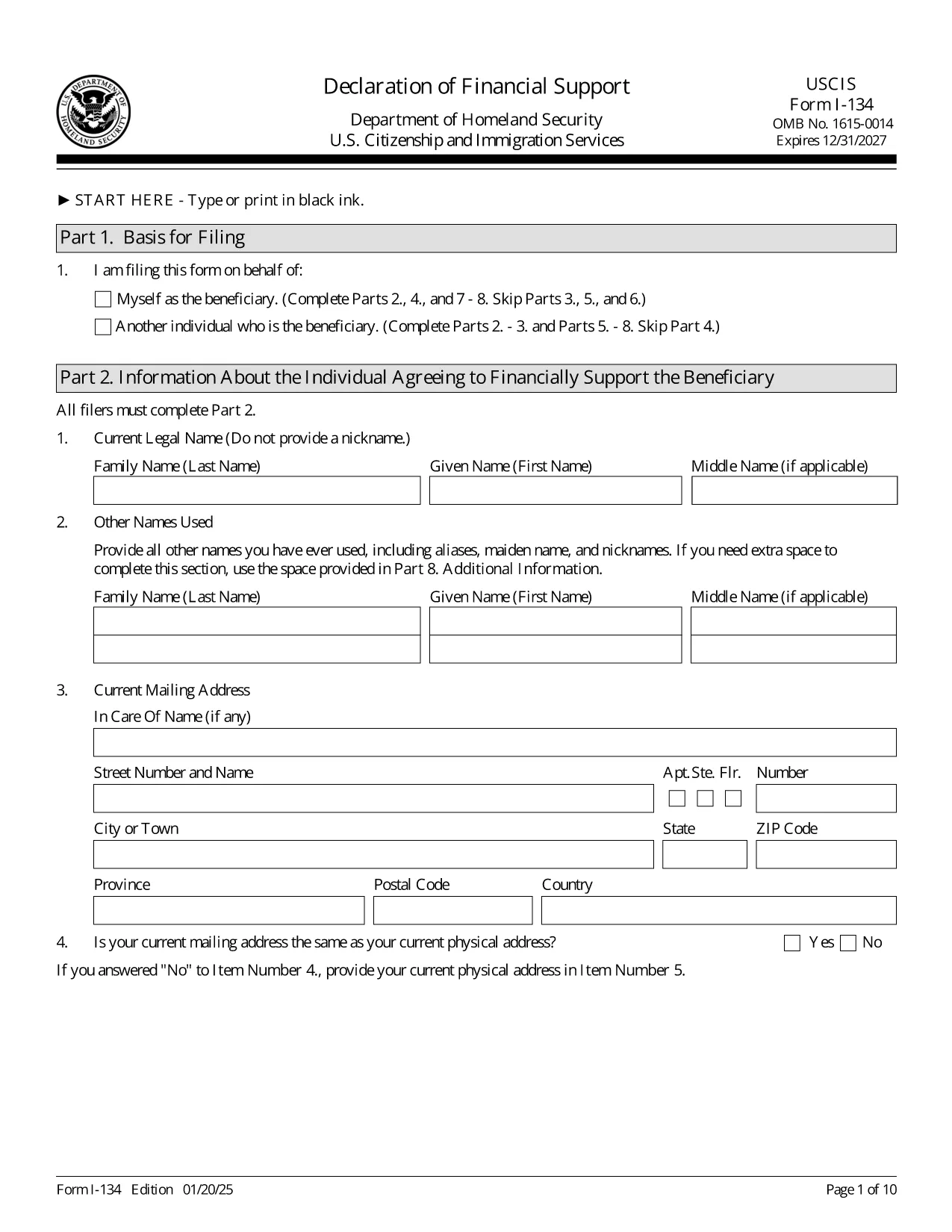
Form I-134 – Declaration of Financial Support (Fillable PDF)

  1. Държава САЩ
  2. език Английски
  3. Отдел Служби за гражданство и имиграция на САЩ
Form I-134 – Declaration of Financial Support (Fillable PDF)

The Form I-134, Declaration of Financial Support is the U.S. Citizenship and Immigration Services (USCIS) document used by sponsors to prove they have sufficient financial resources to support a visa or immigration beneficiary during their temporary stay in the United States.

Our fillable PDF version lets you complete the form quickly, accurately, and without printing a single page. Simply click the Fill out this form button, fill in each field, and download a ready‑to‑submit PDF.

What Is Form I-134?

Form I-134 is required for a variety of immigration benefits, including visitor visas (B‑2), fiancé(e) visas (K‑1), and certain humanitarian cases. The sponsor signs under penalty of perjury, confirming they will cover the beneficiary’s living expenses, health care, and any other costs that arise while the beneficiary is in the U.S.

How to Complete the Fillable I-134 Online

Using Formize’s PDF Filler you can:

  • Enter personal and financial information directly into the PDF fields.
  • Save progress and return later if you need to gather documents.
  • Validate required fields before submission to avoid rejection.

Common Mistakes to Avoid

  • Leaving fields blank: Every required field must be completed; otherwise USCIS will reject the form.
  • Using an outdated edition: Always use the latest PDF (edition date 01/20/25) found on this page.
  • Incorrect signatures: Sign with your full legal name. No notarization is required.
  • Submitting untranslated documents: Any non‑English documents must include a certified English translation.

Where to Submit the Completed Form

The filing location depends on the beneficiary’s status and the specific immigration petition. Refer to the USCIS instructions that accompany the form for the exact address. Generally, the I-134 is submitted together with the primary visa or petition application.

Download the Official PDF

Click the button below to open the official, fillable Form I-134 PDF in Formize’s online editor. When you’re finished, download the completed document and attach it to your visa or petition package.

ЧЗВ
  • Do I need to print the I-134 after filling it online?

    USCIS accepts a printed, signed copy of the completed form. After using the online filler, download the PDF, print it, sign in ink, and include it with your application.

  • Can I submit the I-134 electronically?

    Most visa and petition packages require a hard‑copy, signed form. However, some electronic filing systems accept a scanned PDF. Check the specific instructions for your case.

  • How often is the I-134 form updated?

    USCIS releases new editions periodically. The current edition (date 01/20/25) is provided here. Always use the latest version to avoid rejection.

  • What financial information must I provide?

    You must list your annual income, assets, and any other sources of support. Attach supporting documents such as tax returns, W‑2s, or bank statements as required.

  • Is a notarized signature required on Form I-134?

    No. The sponsor signs under penalty of perjury, but notarization is not required.

  • Can I save my progress and finish later?

    Yes. The Formize PDF Filler lets you save the partially completed form to your computer and reopen it later to finish.

  • What happens if I make a mistake on the form?

    USCIS may reject the form and request a new, corrected version. Double‑check all entries and use the online validation features to minimize errors.

КАК ДА

Как да попълните Form I-134 безплатно онлайн в 3 лесни стъпки:

  1. 1
    Open the Fillable Form
    Click the “Fill out this form” button on the page. The Formize PDF Filler will load the official I-134 PDF directly in your browser.
  2. 2
    Enter Your Information
    Complete each field with accurate sponsor and beneficiary details. The online editor validates required entries in real time.
  3. 3
    Download and Submit
    When all sections are filled, click “Download PDF”. Save the completed form, print if required, and attach it to your visa or immigration petition.
Приложение Formize PDF Filler
ОТНОСНО

Form I-134 шаблон

С традиционния набор от функции за преглед и попълване на PDF документ, съчетан с предимствата на уеб приложение и адаптивно оформление, можете да завършите Form I-134 за минути.

ХАРАКТЕРИСТИКА

PDF пълнител

Най-лесният начин да попълните Form I-134 онлайн

  • Бързо попълнете Form I-134
    Търсите начин бързо да попълните Form I-134 онлайн? С нашия онлайн безплатен инструмент за попълване на PDF формуляри ще знаете как да редактирате и попълвате този PDF документ за по-малко от минута.
  • Лесен за използване онлайн PDF редактор
    Писнало ви е да разпечатвате PDF файлове, за да можете да ги редактирате, преди да сканирате повторно и да ги изпратите обратно? Редактирайте PDF документи безплатно онлайн. Използвайте нашия онлайн pdf редактор, за да спестите време и хартия.
  • Страхотни инструменти, всички платформи
    Чудите се как да попълните Form I-134 на Mac или може би как да използвате PDF пълнител безплатно? Нашите онлайн PDF инструменти работят на всички платформи.
  • Сигурно съхранение на файлове
    Завършените „Form I-134“ файлове се съхраняват в защитена база данни, управлявана от Amazon Cloud хостинг. Можете да изтриете вашите файлове от нашата система по всяко време. Във всеки случай тези файлове се изтриват автоматично след 24 часа.
  • Чат с Form I-134
    Разговаряйте с „Form I-134“ в Chatize, който е безплатен асистент за четене на PDF файлове. Задавайте въпроси и получавайте отговори от „Form I-134“. Просто щракнете върху бутона Чат с документ по-горе.

Изтриване на сесията за пълнене

Изтриване на избраната сесия за пълнене? В този случай вашият напредък в попълването на формуляра ще бъде загубен.

Изтриване на сесия за редактиране

Изтриване на избраната сесия за редактиране? В този случай вашият напредък в създаването и редактирането на формуляра ще бъде загубен.