Избери език

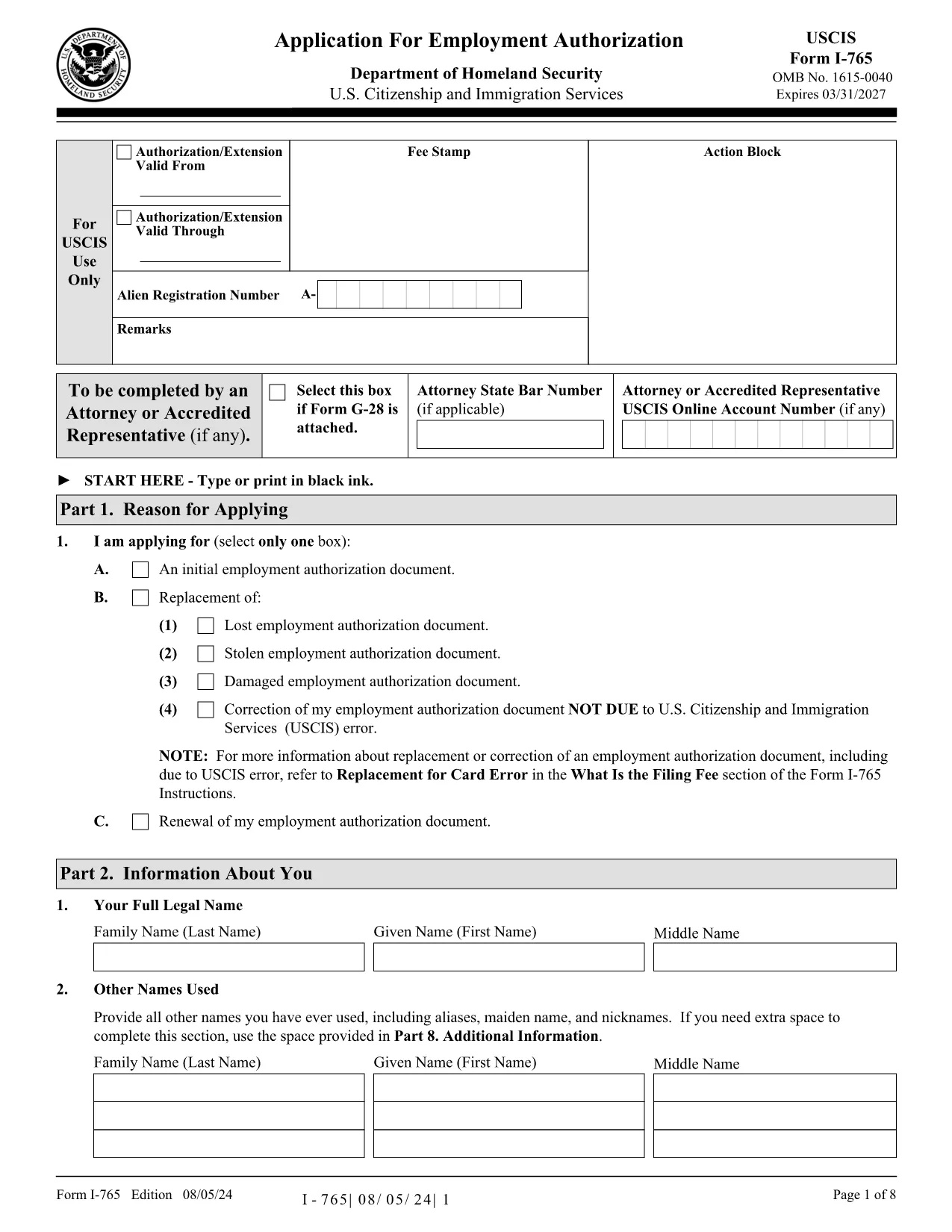
Application Form Link – Fillable I-765 PDF

  1. език Английски
  2. Държава САЩ
  3. Дейност Имиграция
  4. Отдел USCIS
Application Form Link – Fillable I-765 PDF

Looking for an application form link that lets you complete the USCIS Form I-765 without downloading a PDF editor? You’re in the right place. Our Formize PDF Filler loads the official fillable I-765 Application for Employment Authorization directly in your browser.

Why Use a Fillable PDF Form?

Fillable PDFs keep the original layout, reduce errors, and automatically save your entries. With Formize, you get a secure, cloud‑based environment that works on any device—desktop, tablet, or phone.

How to Fill the I-765 Application Online

Simply click the "Fill out this form" button below. The Formize PDF Filler app will launch, load the I-765, and you can start typing immediately. No extra software, no printing, and no sending large files back and forth.

Common Mistakes to Avoid

  • Leaving required fields blank – the filler highlights missing information.
  • Using an outdated version of the form – our link always points to the latest USCIS PDF.
  • Entering information that doesn’t match your supporting documents – double‑check names, dates, and passport numbers.

Where to Submit Your Completed Form

After you finish, download the completed PDF from Formize and mail it to the USCIS address listed in the form instructions, or upload it through your USCIS online account.

Need Help? Quick Resources

Visit the USCIS I-765 page for filing fees, eligibility criteria, and processing times.

ЧЗВ
  • What is Form I-765?

    Form I-765 is the USCIS Application for Employment Authorization, used by eligible non‑citizens to request a work permit.

  • Do I need a PDF editor to fill I-765?

    No. With Formize you can fill the form directly in your browser—no download or third‑party editor required.

  • Can I save my progress and return later?

    Yes. The Formize filler lets you save a draft to your computer and reload it later to continue editing.

  • Is the online filler secure?

    Absolutely. All data is processed locally in your browser and never stored on our servers unless you choose to download the file.

  • What if I make a mistake after downloading?

    You can reopen the downloaded PDF in any PDF editor, correct the error, and resubmit. For minor edits, use Formize again and re‑download.

  • How do I know I have the latest version of I-765?

    Our link points directly to the USCIS website, which always hosts the current version of the form.

  • What filing fee is required for I-765?

    Check the latest fee schedule on the USCIS I-765 page; fees can change annually.

  • Can I submit the form electronically?

    If you have a USCIS online account, you can upload the completed PDF directly. Otherwise, you must mail a printed copy.

КАК ДА

Как да попълните application form link безплатно онлайн в 5 лесни стъпки:

  1. 1
    Click the Fill Button
    Press the "Fill out this form" button on the page. The Formize PDF Filler app will open in a new tab.
  2. 2
    Wait for the Form to Load
    The I-765 PDF loads automatically. All fields become editable—no extra clicks needed.
  3. 3
    Enter Your Information
    Type directly into each highlighted field. Use the navigation pane on the left to jump between sections.
  4. 4
    Review and Save
    Click "Review" to let the filler check for missing required fields. When you’re satisfied, download the completed PDF.
  5. 5
    Submit to USCIS
    Print and mail the file, or upload it through your USCIS online account as instructed in the form guide.
Приложение Formize PDF Filler
ОТНОСНО

application form link шаблон

С традиционния набор от функции за преглед и попълване на PDF документ, съчетан с предимствата на уеб приложение и адаптивно оформление, можете да завършите application form link за минути.

ХАРАКТЕРИСТИКА

PDF пълнител

Най-лесният начин да попълните application form link онлайн

  • Бързо попълнете application form link
    Търсите начин бързо да попълните application form link онлайн? С нашия онлайн безплатен инструмент за попълване на PDF формуляри ще знаете как да редактирате и попълвате този PDF документ за по-малко от минута.
  • Лесен за използване онлайн PDF редактор
    Писнало ви е да разпечатвате PDF файлове, за да можете да ги редактирате, преди да сканирате повторно и да ги изпратите обратно? Редактирайте PDF документи безплатно онлайн. Използвайте нашия онлайн pdf редактор, за да спестите време и хартия.
  • Страхотни инструменти, всички платформи
    Чудите се как да попълните application form link на Mac или може би как да използвате PDF пълнител безплатно? Нашите онлайн PDF инструменти работят на всички платформи.
  • Сигурно съхранение на файлове
    Завършените „application form link“ файлове се съхраняват в защитена база данни, управлявана от Amazon Cloud хостинг. Можете да изтриете вашите файлове от нашата система по всяко време. Във всеки случай тези файлове се изтриват автоматично след 24 часа.
  • Чат с application form link
    Разговаряйте с „application form link“ в Chatize, който е безплатен асистент за четене на PDF файлове. Задавайте въпроси и получавайте отговори от „application form link“. Просто щракнете върху бутона Чат с документ по-горе.

Изтриване на сесията за пълнене

Изтриване на избраната сесия за пълнене? В този случай вашият напредък в попълването на формуляра ще бъде загубен.

Изтриване на сесия за редактиране

Изтриване на избраната сесия за редактиране? В този случай вашият напредък в създаването и редактирането на формуляра ще бъде загубен.