Избери език

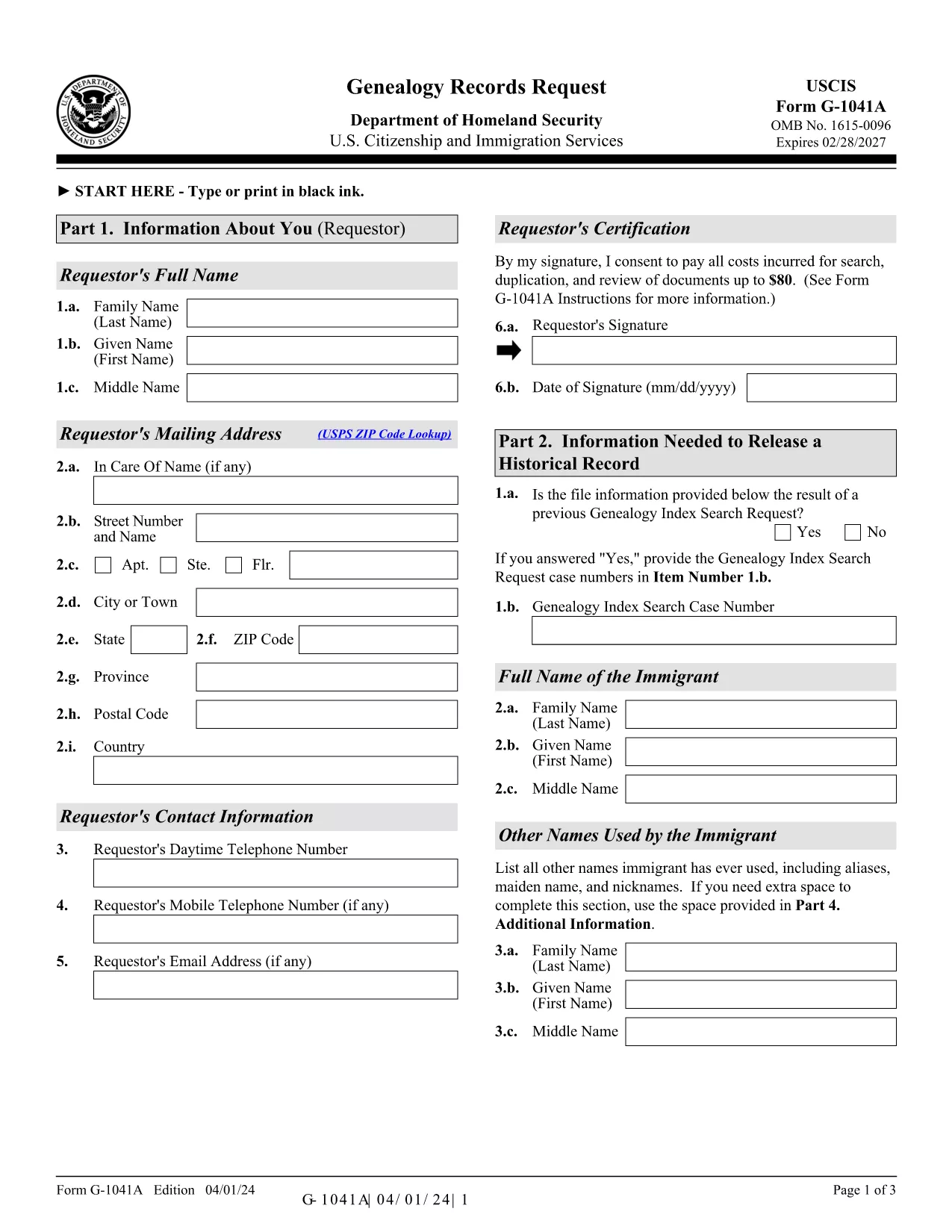
G-1041A – Genealogy Records Request (Fillable PDF)

  1. Държава САЩ
  2. език Английски
  3. Дейност Immigration Records
  4. Отдел USCIS
G-1041A – Genealogy Records Request (Fillable PDF)

The G-1041A is the official USCIS Genealogy Records Request form. It lets you obtain copies of historical immigration records for yourself or a relative. Instead of printing, scanning, and mailing a static PDF, you can fill the form directly on our site using the Formize PDF Filler – a secure, browser‑based editor that saves you time and eliminates formatting errors.

What Is the G-1041A Form?

G-1041A is used when you need full copies of an immigrant’s USCIS file, such as birth certificates, naturalization records, or travel documents. It is different from Form G-1041, which only requests an index search.

How to Complete the G-1041A with Formize

Follow the simple steps below to fill out the form online and download a completed PDF ready for mailing.

Common Mistakes & Tips for a Successful Submission

  • Use the latest edition – the form edition date is 04/01/24. Our filler always loads the current version.
  • Sign the form – the signature field is required; you can type your name and add a digital signature.
  • Provide English translations for any foreign‑language documents.
  • Do not send original documents unless specifically requested.

Where to Send Your Completed Request

After you download the filled PDF, mail it with the required fee to the USCIS Chicago Lockbox:

USCIS Attn: Genealogy Program
P.O. Box 805925
Chicago, IL 60680‑4188

For faster processing, you can also submit the request online through the USCIS Genealogy Program portal, but the fillable PDF remains the most reliable method for complex cases.

Need help? Review the official USCIS instructions or contact the USCIS Customer Service Center.

ЧЗВ
  • What is the difference between G-1041 and G-1041A?

    Form G-1041 requests an index search of USCIS records, while G-1041A requests full copies of the records once the index is located.

  • Can I submit the G-1041A online instead of by mail?

    Yes, USCIS offers an online portal for genealogy requests, but the fillable PDF is required for many detailed or complex cases.

  • How much does the genealogy request cost?

    USCIS charges a fee for each copy of a document requested (up to $80 per document). Check the current fee schedule on the USCIS website.

  • Do I need to provide proof of death for the person I’m requesting?

    If the record holder is deceased and under 100 years old, you must include a death certificate or other acceptable proof of death.

  • What should I do if I receive a rejection notice?

    Review the notice for missing signatures, incorrect edition dates, or incomplete supporting documents. Correct the issue and resend the form.

  • Is the Formize filler secure for personal data?

    Yes. Formize uses SSL encryption and does not store your data on our servers after the PDF is generated.

КАК ДА

Как да попълните G-1041A безплатно онлайн в 5 лесни стъпки:

  1. 1
    Open the Fillable Form
    Click the “Fill out this form” button on the page. The Formize PDF Filler app loads directly in your browser.
  2. 2
    Enter Your Information
    Complete each field – name, date of birth, alien registration number, and the relationship to the record holder. Use the Tab key to move quickly.
  3. 3
    Add a Digital Signature
    Type your full name in the signature field or upload a scanned signature image. The app validates the signature format automatically.
  4. 4
    Review & Download
    Click “Review” to check for missing fields. When everything looks correct, press “Download Completed PDF” to save the file to your computer.
  5. 5
    Mail the Request
    Print the downloaded PDF, attach the required fee, and mail it to the USCIS Chicago Lockbox address provided above.
Приложение Formize PDF Filler
ОТНОСНО

G-1041A шаблон

С традиционния набор от функции за преглед и попълване на PDF документ, съчетан с предимствата на уеб приложение и адаптивно оформление, можете да завършите G-1041A за минути.

ХАРАКТЕРИСТИКА

PDF пълнител

Най-лесният начин да попълните G-1041A онлайн

  • Бързо попълнете G-1041A
    Търсите начин бързо да попълните G-1041A онлайн? С нашия онлайн безплатен инструмент за попълване на PDF формуляри ще знаете как да редактирате и попълвате този PDF документ за по-малко от минута.
  • Лесен за използване онлайн PDF редактор
    Писнало ви е да разпечатвате PDF файлове, за да можете да ги редактирате, преди да сканирате повторно и да ги изпратите обратно? Редактирайте PDF документи безплатно онлайн. Използвайте нашия онлайн pdf редактор, за да спестите време и хартия.
  • Страхотни инструменти, всички платформи
    Чудите се как да попълните G-1041A на Mac или може би как да използвате PDF пълнител безплатно? Нашите онлайн PDF инструменти работят на всички платформи.
  • Сигурно съхранение на файлове
    Завършените „G-1041A“ файлове се съхраняват в защитена база данни, управлявана от Amazon Cloud хостинг. Можете да изтриете вашите файлове от нашата система по всяко време. Във всеки случай тези файлове се изтриват автоматично след 24 часа.
  • Чат с G-1041A
    Разговаряйте с „G-1041A“ в Chatize, който е безплатен асистент за четене на PDF файлове. Задавайте въпроси и получавайте отговори от „G-1041A“. Просто щракнете върху бутона Чат с документ по-горе.

Изтриване на сесията за пълнене

Изтриване на избраната сесия за пълнене? В този случай вашият напредък в попълването на формуляра ще бъде загубен.

Изтриване на сесия за редактиране

Изтриване на избраната сесия за редактиране? В този случай вашият напредък в създаването и редактирането на формуляра ще бъде загубен.