Избери език

USDA TM-11 Export Certificate – Fillable PDF Form

  1. език Английски
  2. Държава САЩ
  3. Дейност Agriculture
  4. Отдел USDA
USDA TM-11 Export Certificate – Fillable PDF Form

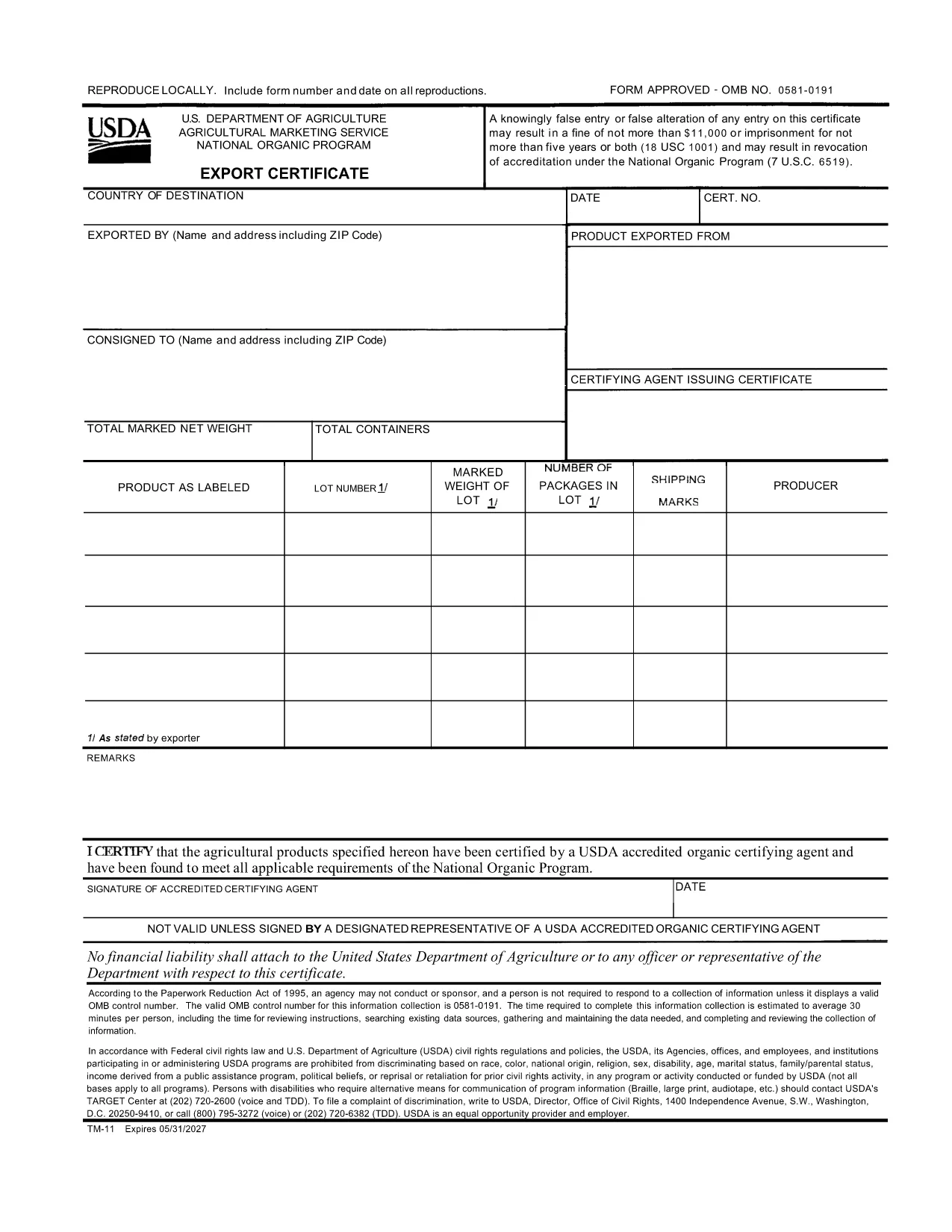
The TM-11 Export Certificate is the USDA‑approved document required for exporting organic products to certain foreign markets. Whether you are shipping to Taiwan, Japan, or other USDA‑recognized trade partners, a correctly completed TM-11 ensures your shipment meets all organic compliance standards.

What Is the TM-11 Export Certificate?

Form TM‑11 is issued by the U.S. Department of Agriculture (USDA) Agricultural Marketing Service (AMS). It verifies that the goods being exported comply with the organic regulations of both the United States and the destination country. The form must be signed by an accredited certifying agent (ACA) and accompany the shipment.

How to Complete the TM-11 Form Online

With Formize’s built‑in PDF filler, you can complete the TM‑11 without downloading any software. Just click the “Fill out this form” button, wait for the Formize PDF Filler to load, and start entering your information directly in the browser.

Common Mistakes to Avoid

  • Leaving required fields blank – every section marked with an asterisk must be completed.
  • Incorrect certification numbers – double‑check the ACA’s certification number before submitting.
  • Signature errors – the ACA must sign the form electronically or print, sign, and scan the final PDF.
  • Mismatched product descriptions – ensure the product name matches the USDA organic certification.

Download the Fillable PDF Instantly

Click the button below to open the official USDA TM‑11 PDF in the Formize filler. When you finish, download the completed form and attach it to your export documentation package.

ЧЗВ
  • What is the purpose of Form TM‑11?

    Form TM‑11 serves as the official USDA Export Certificate for organic products, confirming compliance with U.S. and foreign organic standards.

  • Can I sign the TM‑11 electronically?

    Yes. The Formize filler allows electronic signatures for the exporter. The certifying agent must still provide a handwritten signature or an approved electronic signature.

  • Do I need a separate PDF for each shipment?

    A new TM‑11 must be completed for each export batch. Re‑using an old certificate can lead to compliance violations.

  • Is the TM‑11 form free to download?

    Yes. The USDA provides the TM‑11 PDF at no cost. Formize hosts the fillable version for free use.

  • What countries accept the USDA TM‑11?

    Countries with USDA organic trade agreements—such as Taiwan, Japan, and others listed in the USDA Export Arrangement—accept the TM‑11.

  • What if I make a mistake after submitting?

    Correct the error on a new TM‑11 form and attach it to the shipment. Keep both the original and corrected copies for records.

КАК ДА

Как да попълните TM-11 безплатно онлайн в 3 лесни стъпки:

  1. 1
    Open the TM-11 Form
    Click the “Fill out this form” button on this page. The Formize PDF Filler will load directly in your browser.
  2. 2
    Enter Your Information
    Fill in each required field—exporter details, product description, destination country, and certification numbers.
  3. 3
    Save and Download
    When all fields are completed, click “Save” to download the filled PDF. Attach the file to your export paperwork.
Приложение Formize PDF Filler
ОТНОСНО

TM-11 шаблон

С традиционния набор от функции за преглед и попълване на PDF документ, съчетан с предимствата на уеб приложение и адаптивно оформление, можете да завършите TM-11 за минути.

ХАРАКТЕРИСТИКА

PDF пълнител

Най-лесният начин да попълните TM-11 онлайн

  • Бързо попълнете TM-11
    Търсите начин бързо да попълните TM-11 онлайн? С нашия онлайн безплатен инструмент за попълване на PDF формуляри ще знаете как да редактирате и попълвате този PDF документ за по-малко от минута.
  • Лесен за използване онлайн PDF редактор
    Писнало ви е да разпечатвате PDF файлове, за да можете да ги редактирате, преди да сканирате повторно и да ги изпратите обратно? Редактирайте PDF документи безплатно онлайн. Използвайте нашия онлайн pdf редактор, за да спестите време и хартия.
  • Страхотни инструменти, всички платформи
    Чудите се как да попълните TM-11 на Mac или може би как да използвате PDF пълнител безплатно? Нашите онлайн PDF инструменти работят на всички платформи.
  • Сигурно съхранение на файлове
    Завършените „TM-11“ файлове се съхраняват в защитена база данни, управлявана от Amazon Cloud хостинг. Можете да изтриете вашите файлове от нашата система по всяко време. Във всеки случай тези файлове се изтриват автоматично след 24 часа.
  • Чат с TM-11
    Разговаряйте с „TM-11“ в Chatize, който е безплатен асистент за четене на PDF файлове. Задавайте въпроси и получавайте отговори от „TM-11“. Просто щракнете върху бутона Чат с документ по-горе.

Изтриване на сесията за пълнене

Изтриване на избраната сесия за пълнене? В този случай вашият напредък в попълването на формуляра ще бъде загубен.

Изтриване на сесия за редактиране

Изтриване на избраната сесия за редактиране? В този случай вашият напредък в създаването и редактирането на формуляра ще бъде загубен.