
Избери език

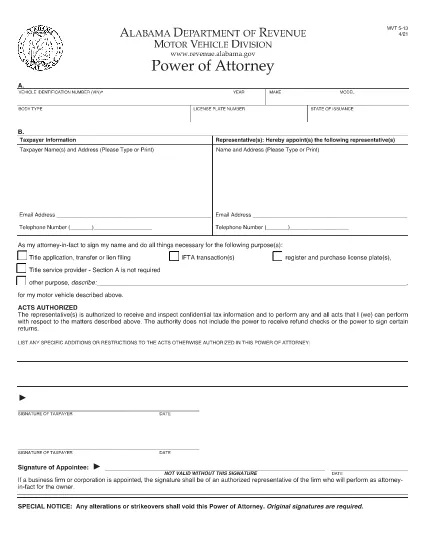
Alabama Motor Vehicle Power of Attorney (Form MVT‑5‑13)

  1. език Английски
  2. Държава САЩ
  3. Дейност Регистрация на превозно средство
  4. състояние Алабама
Alabama Motor Vehicle Power of Attorney (Form MVT‑5‑13)

The Alabama Motor Vehicle Power of Attorney (Form MVT‑5‑13) lets a vehicle owner authorize another person—called the appointee or attorney‑in‑fact—to perform specific vehicle‑related tasks such as registration, title transfer, or sale. This form is required whenever the owner cannot be present at the Alabama Department of Revenue or a local licensing office.

What Is Form MVT‑5‑13?

Form MVT‑5‑13 is a short, state‑approved document that grants limited authority to a trusted representative. It is used for:

  • Transferring a vehicle title
  • Registering or renewing a vehicle
  • Submitting a bill of sale
  • Handling lien releases
The form must be signed by both the vehicle owner (taxpayer) and the appointed representative.

How to Fill the MVT‑5‑13 Online

Instead of downloading the PDF and editing it in a separate program, simply click the "Fill out this form" button on this page. The Formize PDF Filler app will load instantly, allowing you to complete every field directly in your browser.

Signing Requirements & Notarization

Alabama law requires:

  • Both the owner and the representative to sign and date the form.
  • A notary public is not mandatory, but a notarized signature adds credibility and is often requested by the licensing office.
If you choose notarization, bring a valid ID and the completed form to a notary.

Common Mistakes to Avoid

  • Leaving sections blank: Every field marked with an asterisk (*) is required.
  • Incorrect VIN: Double‑check the Vehicle Identification Number; a single digit error can delay processing.
  • Mismatched signatures: The signatures on the PDF must match the printed names exactly.
  • Using an expired form: Ensure you are using the latest version (the link below is the current 2021 revision).

Where to Submit the Completed Form

After filling and signing, you can:

  • Bring the printed form to any Alabama Department of Revenue office.
  • Mail it to the appropriate Vehicle Licensing Office.
  • Upload a scanned copy through the online portal if the agency permits electronic submissions.
Having a clean, correctly completed Form MVT‑5‑13 speeds up title transfers and registration renewals.

Download the official PDF version of Form MVT‑5‑13 for reference or offline use.

ЧЗВ
  • Who can be appointed as an attorney‑in‑fact on Form MVT‑5‑13?

    Any adult individual you trust – a family member, friend, attorney, or title‑service representative – can be appointed, as long as they are willing to sign the form.

  • Is notarization required for the MVT‑5‑13?

    Alabama law does not require notarization, but many licensing offices prefer or require a notarized signature for added security.

  • Can I use the same Form MVT‑5‑13 for multiple vehicles?

    No. Each vehicle requires its own completed Form MVT‑5‑13 with the specific VIN, make, model, and year.

  • How long is the power of attorney valid?

    The form remains effective until the vehicle transaction is completed, or until you submit a written revocation to the Department of Revenue.

  • What should I do if I make a mistake after signing?

    Correct the error by crossing out the mistake, initialing the change, and having both the owner and representative sign again. For major errors, submit a new Form MVT‑5‑13.

  • Can I submit the form electronically?

    Some county offices accept scanned copies via their online portals. Check with your local licensing office for electronic submission policies.

  • Do I need to provide additional documents with the POA?

    Typically you’ll need the vehicle’s current title, a valid photo ID for both parties, and any applicable fees for the transaction you’re performing.

  • Is there a fee to download the PDF?

    No. The PDF is provided free of charge; you only pay any notary or filing fees required by the Department of Revenue.

КАК ДА

Как да попълните MVT-5-13 безплатно онлайн в 5 лесни стъпки:

  1. 1
    Click the Fill Button
    Press the “Fill out this form” button on the page. The Formize PDF Filler app loads instantly in your browser.
  2. 2
    Enter All Required Information
    Complete each field – vehicle details, owner information, and representative details. Required fields are marked with an asterisk (*).
  3. 3
    Review and Sign
    Double‑check the entered data, then use the built‑in signature tool to sign as the owner and as the appointee.
  4. 4
    Download or Email the Completed Form
    When you’re satisfied, click “Save & Download” to get a copy, or choose “Email” to send the filled PDF directly to the licensing office.
  5. 5
    Print and Notarize (if needed)
    Print the saved PDF, bring it to a notary public for notarization if your local office requires it, then submit the final document.
Приложение Formize PDF Filler
ОТНОСНО

Формуляри за регистрация на превозни средства

Ако притежавате или наемате моторно превозно средство, ремарке или лодка, трябва да изпълните определени задължения, за да поддържате превозното си средство законно регистрирано и безопасно.

MVT-5-13 е един от формулярите за регистрация на превозно средство, които са документи, които се използват за регистриране на моторно превозно средство в съответния държавен или провинциален орган. Тези формуляри обикновено се изискват, когато човек закупи ново или употребявано превозно средство или когато се премести в нов щат или провинция с превозно средство.

Точните изисквания и формуляри, необходими за регистрация на превозно средство, могат да варират в зависимост от местоположението, но като цяло процесът включва предоставяне на информация за превозното средство, собственика и всякакви права върху превозното средство.

След като формулярите за регистрация и таксите бъдат изпратени, държавният или провинциален орган ще издаде свидетелство за регистрация или регистрационен номер на собственика на превозното средство. Тази регистрация позволява превозното средство да се използва законно по обществени пътища и магистрали.

ХАРАКТЕРИСТИКА

PDF пълнител

Най-лесният начин да попълните MVT-5-13 онлайн

  • Бързо попълнете MVT-5-13
    Търсите начин бързо да попълните MVT-5-13 онлайн? С нашия онлайн безплатен инструмент за попълване на PDF формуляри ще знаете как да редактирате и попълвате този PDF документ за по-малко от минута.
  • Лесен за използване онлайн PDF редактор
    Писнало ви е да разпечатвате PDF файлове, за да можете да ги редактирате, преди да сканирате повторно и да ги изпратите обратно? Редактирайте PDF документи безплатно онлайн. Използвайте нашия онлайн pdf редактор, за да спестите време и хартия.
  • Страхотни инструменти, всички платформи
    Чудите се как да попълните MVT-5-13 на Mac или може би как да използвате PDF пълнител безплатно? Нашите онлайн PDF инструменти работят на всички платформи.
  • Сигурно съхранение на файлове
    Завършените „MVT-5-13“ файлове се съхраняват в защитена база данни, управлявана от Amazon Cloud хостинг. Можете да изтриете вашите файлове от нашата система по всяко време. Във всеки случай тези файлове се изтриват автоматично след 24 часа.
  • Чат с MVT-5-13
    Разговаряйте с „MVT-5-13“ в Chatize, който е безплатен асистент за четене на PDF файлове. Задавайте въпроси и получавайте отговори от „MVT-5-13“. Просто щракнете върху бутона Чат с документ по-горе.

Изтриване на сесията за пълнене

Изтриване на избраната сесия за пълнене? В този случай вашият напредък в попълването на формуляра ще бъде загубен.

Изтриване на сесия за редактиране

Изтриване на избраната сесия за редактиране? В този случай вашият напредък в създаването и редактирането на формуляра ще бъде загубен.