
Избери език

Pennsylvania Form MV-39 – Notification of Assignment/Correction of Vehicle Title

  1. език Английски
  2. Държава САЩ
  3. Дейност Регистрация на превозно средство
  4. състояние Пенсилвания
Pennsylvania Form MV-39 – Notification of Assignment/Correction of Vehicle Title

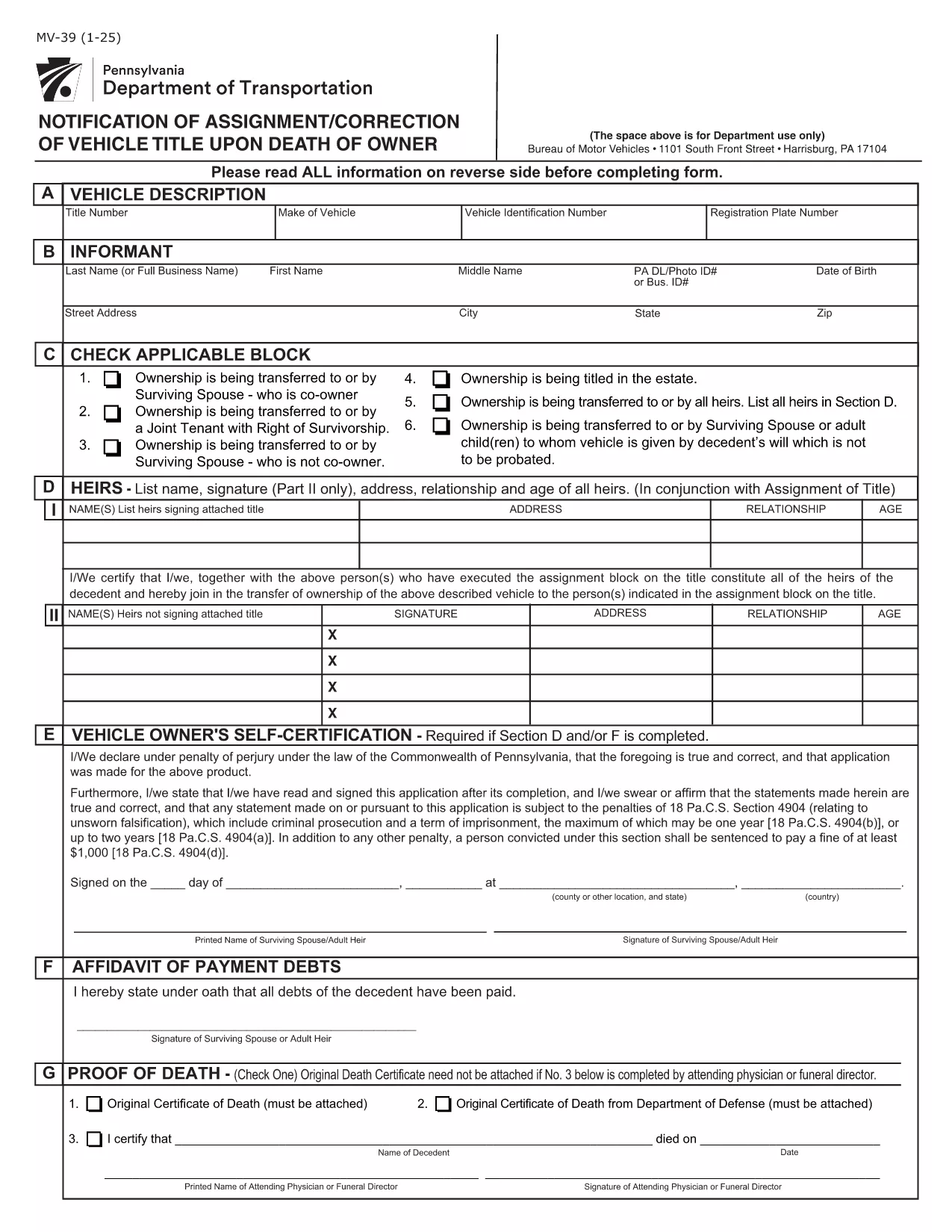
Form MV-39, titled “Notification of Assignment/Correction of Vehicle Title upon Death of Owner,” is required by the Pennsylvania Department of Transportation (PennDOT) whenever a vehicle title must be transferred after the owner’s death.

Our online fillable PDF lets you complete the form quickly without printing or using a separate PDF editor. Simply click the “Fill out this form” button, edit the fields, and download the finished document to submit to your local BMV office.

What Is Form MV-39?

This form notifies PennDOT of a change in ownership caused by the death of the original vehicle owner. It is used to assign the title to a surviving spouse, heir, or other qualified party and to correct any errors on the original title.

How to Complete Form MV-39 Online

Follow the step‑by‑step guide below to fill out the form directly in your browser using Formize’s PDF Filler.

  • Section A – Vehicle Information: Enter VIN, make, model, and year.
  • Section B – Owner’s Details: Provide the deceased owner’s name, Social Security Number, and date of death.
  • Section C – New Owner: List the name(s) of the surviving spouse, heir, or purchaser, along with their contact information.
  • Section G & H – Registration Intent: Indicate whether the vehicle will be re‑registered.
  • Section I – Signature: The new owner must sign and date the form.

Common Mistakes to Avoid

  • Leaving any required field blank – every section marked with an asterisk (*) is mandatory.
  • Using an illegible or mismatched VIN – copy it exactly as it appears on the current title.
  • Forgetting to attach a certified copy of the death certificate when required.
  • Signing the form with a pen before the PDF is fully completed – sign only after all information is entered.

Where to Submit the Completed Form

After saving the filled PDF, mail or deliver it to your nearest PennDOT Driver & Vehicle Services (DVS) office along with any supporting documents (e.g., death certificate, proof of relationship). Some offices also accept electronic submissions; check your local BMV’s website for details.

Frequently Asked Questions

Below are answers to the most common queries about Form MV-39.

ЧЗВ
  • Do I need to print Form MV-39 after filling it online?

    Most PennDOT offices require a hard copy with an original signature, so print the completed PDF, sign it, and mail or deliver it as instructed.

  • Can I submit Form MV-39 electronically?

    Some DVS locations accept electronic submissions. Check your local office’s website for specific instructions and accepted file formats.

  • What supporting documents are required?

    You’ll need a certified copy of the owner’s death certificate, proof of relationship (e.g., marriage certificate), and any existing title documents.

  • Is there a fee for filing Form MV-39?

    PennDOT does not charge a fee for the MV-39 notification itself, but standard title transfer fees may apply when the new title is issued.

  • What if I make a mistake after submitting?

    Contact your local PennDOT office immediately. They may require you to submit a corrected MV-39 or an additional affidavit.

  • How long does it take to process the form?

    Processing times vary by office, but expect 7‑10 business days from receipt of the completed form and required documents.

КАК ДА

Как да попълните MV-39 безплатно онлайн в 4 лесни стъпки:

  1. 1
    Open the Fillable Form
    Click the “Fill out this form” button on the page. The Formize PDF Filler app will load the MV-39 document directly in your browser.
  2. 2
    Enter Required Information
    Complete each highlighted field (Sections A, B, C, G, H, and I). The filler validates entries in real time, so you’ll know immediately if something is missing.
  3. 3
    Review and Sign
    Double‑check all data for accuracy, then add your electronic signature in the designated signature box.
  4. 4
    Save and Submit
    Click “Save PDF” to download the completed form. Print it (if required) and submit it to your local PennDOT office with any supporting documents.
Приложение Formize PDF Filler
ОТНОСНО

Формуляри за регистрация на превозни средства

Ако притежавате или наемате моторно превозно средство, ремарке или лодка, трябва да изпълните определени задължения, за да поддържате превозното си средство законно регистрирано и безопасно.

MV-39 е един от формулярите за регистрация на превозно средство, които са документи, които се използват за регистриране на моторно превозно средство в съответния държавен или провинциален орган. Тези формуляри обикновено се изискват, когато човек закупи ново или употребявано превозно средство или когато се премести в нов щат или провинция с превозно средство.

Точните изисквания и формуляри, необходими за регистрация на превозно средство, могат да варират в зависимост от местоположението, но като цяло процесът включва предоставяне на информация за превозното средство, собственика и всякакви права върху превозното средство.

След като формулярите за регистрация и таксите бъдат изпратени, държавният или провинциален орган ще издаде свидетелство за регистрация или регистрационен номер на собственика на превозното средство. Тази регистрация позволява превозното средство да се използва законно по обществени пътища и магистрали.

ХАРАКТЕРИСТИКА

PDF пълнител

Най-лесният начин да попълните MV-39 онлайн

  • Бързо попълнете MV-39
    Търсите начин бързо да попълните MV-39 онлайн? С нашия онлайн безплатен инструмент за попълване на PDF формуляри ще знаете как да редактирате и попълвате този PDF документ за по-малко от минута.
  • Лесен за използване онлайн PDF редактор
    Писнало ви е да разпечатвате PDF файлове, за да можете да ги редактирате, преди да сканирате повторно и да ги изпратите обратно? Редактирайте PDF документи безплатно онлайн. Използвайте нашия онлайн pdf редактор, за да спестите време и хартия.
  • Страхотни инструменти, всички платформи
    Чудите се как да попълните MV-39 на Mac или може би как да използвате PDF пълнител безплатно? Нашите онлайн PDF инструменти работят на всички платформи.
  • Сигурно съхранение на файлове
    Завършените „MV-39“ файлове се съхраняват в защитена база данни, управлявана от Amazon Cloud хостинг. Можете да изтриете вашите файлове от нашата система по всяко време. Във всеки случай тези файлове се изтриват автоматично след 24 часа.
  • Чат с MV-39
    Разговаряйте с „MV-39“ в Chatize, който е безплатен асистент за четене на PDF файлове. Задавайте въпроси и получавайте отговори от „MV-39“. Просто щракнете върху бутона Чат с документ по-горе.

Изтриване на сесията за пълнене

Изтриване на избраната сесия за пълнене? В този случай вашият напредък в попълването на формуляра ще бъде загубен.

Изтриване на сесия за редактиране

Изтриване на избраната сесия за редактиране? В този случай вашият напредък в създаването и редактирането на формуляра ще бъде загубен.