
Избери език

Virginia DSD 27 – Permit to Use Dealer License Plates (Fillable PDF)

  1. език Английски
  2. Държава САЩ
  3. Дейност Регистрация на превозно средство
  4. състояние Вирджиния
Virginia DSD 27 – Permit to Use Dealer License Plates (Fillable PDF)

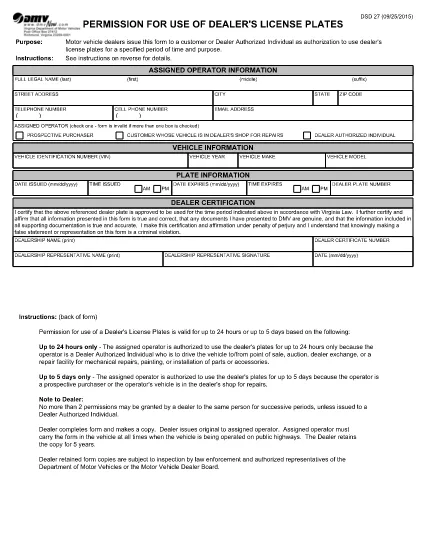
The DSD 27 form is the official Virginia Department of Motor Vehicles (DMV) document that grants a dealer‑authorized individual permission to operate a vehicle with the dealer’s license plates for a limited period—usually up to 24 hours. This permit is essential for test drives, vehicle repairs, auctions, and transfers.

What Is the DSD 27 Form?

DSD 27 is titled “Permission for Use of Dealer’s License Plates.” It records the operator’s details, vehicle information, the plate issuance and expiration times, and the dealer’s certification. The form ensures the DMV tracks temporary plate usage and protects both the dealer and the public.

When and Who Can Use the Permit

  • Dealers: Any licensed motor‑vehicle dealer in Virginia.
  • Authorized Individuals: Prospective buyers, service technicians, or transport agents who need to drive the vehicle.
  • Time Limit: Up to 24 hours or the mileage limit stated on the form.

Step‑by‑Step: Fill Out DSD 27 Online

Instead of downloading, printing, and scanning, use Formize’s built‑in PDF filler:

  1. Click “Fill out this form” on this page.
  2. Wait for the Formize PDF Filler app to load (a few seconds).
  3. Enter the operator’s full name, address, phone, and email.
  4. Provide vehicle details: VIN, year, make, model, and mileage at issuance.
  5. Set the plate issue date/time and the expiration date/time.
  6. Dealer certification: enter the dealer plate number and sign electronically.
  7. Review for accuracy, then click **Save & Download** or **Print** for your records.

Common Mistakes to Avoid

  • Leaving the expiration time blank – the DMV requires a specific end time.
  • Mismatching the VIN with the vehicle year/make.
  • Using the form for more than 24 hours without a new permit.
  • Missing the dealer’s signature or title.

Where to Submit the Completed Form

After saving, you can:

  • Print and hand it to the DMV during a visit.
  • Email the PDF to the dealership’s compliance officer.
  • Mail the form to the Virginia DMV address listed on the form.

Using the electronic version speeds up processing and reduces paper waste.

ЧЗВ
  • What is the purpose of the DSD 27 form?

    It authorizes a dealer‑authorized individual to use the dealer’s license plates for a limited time, typically for test drives, repairs, or transfers.

  • Who can complete the DSD 27 permit?

    Only licensed motor‑vehicle dealers in Virginia and their authorized representatives (buyers, technicians, transport agents).

  • How long is the permit valid?

    The permit is valid for up to 24 hours or the mileage limit stated on the form. Exceeding this requires a new DSD 27.

  • Can the DSD 27 be used for trucks or tractor‑trucks?

    Yes. The form includes a section for “temporary transport plate on trucks or tractor‑trucks” and allows those vehicles to be driven under the permit.

  • Do I need to submit the form to the DMV after filling it out?

    A printed copy should be presented to the DMV during a visit or mailed to the address on the form. An electronic copy can also be kept for the dealer’s records.

  • What common errors cause the DMV to reject a DSD 27?

    Missing expiration time, incorrect VIN, no dealer signature, or using the permit beyond 24 hours are typical reasons for rejection.

  • Is there a fee for filing DSD 27?

    Virginia does not charge a separate fee for the DSD 27 itself; any applicable plate or registration fees are handled through the standard dealer processes.

  • Can I fill out DSD 27 on a mobile device?

    Yes. The Formize PDF filler works on smartphones and tablets, allowing you to complete the form anywhere with an internet connection.

КАК ДА

Как да попълните DSD 27 безплатно онлайн в 5 лесни стъпки:

  1. 1
    Open the Fillable Form
    Click the “Fill out this form” button on the page. The Formize PDF Filler loads directly in your browser.
  2. 2
    Enter Required Information
    Type the operator’s name, address, vehicle VIN, make, model, and mileage into the highlighted fields.
  3. 3
    Set Permit Dates
    Select the date and time the dealer plates are issued and the exact expiration time (max 24 hours).
  4. 4
    Dealer Certification & Signature
    Enter the dealer’s plate number, choose your role (Dealer Authorized Individual), and sign electronically.
  5. 5
    Save, Download, or Print
    Review the completed form, then click “Save & Download” to store a copy or “Print” to submit to the DMV.
Приложение Formize PDF Filler
ОТНОСНО

Формуляри за регистрация на превозни средства

Ако притежавате или наемате моторно превозно средство, ремарке или лодка, трябва да изпълните определени задължения, за да поддържате превозното си средство законно регистрирано и безопасно.

DSD 27 е един от формулярите за регистрация на превозно средство, които са документи, които се използват за регистриране на моторно превозно средство в съответния държавен или провинциален орган. Тези формуляри обикновено се изискват, когато човек закупи ново или употребявано превозно средство или когато се премести в нов щат или провинция с превозно средство.

Точните изисквания и формуляри, необходими за регистрация на превозно средство, могат да варират в зависимост от местоположението, но като цяло процесът включва предоставяне на информация за превозното средство, собственика и всякакви права върху превозното средство.

След като формулярите за регистрация и таксите бъдат изпратени, държавният или провинциален орган ще издаде свидетелство за регистрация или регистрационен номер на собственика на превозното средство. Тази регистрация позволява превозното средство да се използва законно по обществени пътища и магистрали.

ХАРАКТЕРИСТИКА

PDF пълнител

Най-лесният начин да попълните DSD 27 онлайн

  • Бързо попълнете DSD 27
    Търсите начин бързо да попълните DSD 27 онлайн? С нашия онлайн безплатен инструмент за попълване на PDF формуляри ще знаете как да редактирате и попълвате този PDF документ за по-малко от минута.
  • Лесен за използване онлайн PDF редактор
    Писнало ви е да разпечатвате PDF файлове, за да можете да ги редактирате, преди да сканирате повторно и да ги изпратите обратно? Редактирайте PDF документи безплатно онлайн. Използвайте нашия онлайн pdf редактор, за да спестите време и хартия.
  • Страхотни инструменти, всички платформи
    Чудите се как да попълните DSD 27 на Mac или може би как да използвате PDF пълнител безплатно? Нашите онлайн PDF инструменти работят на всички платформи.
  • Сигурно съхранение на файлове
    Завършените „DSD 27“ файлове се съхраняват в защитена база данни, управлявана от Amazon Cloud хостинг. Можете да изтриете вашите файлове от нашата система по всяко време. Във всеки случай тези файлове се изтриват автоматично след 24 часа.
  • Чат с DSD 27
    Разговаряйте с „DSD 27“ в Chatize, който е безплатен асистент за четене на PDF файлове. Задавайте въпроси и получавайте отговори от „DSD 27“. Просто щракнете върху бутона Чат с документ по-горе.

Изтриване на сесията за пълнене

Изтриване на избраната сесия за пълнене? В този случай вашият напредък в попълването на формуляра ще бъде загубен.

Изтриване на сесия за редактиране

Изтриване на избраната сесия за редактиране? В този случай вашият напредък в създаването и редактирането на формуляра ще бъде загубен.