Zvolte jazyk

Form 43 – Request to Load Goods onto Ship (Fillable PDF)

  1. Země Austrálie
  2. Jazyk Angličtina
  3. Aktivita Import/Export
  4. oddělení Customs
Form 43 – Request to Load Goods onto Ship (Fillable PDF)

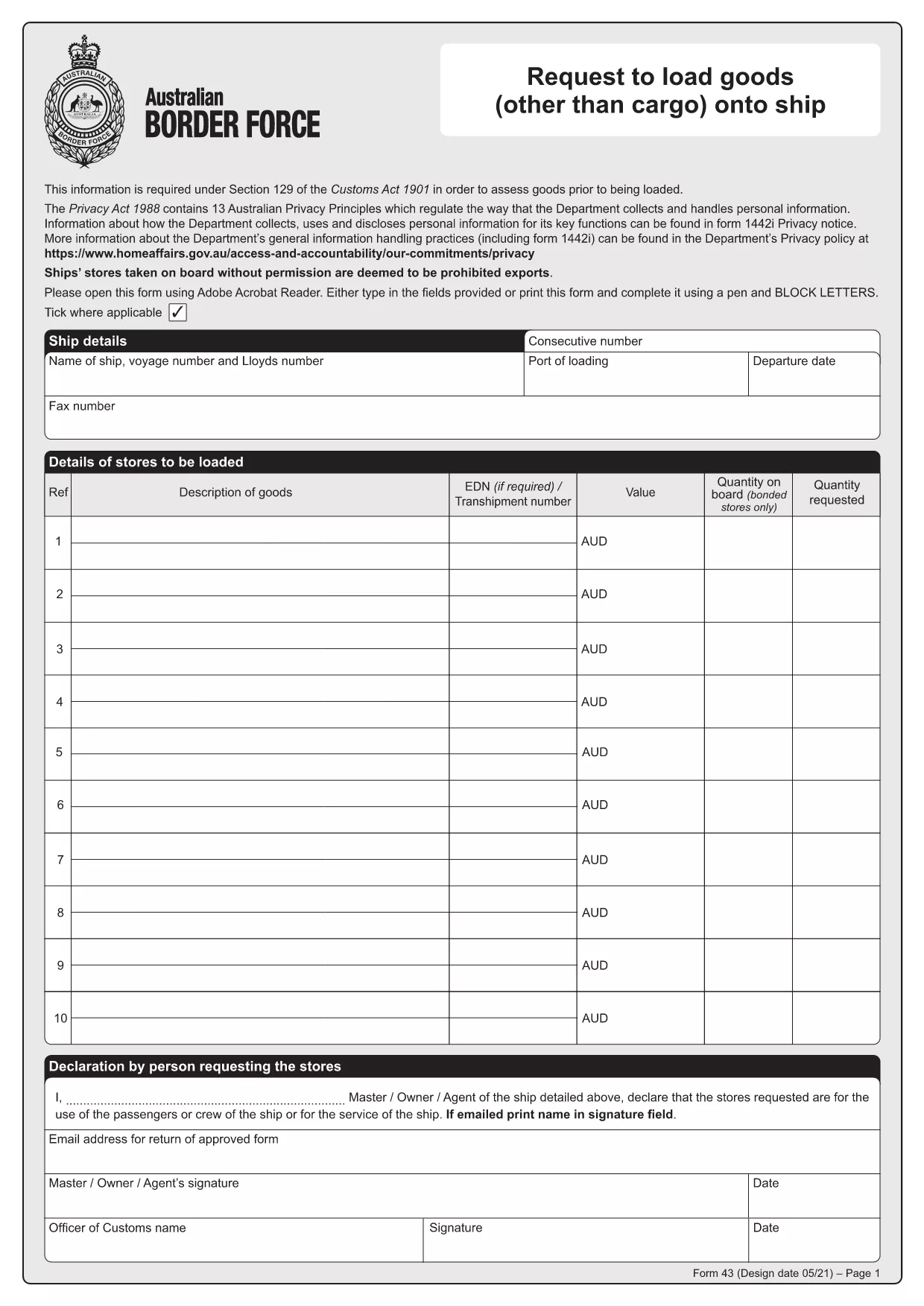
Form 43 is the Australian Border Force (ABF) customs form used when ship stores or other goods are taken on board a vessel without prior permission. It records essential details about the ship, the supplier, the goods, and the customs officer’s approval.

Whether you are a ship captain, a logistics officer, or a supplier, having a quick, fillable version of Form 43 saves time and reduces errors. With Formize’s online PDF filler, you can complete the form directly in your browser – no extra software required.

  • Instant download: Get the official PDF in seconds.
  • Online filling: Click “Fill out this form” and the Formize PDF Filler loads automatically.
  • Secure storage: Save a copy to your device or cloud storage after you submit.

Below you’ll find step‑by‑step instructions, common pitfalls, and answers to the most frequently asked questions about Form 43.

FAQ
  • What is the purpose of Form 43?

    Form 43 records the request to load ship stores or other goods onto a vessel without prior customs permission, ensuring the goods are documented and approved.

  • Can I edit the PDF on my phone?

    Yes. The Formize PDF Filler works on all modern browsers, including mobile Safari and Chrome, so you can complete the form on a smartphone or tablet.

  • Do I need a PDF editor to fill Form 43?

    No. The online filler lets you fill, sign, and save the form without installing any PDF editor.

  • Is the downloaded PDF an official version?

    Absolutely. The file is the official Form 43 PDF provided by the Australian Border Force, unchanged and ready for submission.

  • What common mistakes should I avoid?

    Make sure all dates are in DD/MM/YYYY format, double‑check the ship’s registration number, and ensure the customs officer’s signature field is left blank for them to sign later.

  • How long is Form 43 valid after submission?

    The form remains valid for the duration of the voyage it covers. Keep a saved copy for your records in case customs request it later.

  • Can I submit Form 43 electronically to customs?

    Customs usually requires a printed copy with the officer’s signature, but you can email a PDF copy for preliminary review if your port authority allows it.

JAK

Jak zdarma vyplnit Form 43 PDF online v 4 jednoduchých krocích:

  1. 1
    Step 1 – Click the Fill Button
    On this page, click the bright “Fill out this form” button. The Formize PDF Filler app will open in a new tab.
  2. 2
    Step 2 – Wait for the Filler to Load
    The online filler loads the official Form 43 PDF automatically. This usually takes only a few seconds.
  3. 3
    Step 3 – Enter the Required Information
    Type directly into each field: ship details, supplier name, description of goods, dates, and customs officer approval. All fields are searchable and auto‑save.
  4. 4
    Step 4 – Save or Print Your Completed Form
    When you finish, click “Save” to download a filled PDF to your device, or click “Print” to produce a hard copy for submission to customs.
Aplikace Formize PDF Filler
O

šablona Form 43 PDF

S tradiční sadou funkcí pro prohlížení a vyplňování dokumentu PDF v kombinaci s výhodami webové aplikace a responzivního rozvržení zvládnete Form 43 PDF dokončit během několika minut.

FUNKCE

PDF Filler

Nejjednodušší způsob, jak vyplnit Form 43 PDF online

  • Rychle vyplňte Form 43 PDF
    Hledáte způsob, jak rychle vyplnit Form 43 PDF online? S naším online bezplatným vyplňováním formulářů PDF budete vědět, jak upravit a vyplnit tento dokument PDF za méně než minutu.
  • Snadno použitelný online editor PDF
    Už vás nebaví tisknout soubory PDF, abyste je mohli upravovat, než je znovu naskenujete a odešlete zpět? Upravujte dokumenty PDF zdarma online. Použijte náš online editor PDF, abyste ušetřili čas a papír.
  • Skvělé nástroje, všechny platformy
    Zajímá vás, jak vyplnit Form 43 PDF na Macu, nebo možná jak používat PDF filler zdarma? Naše online nástroje PDF fungují na všech platformách.
  • Bezpečné ukládání souborů
    Dokončené soubory „Form 43 PDF“ jsou uloženy v zabezpečené databázi spravované hostingem Amazon Cloud. Své soubory můžete z našeho systému kdykoli smazat. V každém případě jsou tyto soubory po 24 hodinách automaticky smazány.
  • Chat s Form 43 PDF
    Chatujte s „Form 43 PDF“ na Chatize, což je bezplatný pomocník pro čtení PDF. Ptejte se a získejte odpovědi z „Form 43 PDF“. Stačí kliknout na tlačítko Chat with Document výše.

Smazat relaci plnění

Smazat vybranou relaci plnění? V takovém případě bude váš postup při vyplňování formuláře ztracen.

Smazat relaci úprav

Smazat vybranou relaci úprav? V tomto případě bude váš postup při vytváření a úpravách formuláře ztracen.