Zvolte jazyk

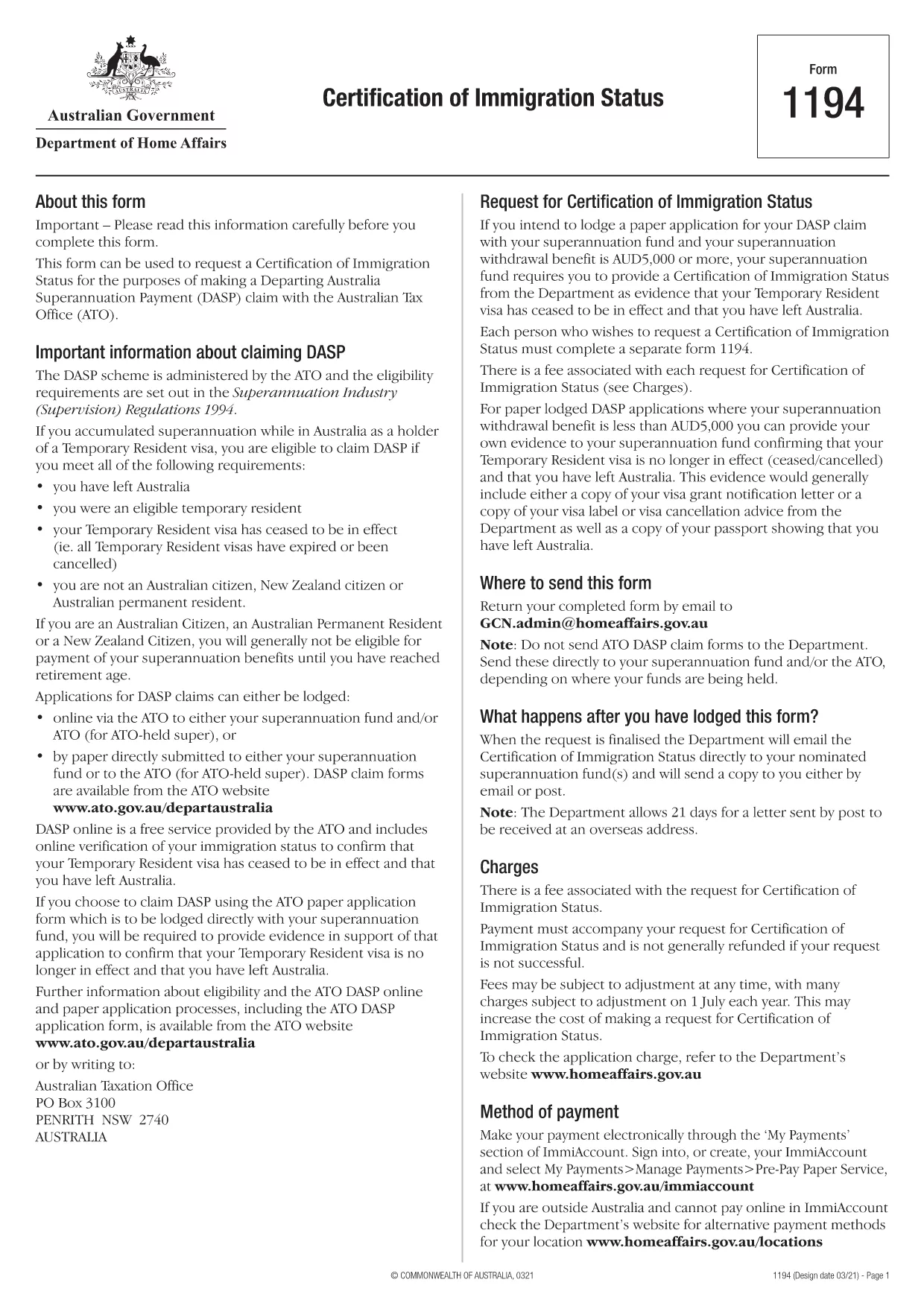
Form 1194 – Certification of Immigration Status (Fillable PDF)

  1. Jazyk Angličtina
  2. Země Austrálie
  3. Aktivita Odjezd z Austrálie
Form 1194 – Certification of Immigration Status (Fillable PDF)

Form 1194 is the official Australian Certification of Immigration Status used when you need to prove your visa status for a Departing Australia Superannuation Payment (DASP) claim, bank verification, or any other official purpose. The form is required for former temporary residents who have left Australia and no longer hold citizenship or permanent residency.

What is Form 1194 and when do you need it?

The Department of Home Affairs issues Form 1194 to certify whether you are a former temporary resident, a New Zealand citizen, or an Australian permanent resident. You will need this certification if you are:

  • Applying for a DASP claim with your superannuation fund.
  • Providing proof of immigration status to a financial institution.
  • Requesting the cancellation of a Temporary Resident visa.

Key sections of Form 1194 explained

Form 1194 contains four main parts:

  1. Applicant details – name, date of birth, passport number, and contact information.
  2. Visa information – visa subclass, grant date, and expiry date.
  3. Certification request – choose whether you need a certification of status or a visa cancellation.
  4. Signature & declaration – sign and date the form to confirm the information is correct.

How to complete Form 1194 online with Formize

Instead of downloading, printing, and scanning, you can fill the form directly in your browser using Formize’s secure PDF filler. Follow these simple steps:

Common mistakes to avoid

  • Leaving the passport number blank – the form will be rejected.
  • Using an outdated visa subclass number.
  • Forgetting to sign the declaration page.
  • Submitting the form to the wrong department (it must go to the Department of Home Affairs).

Where to submit the completed form

Once you have filled and signed Form 1194, you can submit it by:

  • Mailing it to the address printed on the form.
  • Uploading a scanned copy via the Department of Home Affairs online portal.

Make sure to keep a copy of the signed PDF for your records.

FAQ
  • Do I need to print Form 1194 after filling it online?

    No. The Formize filler creates a fully signed PDF that you can download and submit electronically or print if you prefer.

  • Can I use Form 1194 if I am still a permanent resident?

    Form 1194 is intended for former temporary residents or New Zealand citizens. Permanent residents should use the appropriate Australian citizenship or residency certification form.

  • How long does it take for the Department to process the certification?

    Processing times vary, but most certifications are issued within 10‑15 business days after receipt of the complete form.

  • Is there a fee to submit Form 1194?

    There is no fee for the certification itself, but some superannuation funds may charge a small administrative fee for DASP processing.

  • What should I do if I make a mistake after submitting?

    Contact the Department of Home Affairs immediately. You may need to submit a corrected form with a brief explanation of the error.

  • Can I submit Form 1194 via email?

    Yes, you can email the signed PDF to the address provided on the form, but ensure the file is not password‑protected.

  • Is the Formize filler secure?

    Formize uses end‑to‑end encryption and complies with Australian privacy standards, keeping your personal data safe.

JAK

Jak zdarma vyplnit Form 1194 online v 4 jednoduchých krocích:

  1. 1
    Open the fillable form
    Click the **Fill out this form** button on this page. The Formize PDF Filler app will load the PDF directly in your browser.
  2. 2
    Enter your information
    Type your details into each field – the form automatically saves your entries as you go.
  3. 3
    Add your signature
    Use the built‑in e‑signature tool to sign the declaration section. No printer needed.
  4. 4
    Download or share
    When you’re finished, click **Download PDF** to save a copy or **Share Link** to email it directly to the Department of Home Affairs.
Aplikace Formize PDF Filler
O

šablona Form 1194

S tradiční sadou funkcí pro prohlížení a vyplňování dokumentu PDF v kombinaci s výhodami webové aplikace a responzivního rozvržení zvládnete Form 1194 dokončit během několika minut.

FUNKCE

PDF Filler

Nejjednodušší způsob, jak vyplnit Form 1194 online

  • Rychle vyplňte Form 1194
    Hledáte způsob, jak rychle vyplnit Form 1194 online? S naším online bezplatným vyplňováním formulářů PDF budete vědět, jak upravit a vyplnit tento dokument PDF za méně než minutu.
  • Snadno použitelný online editor PDF
    Už vás nebaví tisknout soubory PDF, abyste je mohli upravovat, než je znovu naskenujete a odešlete zpět? Upravujte dokumenty PDF zdarma online. Použijte náš online editor PDF, abyste ušetřili čas a papír.
  • Skvělé nástroje, všechny platformy
    Zajímá vás, jak vyplnit Form 1194 na Macu, nebo možná jak používat PDF filler zdarma? Naše online nástroje PDF fungují na všech platformách.
  • Bezpečné ukládání souborů
    Dokončené soubory „Form 1194“ jsou uloženy v zabezpečené databázi spravované hostingem Amazon Cloud. Své soubory můžete z našeho systému kdykoli smazat. V každém případě jsou tyto soubory po 24 hodinách automaticky smazány.
  • Chat s Form 1194
    Chatujte s „Form 1194“ na Chatize, což je bezplatný pomocník pro čtení PDF. Ptejte se a získejte odpovědi z „Form 1194“. Stačí kliknout na tlačítko Chat with Document výše.

Smazat relaci plnění

Smazat vybranou relaci plnění? V takovém případě bude váš postup při vyplňování formuláře ztracen.

Smazat relaci úprav

Smazat vybranou relaci úprav? V tomto případě bude váš postup při vytváření a úpravách formuláře ztracen.