Zvolte jazyk

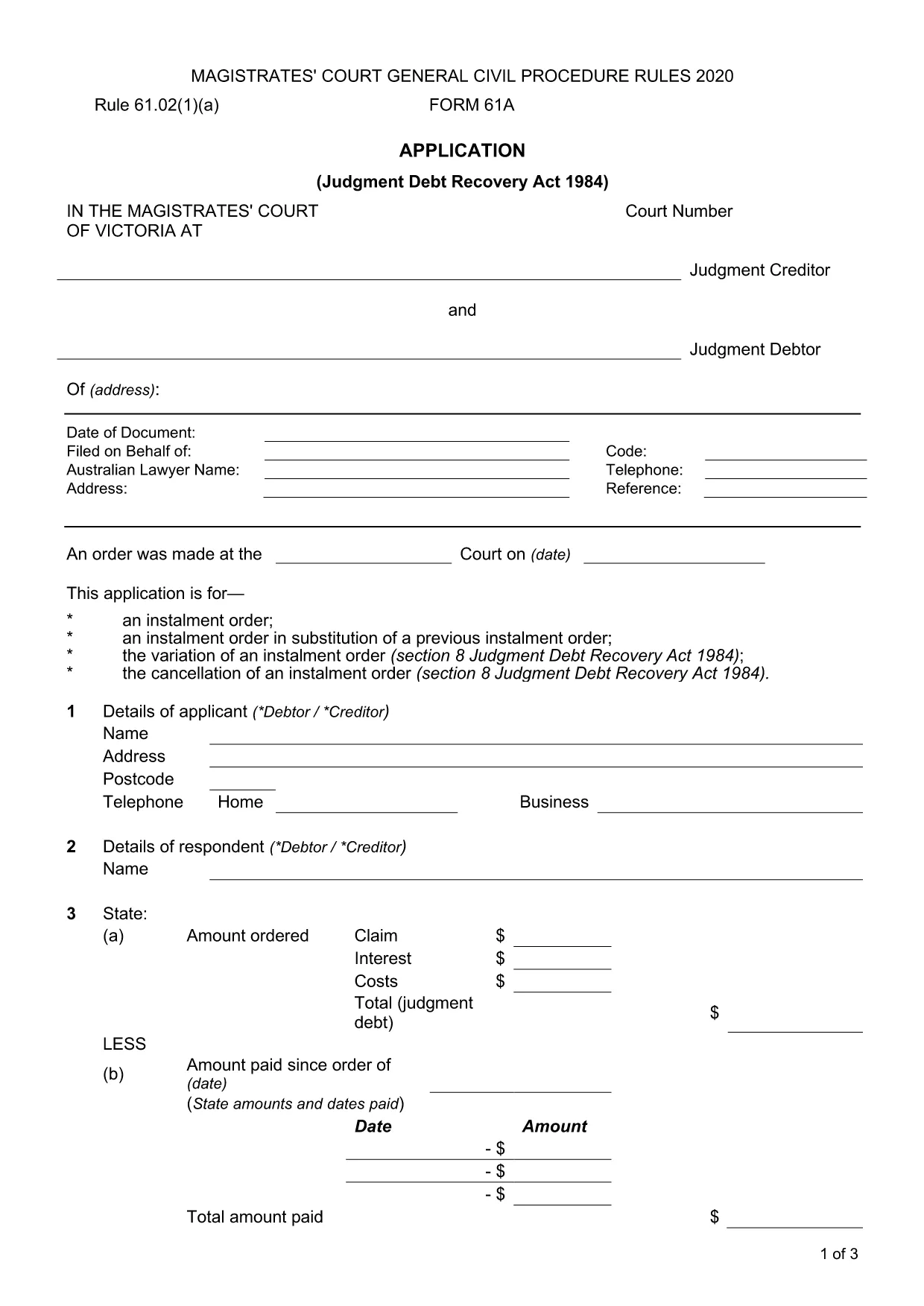
Form 61A – Application for Instalment Order (Fillable PDF)

  1. Jazyk Angličtina
  2. Země Austrálie
  3. oddělení Magistrates' Court of Victoria
  4. Aktivita Legal Forms
Form 61A – Application for Instalment Order (Fillable PDF)

Form 61A is the official application used in the Magistrates' Court of Victoria to request an instalment order for the repayment of a court‑ordered debt. The form must be accompanied by a Statement of Financial Affairs (Form 61B for individuals or Form 61C for corporations). Our fillable PDF version lets you complete every field directly in your browser – no printing, scanning, or special software required.

Using Formize’s secure PDF Filler, you can:

  • Enter information quickly with auto‑save.
  • Validate required fields before you finish.
  • Download a completed, court‑ready PDF.

Below you’ll find step‑by‑step instructions, tips to avoid common errors, and a checklist of supporting documents.

FAQ
  • Who can submit Form 61A?

    Any judgment debtor (individual or corporation) who wants the court to allow repayment of a debt in instalments can submit Form 61A.

  • Do I need Form 61B or 61C with Form 61A?

    Yes. If you are an individual, attach Form 61B (Statement of Financial Affairs). If you are a corporation, attach Form 61C.

  • Can I save my progress and return later?

    The Formize PDF Filler automatically saves your entries locally. You can close the tab and reopen the saved file to continue.

  • What happens if I make a mistake on the form?

    Incorrect or missing information can delay the court’s decision. Use the review step to catch errors before filing.

  • Is there a filing fee for an instalment order?

    The Magistrates' Court of Victoria may charge a modest filing fee. Check the court’s fee schedule or contact the registry for the current amount.

  • How long does the court take to decide?

    Processing times vary, but most instalment order applications are heard within a few weeks of filing.

  • Can I edit the PDF after I’ve downloaded it?

    Yes, you can reopen the saved PDF in Formize’s filler to make changes, then re‑download the updated version.

JAK

Jak zdarma vyplnit Form 61A online v 5 jednoduchých krocích:

  1. 1
    Open the Fillable Form
    Click the **"Fill out this form"** button on this page. The Formize PDF Filler app will open in a new tab.
  2. 2
    Wait for the PDF Filler to Load
    The app loads the fillable Form 61A automatically. This only takes a few seconds.
  3. 3
    Enter Your Information
    Complete each section – debtor details, judgment information, and proposed instalment plan. Required fields are highlighted.
  4. 4
    Review and Save
    Use the built‑in review tool to check for missing or inconsistent data, then click **Save** to download the completed PDF.
  5. 5
    Print or Submit
    Print the saved PDF and file it with the required Statement of Financial Affairs, or follow your court’s electronic filing instructions.
Aplikace Formize PDF Filler
O

šablona Form 61A

S tradiční sadou funkcí pro prohlížení a vyplňování dokumentu PDF v kombinaci s výhodami webové aplikace a responzivního rozvržení zvládnete Form 61A dokončit během několika minut.

FUNKCE

PDF Filler

Nejjednodušší způsob, jak vyplnit Form 61A online

  • Rychle vyplňte Form 61A
    Hledáte způsob, jak rychle vyplnit Form 61A online? S naším online bezplatným vyplňováním formulářů PDF budete vědět, jak upravit a vyplnit tento dokument PDF za méně než minutu.
  • Snadno použitelný online editor PDF
    Už vás nebaví tisknout soubory PDF, abyste je mohli upravovat, než je znovu naskenujete a odešlete zpět? Upravujte dokumenty PDF zdarma online. Použijte náš online editor PDF, abyste ušetřili čas a papír.
  • Skvělé nástroje, všechny platformy
    Zajímá vás, jak vyplnit Form 61A na Macu, nebo možná jak používat PDF filler zdarma? Naše online nástroje PDF fungují na všech platformách.
  • Bezpečné ukládání souborů
    Dokončené soubory „Form 61A“ jsou uloženy v zabezpečené databázi spravované hostingem Amazon Cloud. Své soubory můžete z našeho systému kdykoli smazat. V každém případě jsou tyto soubory po 24 hodinách automaticky smazány.
  • Chat s Form 61A
    Chatujte s „Form 61A“ na Chatize, což je bezplatný pomocník pro čtení PDF. Ptejte se a získejte odpovědi z „Form 61A“. Stačí kliknout na tlačítko Chat with Document výše.

Smazat relaci plnění

Smazat vybranou relaci plnění? V takovém případě bude váš postup při vyplňování formuláře ztracen.

Smazat relaci úprav

Smazat vybranou relaci úprav? V tomto případě bude váš postup při vytváření a úpravách formuláře ztracen.