Zvolte jazyk

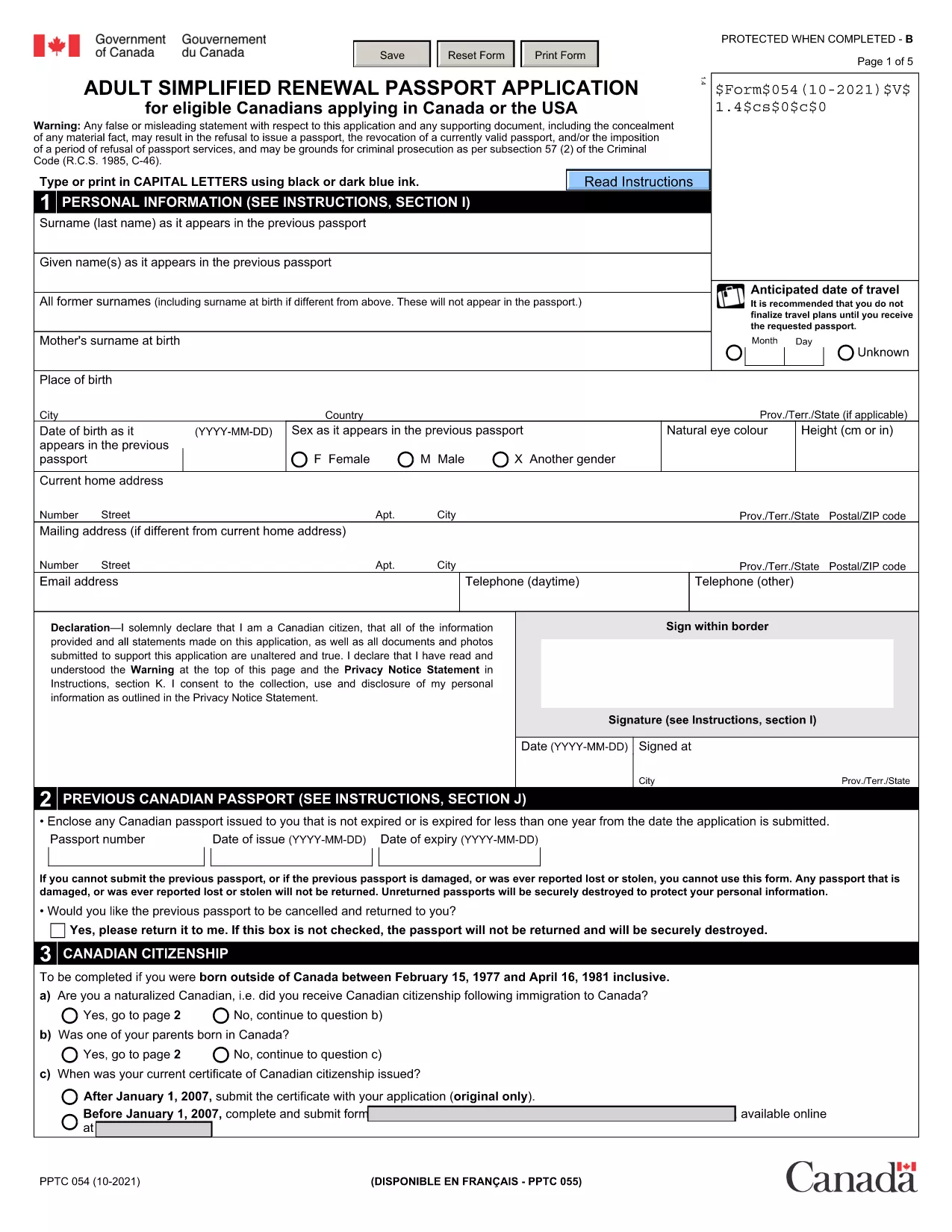
Passport Renewal Application Form – Fillable PDF

  1. Jazyk Angličtina
  2. Země Kanada
  3. oddělení Immigration, Refugees and Citizenship Canada
  4. Aktivita Passports
Passport Renewal Application Form – Fillable PDF

Renewing your passport doesn’t have to be a hassle. Our free, fillable PDF version of the Adult Simplified Renewal Passport Application lets you complete the entire form online, save your progress, and print a clean, error‑free document ready for submission.

Why Use Our Fillable PDF Form?

  • Instant access: No need to hunt for the official PDF on government sites.
  • Online editing: Fill fields directly in your browser – no extra software required.
  • Reduced errors: Automatic validation checks help you avoid common mistakes.
  • Secure download: The file is hosted on a trusted HTTPS server.

How to Complete the Passport Renewal Form in Minutes

Follow these simple steps to finish your renewal application:

  1. Click the "Fill out this form" button below.
  2. Wait a few seconds while the Formize PDF Filler app loads.
  3. Enter your personal details, passport information, and supporting data in the highlighted fields.
  4. Review each section – the filler will highlight any missing or incorrectly formatted entries.
  5. When you’re satisfied, click Save & Download to get a printable PDF.

Common Mistakes to Avoid When Renewing Your Passport

  • Leaving the "Previous Passport Number" blank even if you have it.
  • Using an outdated photo that doesn’t meet the 2‑inch, neutral‑expression requirements.
  • Forgetting to sign the form in the designated area.
  • Submitting an incomplete form – the filler will alert you, but double‑check before printing.

Where to Submit Your Completed Form

After printing, mail the completed application with your current passport, a new passport photo, and the required fee to the nearest Passport Canada office. If you need urgent service, visit a participating Service Canada location in person.

FAQs About Passport Renewal

Below are answers to the most common questions we receive from applicants.

FAQ
  • Who can use the adult simplified renewal form?

    Canadian citizens aged 18 or older who already hold a valid passport and meet the standard renewal criteria.

  • Do I need to provide a new passport photo?

    Yes. The photo must be 2 × 2 inches, recent (taken within the last six months), and meet the standard Canadian passport photo specifications.

  • Can I submit the form electronically?

    No. The form must be printed, signed, and mailed or delivered in person with the required supporting documents.

  • How long does processing take?

    Standard processing is usually 10‑20 business days. Expedited services are available for an additional fee.

  • What if I make a mistake after printing?

    Correct any errors on the printed form by crossing out the mistake, initialing, and writing the correct information. If the error is extensive, download a fresh PDF and start over.

  • Is there a fee waiver for minors?

    Fees for minors under 16 are reduced, but a fee waiver is only available in specific hardship cases approved by Passport Canada.

  • Can I use this form to change my name?

    Yes, the same renewal form can be used for a name change if you provide legal proof (marriage certificate, legal name change document, etc.).

JAK

Jak zdarma vyplnit passport renewal form online v 5 jednoduchých krocích:

  1. 1
    Click the Fill‑out Button
    Press the "Fill out this form" button on the page to launch the Formize PDF Filler.
  2. 2
    Wait for the Filler to Load
    A few seconds later the online editor appears, ready for you to start entering data.
  3. 3
    Complete All Required Fields
    Type your information into each highlighted field, following the on‑screen prompts.
  4. 4
    Validate and Save
    The filler checks for missing or incorrectly formatted entries. When everything is correct, click "Save & Download".
  5. 5
    Print and Submit
    Print the completed PDF, attach your current passport, photo, and fee, then mail or deliver it to the nearest Passport Canada office.
Aplikace Formize PDF Filler
O

šablona passport renewal form

S tradiční sadou funkcí pro prohlížení a vyplňování dokumentu PDF v kombinaci s výhodami webové aplikace a responzivního rozvržení zvládnete passport renewal form dokončit během několika minut.

FUNKCE

PDF Filler

Nejjednodušší způsob, jak vyplnit passport renewal form online

  • Rychle vyplňte passport renewal form
    Hledáte způsob, jak rychle vyplnit passport renewal form online? S naším online bezplatným vyplňováním formulářů PDF budete vědět, jak upravit a vyplnit tento dokument PDF za méně než minutu.
  • Snadno použitelný online editor PDF
    Už vás nebaví tisknout soubory PDF, abyste je mohli upravovat, než je znovu naskenujete a odešlete zpět? Upravujte dokumenty PDF zdarma online. Použijte náš online editor PDF, abyste ušetřili čas a papír.
  • Skvělé nástroje, všechny platformy
    Zajímá vás, jak vyplnit passport renewal form na Macu, nebo možná jak používat PDF filler zdarma? Naše online nástroje PDF fungují na všech platformách.
  • Bezpečné ukládání souborů
    Dokončené soubory „passport renewal form“ jsou uloženy v zabezpečené databázi spravované hostingem Amazon Cloud. Své soubory můžete z našeho systému kdykoli smazat. V každém případě jsou tyto soubory po 24 hodinách automaticky smazány.
  • Chat s passport renewal form
    Chatujte s „passport renewal form“ na Chatize, což je bezplatný pomocník pro čtení PDF. Ptejte se a získejte odpovědi z „passport renewal form“. Stačí kliknout na tlačítko Chat with Document výše.

Smazat relaci plnění

Smazat vybranou relaci plnění? V takovém případě bude váš postup při vyplňování formuláře ztracen.

Smazat relaci úprav

Smazat vybranou relaci úprav? V tomto případě bude váš postup při vytváření a úpravách formuláře ztracen.