
Zvolte jazyk

Form 1040‑NR Schedule NEC (SP) – Fillable PDF

  1. Země USA
  2. Jazyk španělština
  3. Aktivita Daně
  4. oddělení Internal Revenue Service
Form 1040‑NR Schedule NEC (SP) – Fillable PDF

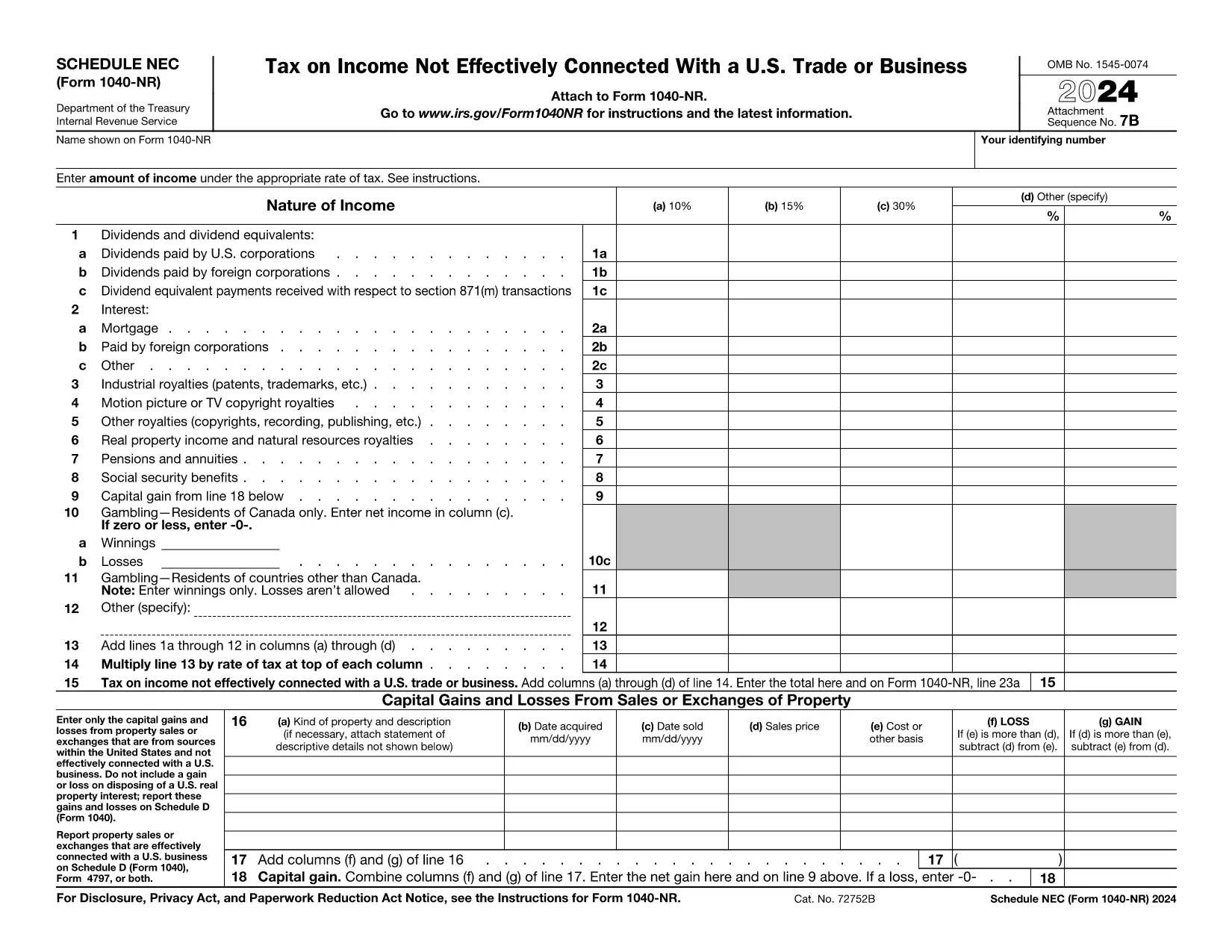
The Schedule NEC (SP) is the supplemental page attached to the Form 1040‑NR that reports income not effectively connected with a U.S. trade or business (non‑ECI). It is used by nonresident aliens to calculate the tax on U.S. source income such as dividends, interest, and certain capital gains.

This page lets you access a fillable PDF version of Schedule NEC (SP) that works directly with Formize’s online PDF Filler. No extra software is required – simply click the button, fill in your numbers, and download the completed form.

What Is Schedule NEC (SP)?

Schedule NEC (SP) separates taxable U.S. source income into three rate columns (10 %, 15 %, 30 % or a treaty‑adjusted rate). Each line corresponds to a specific type of income, allowing you to apply the correct withholding or treaty rate before the total is carried to Form 1040‑NR.

How to Fill Out Schedule NEC (SP) Online

Using Formize’s PDF filler, the process is streamlined:

  • Enter your personal information at the top of the form.
  • Select the appropriate tax‑rate column for each income item.
  • Enter the dollar amount for each line (dividends, interest, royalties, etc.).
  • The filler automatically totals each column and calculates the overall tax liability.
  • Save or download the completed PDF to attach to your Form 1040‑NR filing.

Common Mistakes to Avoid

  • Mixing ECI with non‑ECI income: Only non‑effectively connected items belong on Schedule NEC.
  • Using the wrong tax‑rate column: Verify treaty rates before selecting columns (a‑d).
  • Leaving lines blank: Even a $0 entry should be entered to keep the form complete.
  • Forgetting to attach Schedule NEC to Form 1040‑NR: The Schedule is not filed separately.

Where to Find Tax Treaty Information

The IRS maintains a list of current U.S. tax treaties. Visit the IRS Tax Treaties page to confirm the reduced rate or exemption that applies to your country of residence.

Download the Fillable PDF

Ready to start? Click the button below, let Formize load the fillable version of Schedule NEC (SP), and complete your non‑resident tax reporting in minutes.

Instrukce

FAQ
  • Who must file Schedule NEC (SP) with Form 1040‑NR?

    Any nonresident alien who has U.S. source income that is not effectively connected with a U.S. trade or business must report that income on Schedule NEC (SP).

  • What is the difference between columns (a)–(d) on the schedule?

    Columns (a)–(c) represent the standard 10 %, 15 %, and 30 % tax rates. Column (d) is for a treaty‑adjusted rate or another special rate specified by a tax treaty.

  • Can I use the same PDF for the 2023 and 2024 tax years?

    The Schedule NEC layout changes only rarely. Verify the year on the PDF header; the linked fillable version is the most recent version available.

  • Do I need to attach supporting documents for each income line?

    Generally, you do not attach separate documents to Schedule NEC, but keep the source statements (e.g., 1099‑INT, 1099‑DIV) in case the IRS requests verification.

  • How do I know which treaty rate applies to me?

    Check the IRS “U.S. Tax Treaties” webpage for the treaty between the United States and your country of residence. The treaty will specify reduced rates or exemptions for each type of income.

  • Is the fillable PDF compatible with Mac and Windows?

    Yes. Formize’s online filler works in all modern browsers on macOS, Windows, and Linux without additional software.

JAK

Jak zdarma vyplnit Form 1040-NR Schedule NEC online v 5 jednoduchých krocích:

  1. 1
    Open the Fillable Form
    Click the “Fill out this form” button on the page. The Formize PDF Filler will open in a new window.
  2. 2
    Wait for the Filler to Load
    A brief loading screen appears while the fillable PDF is prepared. This only takes a few seconds.
  3. 3
    Enter Your Information
    Type your personal details and income amounts directly into the fields. The filler automatically formats numbers and totals columns.
  4. 4
    Review and Save
    Double‑check all entries, then click “Save” or “Download” to obtain the completed Schedule NEC (SP) PDF.
  5. 5
    Attach to Form 1040‑NR
    Print or electronically attach the finished Schedule NEC to your Form 1040‑NR when filing your U.S. nonresident tax return.
Aplikace Formize PDF Filler
O

Federální daňové formuláře

Form 1040-NR Schedule NEC je jeden z federálních daňových formulářů, které jsou dokumenty používané k ohlašování a podávání federálních daní z příjmu úřadu Internal Revenue Service (IRS) ve Spojených státech. Tyto formuláře používají jednotlivci, podniky a organizace k nahlášení svých příjmů, srážek a dalších relevantních informací nezbytných pro výpočet jejich federální daňové povinnosti.

Nejčastěji používaným federálním daňovým formulářem je Formulář 1040, který používají jednotliví daňoví poplatníci k vykazování daně z příjmu fyzických osob. Mezi další běžně používané formuláře patří formulář 1065 pro partnerství, Formulář 1120 pro korporace a Formulář 990 pro organizace osvobozené od daně.

Federální daňové formuláře obvykle vyžadují, aby daňoví poplatníci hlásili různé zdroje příjmů, jako jsou mzdy, platy a spropitné, a také příjmy z investic, pronájmu nemovitostí a dalších zdrojů. Formuláře také umožňují daňovým poplatníkům uplatňovat odpočty a kredity na různé výdaje, jako jsou charitativní příspěvky, úroky z hypoték a výdaje na zdravotní péči.

Je důležité podávat federální daňové formuláře přesně a včas, protože pokud tak neučiníte, může to mít za následek sankce a úroky ze strany IRS.

FUNKCE

PDF Filler

Nejjednodušší způsob, jak vyplnit Form 1040-NR Schedule NEC online

  • Rychle vyplňte Form 1040-NR Schedule NEC
    Hledáte způsob, jak rychle vyplnit Form 1040-NR Schedule NEC online? S naším online bezplatným vyplňováním formulářů PDF budete vědět, jak upravit a vyplnit tento dokument PDF za méně než minutu.
  • Snadno použitelný online editor PDF
    Už vás nebaví tisknout soubory PDF, abyste je mohli upravovat, než je znovu naskenujete a odešlete zpět? Upravujte dokumenty PDF zdarma online. Použijte náš online editor PDF, abyste ušetřili čas a papír.
  • Skvělé nástroje, všechny platformy
    Zajímá vás, jak vyplnit Form 1040-NR Schedule NEC na Macu, nebo možná jak používat PDF filler zdarma? Naše online nástroje PDF fungují na všech platformách.
  • Bezpečné ukládání souborů
    Dokončené soubory „Form 1040-NR Schedule NEC“ jsou uloženy v zabezpečené databázi spravované hostingem Amazon Cloud. Své soubory můžete z našeho systému kdykoli smazat. V každém případě jsou tyto soubory po 24 hodinách automaticky smazány.
  • Chat s Form 1040-NR Schedule NEC
    Chatujte s „Form 1040-NR Schedule NEC“ na Chatize, což je bezplatný pomocník pro čtení PDF. Ptejte se a získejte odpovědi z „Form 1040-NR Schedule NEC“. Stačí kliknout na tlačítko Chat with Document výše.

Smazat relaci plnění

Smazat vybranou relaci plnění? V takovém případě bude váš postup při vyplňování formuláře ztracen.

Smazat relaci úprav

Smazat vybranou relaci úprav? V tomto případě bude váš postup při vytváření a úpravách formuláře ztracen.