
Zvolte jazyk

Form 637 – Application for Excise Tax Registration (Fillable PDF)

  1. Země USA
  2. Jazyk Angličtina
  3. Aktivita Daně
  4. oddělení Internal Revenue Service
Form 637 – Application for Excise Tax Registration (Fillable PDF)

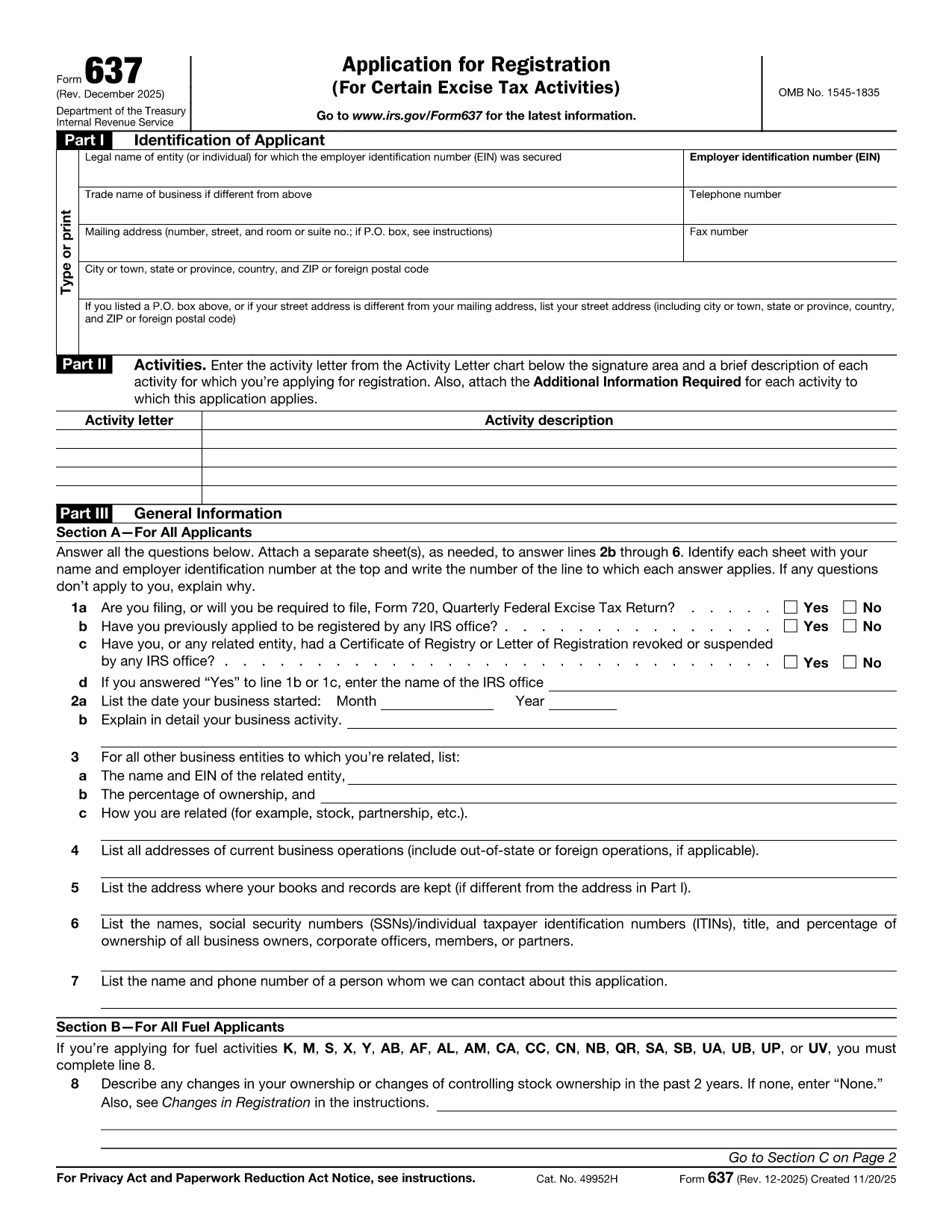
Form 637, Application for Registration (For Certain Excise Tax Activities), is the IRS’s official request to register for activities subject to federal excise taxes. Whether you are a manufacturer, importer, fuel seller, or any other entity that handles taxable products, you need this form to stay compliant.

On Formize.com you can fill the form directly in the browser—no PDF editor required. Just click the Fill out this form button, let the Formize PDF Filler load, and start entering your information.

Who Must File Form 637

  • Manufacturers, producers, or importers of excise‑taxed products.
  • Sellers or purchasers of taxable fuel.
  • Exporters of excise‑taxed goods.
  • Any entity using products that require a Certificate of Registration.

How to Complete Form 637 Online

Follow these simple steps to finish the application without printing a single page:

  1. Click the Fill out this form button on this page.
  2. Wait for the Formize PDF Filler to load (usually a few seconds).
  3. Enter your legal name, EIN, trade name, and contact information.
  4. Select the appropriate activity letter (M, S, etc.) and provide a brief description.
  5. Answer the general information questions in Part III.
  6. Upload any required supporting documents directly in the filler.
  7. Review the completed form, then click Submit to download a signed PDF or mail it to the IRS address shown in the instructions.

Common Mistakes & Tips

  • Incorrect EIN: Double‑check the number; a typo will delay approval.
  • Missing activity letter: Use the chart on pages 2‑5 of the form to pick the right letter.
  • Skipping supporting documents: Attach licenses, permits, or prior registration letters as required.
  • Out‑of‑date form: Always use the latest PDF – the link below points to the current IRS version.

Download the Fillable PDF

If you prefer to work offline, you can download the official PDF from the IRS and open it with any PDF editor. However, the online filler is faster, error‑proof, and saves you a trip to the printer.

FAQs About Form 637

Below are the most frequently asked questions. Click each question to see the answer.

FAQ
  • What is Form 637 used for?

    Form 637 is the IRS application to register for activities subject to federal excise taxes, such as manufacturing or selling taxable fuel.

  • Who is required to file Form 637?

    Manufacturers, producers, importers, fuel sellers, exporters, and any entity that uses products requiring excise tax registration must file Form 637.

  • Can I file Form 637 electronically?

    Yes. On Formize.com you can fill the PDF online, then download the completed form to mail to the IRS. The IRS does not accept direct e‑filing, but the online filler streamlines the process.

  • Do I need an EIN to complete Form 637?

    An Employer Identification Number (EIN) is required. If you don’t have one, apply using Form SS‑4 before completing Form 637.

  • What supporting documents are required?

    Typically you must attach business licenses, permits, prior registration letters, and any documents that prove the activity you’re registering for.

  • How long does the IRS take to approve the registration?

    Processing times vary, but most applicants receive a response within 30‑45 days after the IRS receives the complete application.

  • Is there a fee to file Form 637?

    No filing fee is required for Form 637 itself. However, excise taxes will be due based on the activity once registration is approved.

  • What should I do if I make a mistake on the form?

    Correct the error in the online filler before downloading the final PDF. If you’ve already mailed the form, submit a corrected Form 637 with a cover letter explaining the changes.

  • Where do I mail the completed Form 637?

    The mailing address is listed in the form’s instructions. It is typically the IRS Office of Excise Tax at the address shown on page 1 of the PDF.

  • Can I save my progress while filling the form online?

    Yes. The Formize PDF Filler allows you to save a draft and return later to finish the application.

JAK

Jak zdarma vyplnit Form 637 online v 5 jednoduchých krocích:

  1. 1
    Click "Fill out this form"
    Locate the button on this page and click it to launch the Formize PDF Filler.
  2. 2
    Wait for the filler to load
    The web app loads the fillable version of Form 637 in a few seconds.
  3. 3
    Enter required information
    Complete each field—legal name, EIN, activity letter, and any supporting details.
  4. 4
    Review and validate
    Use the built‑in validation to catch missing or incorrectly formatted entries.
  5. 5
    Submit or download
    When finished, either submit the form directly to the IRS address shown or download the completed PDF for your records.
Aplikace Formize PDF Filler
O

Daňové formuláře

Form 637 je jedním z daňových formulářů, které jsou dokumenty používané k nahlášení informací souvisejících s daněmi příslušnému daňovému úřadu. Existují různé typy daňových formulářů, včetně federálních, státních a místních daňových formulářů, které se mohou lišit v závislosti na okolnostech a umístění poplatníka.

FUNKCE

PDF Filler

Nejjednodušší způsob, jak vyplnit Form 637 online

  • Rychle vyplňte Form 637
    Hledáte způsob, jak rychle vyplnit Form 637 online? S naším online bezplatným vyplňováním formulářů PDF budete vědět, jak upravit a vyplnit tento dokument PDF za méně než minutu.
  • Snadno použitelný online editor PDF
    Už vás nebaví tisknout soubory PDF, abyste je mohli upravovat, než je znovu naskenujete a odešlete zpět? Upravujte dokumenty PDF zdarma online. Použijte náš online editor PDF, abyste ušetřili čas a papír.
  • Skvělé nástroje, všechny platformy
    Zajímá vás, jak vyplnit Form 637 na Macu, nebo možná jak používat PDF filler zdarma? Naše online nástroje PDF fungují na všech platformách.
  • Bezpečné ukládání souborů
    Dokončené soubory „Form 637“ jsou uloženy v zabezpečené databázi spravované hostingem Amazon Cloud. Své soubory můžete z našeho systému kdykoli smazat. V každém případě jsou tyto soubory po 24 hodinách automaticky smazány.
  • Chat s Form 637
    Chatujte s „Form 637“ na Chatize, což je bezplatný pomocník pro čtení PDF. Ptejte se a získejte odpovědi z „Form 637“. Stačí kliknout na tlačítko Chat with Document výše.

Smazat relaci plnění

Smazat vybranou relaci plnění? V takovém případě bude váš postup při vyplňování formuláře ztracen.

Smazat relaci úprav

Smazat vybranou relaci úprav? V tomto případě bude váš postup při vytváření a úpravách formuláře ztracen.