Zvolte jazyk

IRS Form 8879‑C – Fillable Corporate E‑File Signature Authorization

  1. Země USA
  2. Jazyk Angličtina
  3. Aktivita Daně
  4. oddělení Internal Revenue Service
IRS Form 8879‑C – Fillable Corporate E‑File Signature Authorization

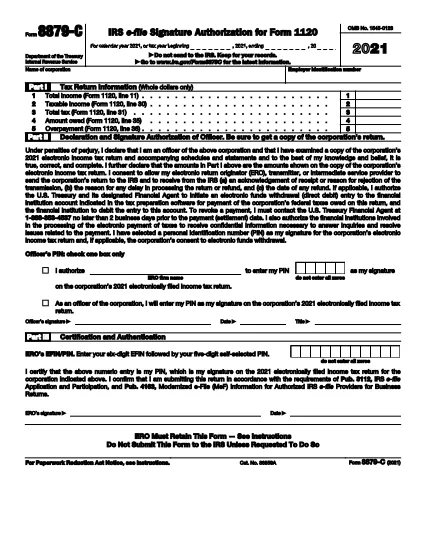
Form 8879‑C, IRS E‑File Signature Authorization for Corporations, is the official document that authorizes the IRS to accept an electronically filed corporate income‑tax return (Form 1120, 1120‑S, 1120‑F, etc.). Instead of mailing a paper signature, corporations can sign electronically using this fillable PDF, saving time and reducing errors.

What is Form 8879‑C?

The form serves as a written declaration that the corporate officer signing the return has reviewed the return, the information is accurate, and the corporation authorizes the IRS to process the e‑filed return. It must be signed by an authorized officer (president, treasurer, or other corporate officer) and attached to the electronic filing.

How to Fill Out Form 8879‑C with Formize

Instead of downloading the PDF and opening a separate editor, simply click the "Fill out this form" button on this page. The Formize PDF Filler app will load instantly, letting you complete every field directly in your browser.

  • Step 1: Click the orange "Fill out this form" button.
  • Step 2: Wait a few seconds for the Formize app to load.
  • Step 3: Enter the corporation’s name, EIN, tax year, and other required data.
  • Step 4: Add the electronic signature of the authorized officer.
  • Step 5: Click "Save" to download the completed PDF, then attach it to your e‑filed return.

Common Mistakes & Tips for a Smooth Submission

  • Incorrect EIN: Double‑check the nine‑digit Employer Identification Number; a typo will cause the return to be rejected.
  • Wrong Tax Year: Use the calendar year or fiscal year that matches the corporate tax return you are filing.
  • Missing Signature: The form is invalid without a clear electronic signature. Use the built‑in signature field—do not draw a signature in a comment box.
  • Unsigned Attachments: If you file multiple returns (e.g., Form 1120‑S and Schedule K‑1), each must have its own Form 8879‑C signed.
  • Saving Errors: After completing the form, click "Download" to store a copy on your computer. Do not rely solely on the browser’s temporary cache.

Where to Find Help and Additional Resources

For detailed instructions, see the IRS Instructions for Form 8879‑C. If you have questions about eligibility, signing authority, or e‑file technical issues, visit the IRS Help & Resources page or contact your tax professional.

FAQ
  • Who must sign Form 8879‑C?

    An officer of the corporation who is authorized to sign the tax return (e.g., president, treasurer, CEO) must sign Form 8879‑C.

  • Can I use a handwritten signature on the fillable PDF?

    Yes, you can draw a handwritten signature using the PDF filler’s signature tool, but the signature must be clear and legible.

  • Is Form 8879‑C required for every corporate e‑file?

    Yes, any corporation that files its income‑tax return electronically must submit a signed Form 8879‑C as the electronic signature authorization.

  • What is the deadline for submitting Form 8879‑C?

    Form 8879‑C must be signed and attached before the corporate tax return is transmitted electronically to the IRS, typically by the filing deadline (usually March 15 for calendar‑year corporations).

  • What should I do if I make a mistake after signing?

    Correct the error on a new copy of Form 8879‑C, have the authorized officer re‑sign, and attach the updated form to the e‑filed return.

  • Do I need a separate Form 8879‑C for each state return?

    State tax authorities may have their own signature forms. Form 8879‑C is only for the federal corporate return.

  • Is there a fee to use Formize’s PDF filler?

    Formize offers a free, no‑cost option for filling out and downloading IRS forms like 8879‑C.

  • Where can I find the official instructions for Form 8879‑C?

    The official IRS instructions are available at https://www.irs.gov/instructions/i8879c.

JAK

Jak zdarma vyplnit Form 8879-C online v 5 jednoduchých krocích:

  1. 1
    Open the Fillable Form
    Click the orange "Fill out this form" button on this page. The Formize PDF Filler will load in a new window.
  2. 2
    Enter Required Information
    Complete the corporation’s name, EIN, tax year, and any other fields shown in the form.
  3. 3
    Add Your Electronic Signature
    Use the built‑in signature field to sign as the authorized corporate officer.
  4. 4
    Save and Download
    After all fields are filled, click "Save" to download the completed PDF to your computer.
  5. 5
    Attach to Your E‑File
    Upload the saved Form 8879‑C PDF with your e‑filed corporate tax return (Form 1120, 1120‑S, etc.).
Aplikace Formize PDF Filler
O

Federální daňové formuláře

Form 8879-C je jeden z federálních daňových formulářů, které jsou dokumenty používané k ohlašování a podávání federálních daní z příjmu úřadu Internal Revenue Service (IRS) ve Spojených státech. Tyto formuláře používají jednotlivci, podniky a organizace k nahlášení svých příjmů, srážek a dalších relevantních informací nezbytných pro výpočet jejich federální daňové povinnosti.

Nejčastěji používaným federálním daňovým formulářem je Formulář 1040, který používají jednotliví daňoví poplatníci k vykazování daně z příjmu fyzických osob. Mezi další běžně používané formuláře patří formulář 1065 pro partnerství, Formulář 1120 pro korporace a Formulář 990 pro organizace osvobozené od daně.

Federální daňové formuláře obvykle vyžadují, aby daňoví poplatníci hlásili různé zdroje příjmů, jako jsou mzdy, platy a spropitné, a také příjmy z investic, pronájmu nemovitostí a dalších zdrojů. Formuláře také umožňují daňovým poplatníkům uplatňovat odpočty a kredity na různé výdaje, jako jsou charitativní příspěvky, úroky z hypoték a výdaje na zdravotní péči.

Je důležité podávat federální daňové formuláře přesně a včas, protože pokud tak neučiníte, může to mít za následek sankce a úroky ze strany IRS.

FUNKCE

PDF Filler

Nejjednodušší způsob, jak vyplnit Form 8879-C online

  • Rychle vyplňte Form 8879-C
    Hledáte způsob, jak rychle vyplnit Form 8879-C online? S naším online bezplatným vyplňováním formulářů PDF budete vědět, jak upravit a vyplnit tento dokument PDF za méně než minutu.
  • Snadno použitelný online editor PDF
    Už vás nebaví tisknout soubory PDF, abyste je mohli upravovat, než je znovu naskenujete a odešlete zpět? Upravujte dokumenty PDF zdarma online. Použijte náš online editor PDF, abyste ušetřili čas a papír.
  • Skvělé nástroje, všechny platformy
    Zajímá vás, jak vyplnit Form 8879-C na Macu, nebo možná jak používat PDF filler zdarma? Naše online nástroje PDF fungují na všech platformách.
  • Bezpečné ukládání souborů
    Dokončené soubory „Form 8879-C“ jsou uloženy v zabezpečené databázi spravované hostingem Amazon Cloud. Své soubory můžete z našeho systému kdykoli smazat. V každém případě jsou tyto soubory po 24 hodinách automaticky smazány.
  • Chat s Form 8879-C
    Chatujte s „Form 8879-C“ na Chatize, což je bezplatný pomocník pro čtení PDF. Ptejte se a získejte odpovědi z „Form 8879-C“. Stačí kliknout na tlačítko Chat with Document výše.

Smazat relaci plnění

Smazat vybranou relaci plnění? V takovém případě bude váš postup při vyplňování formuláře ztracen.

Smazat relaci úprav

Smazat vybranou relaci úprav? V tomto případě bude váš postup při vytváření a úpravách formuláře ztracen.