
Zvolte jazyk

Fillable IRS Form 941‑SS (Quarterly Federal Tax Return)

  1. Země USA
  2. Jazyk Angličtina
  3. Aktivita Daně
  4. oddělení Internal Revenue Service
Fillable IRS Form 941‑SS (Quarterly Federal Tax Return)

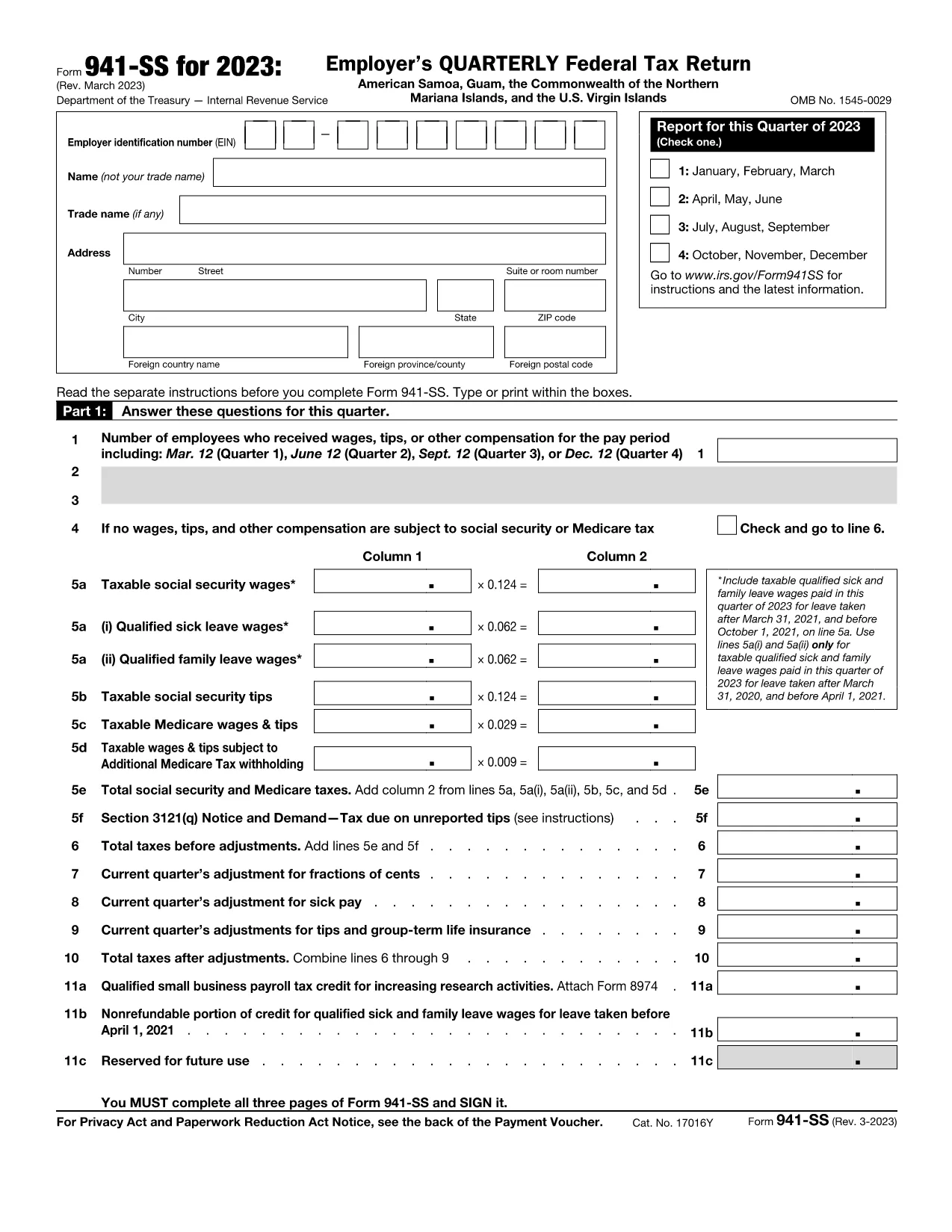
Form 941‑SS is the Employer’s Quarterly Federal Tax Return used by businesses operating in U.S. territories (American Samoa, Guam, the Northern Mariana Islands, and the U.S. Virgin Islands). This fillable PDF lets you enter payroll data quickly, save a digital copy, and print or e‑file without the hassle of paper forms.

What Is Form 941‑SS and Who Needs It?

Employers who pay wages to employees in the territories must file Form 941‑SS each quarter. The form reports income tax, Social Security tax, and Medicare tax withheld from employee wages, as well as the employer’s share of those taxes.

Key Sections and Required Information

The form is divided into clear sections:

  • Employer Information – EIN, name, address, and filing quarter.
  • Wage & Tax Data – Total wages, tips, other compensation, and taxes withheld.
  • Adjustments – Corrections for prior quarters, tax credits, and overpayments.
  • Tax Liability – Calculations for Social Security, Medicare, and additional taxes.
  • Signature – Authorized officer’s signature and date.

How to Complete the Fillable PDF with Formize

Instead of downloading the PDF and opening a separate editor, simply click the “Fill out this form” button on this page. The Formize PDF Filler app loads instantly, providing an intuitive, web‑based interface.

Common Mistakes to Avoid

  • Leaving the EIN blank or entering an incorrect number.
  • Mis‑reporting the quarter (e.g., using Q1 dates for a Q2 filing).
  • Failing to include adjustments from prior quarters.
  • Submitting without a signature or date.

Where to Submit Your Completed Form

After filling out and saving the form, you can:

  • Print and mail it to the IRS processing center listed in the instructions for your territory.
  • Upload the PDF through the IRS e‑file system if you have an approved electronic filing method.

Always keep a copy for your records and verify the filing deadline (the last day of the month following the quarter).

Instrukce

  • Formulář 941-SS Pokyny - Pokyny pro formulář 941-SS, Školení zaměstnavatele Federální daňové přiznání, Americká Samoa, Guam, Společenství Severních Marian a Americké Panenské ostrovy
FAQ
  • Who must file Form 941‑SS?

    All employers who have employees in U.S. territories and are subject to federal employment taxes must file Form 941‑SS each quarter.

  • What is the filing deadline for Form 941‑SS?

    The form is due by the last day of the month following the end of the quarter (e.g., April 30 for Q1).

  • Can I file Form 941‑SS electronically?

    Yes, if you have an approved e‑file provider. You can also submit a printed copy to the IRS address for your territory.

  • What if I have no employees for a quarter?

    You can file a “zero” return, indicating no wages or taxes were paid, to avoid penalties.

  • How do I correct an error on a previously filed Form 941‑SS?

    File Form 941‑SSX (adjusted return) for the quarter with the mistake, or amend the original filing following IRS instructions.

  • Is there a penalty for late filing?

    Yes. The IRS may assess a penalty of 5% of the unpaid tax per month, up to 25%, plus interest on the outstanding amount.

  • Do I need to attach supporting documents?

    Generally, you do not attach supporting schedules with the PDF, but keep them on file in case the IRS requests them.

  • Can I use the same form for all U.S. territories?

    Form 941‑SS is specifically designed for all U.S. territories; the same PDF applies to American Samoa, Guam, NMI, and the U.S. Virgin Islands.

JAK

Jak zdarma vyplnit Form 941-SS online v 4 jednoduchých krocích:

  1. 1
    Click the Fillable Form Button
    On this page, click the bright “Fill out this form” button. The Formize PDF Filler app will open in a new tab.
  2. 2
    Enter Your Payroll Data
    Use your keyboard to type directly into each field. The form automatically saves your progress as you go.
  3. 3
    Review and Sign
    Check all entries for accuracy, then add your electronic signature using the built‑in signature tool.
  4. 4
    Save, Print or Submit
    When finished, click “Save PDF” to download a copy, or choose “Print” to mail a hard copy. You can also export the file for electronic filing.
Aplikace Formize PDF Filler
O

Federální daňové formuláře

Form 941-SS je jeden z federálních daňových formulářů, které jsou dokumenty používané k ohlašování a podávání federálních daní z příjmu úřadu Internal Revenue Service (IRS) ve Spojených státech. Tyto formuláře používají jednotlivci, podniky a organizace k nahlášení svých příjmů, srážek a dalších relevantních informací nezbytných pro výpočet jejich federální daňové povinnosti.

Nejčastěji používaným federálním daňovým formulářem je Formulář 1040, který používají jednotliví daňoví poplatníci k vykazování daně z příjmu fyzických osob. Mezi další běžně používané formuláře patří formulář 1065 pro partnerství, Formulář 1120 pro korporace a Formulář 990 pro organizace osvobozené od daně.

Federální daňové formuláře obvykle vyžadují, aby daňoví poplatníci hlásili různé zdroje příjmů, jako jsou mzdy, platy a spropitné, a také příjmy z investic, pronájmu nemovitostí a dalších zdrojů. Formuláře také umožňují daňovým poplatníkům uplatňovat odpočty a kredity na různé výdaje, jako jsou charitativní příspěvky, úroky z hypoték a výdaje na zdravotní péči.

Je důležité podávat federální daňové formuláře přesně a včas, protože pokud tak neučiníte, může to mít za následek sankce a úroky ze strany IRS.

FUNKCE

PDF Filler

Nejjednodušší způsob, jak vyplnit Form 941-SS online

  • Rychle vyplňte Form 941-SS
    Hledáte způsob, jak rychle vyplnit Form 941-SS online? S naším online bezplatným vyplňováním formulářů PDF budete vědět, jak upravit a vyplnit tento dokument PDF za méně než minutu.
  • Snadno použitelný online editor PDF
    Už vás nebaví tisknout soubory PDF, abyste je mohli upravovat, než je znovu naskenujete a odešlete zpět? Upravujte dokumenty PDF zdarma online. Použijte náš online editor PDF, abyste ušetřili čas a papír.
  • Skvělé nástroje, všechny platformy
    Zajímá vás, jak vyplnit Form 941-SS na Macu, nebo možná jak používat PDF filler zdarma? Naše online nástroje PDF fungují na všech platformách.
  • Bezpečné ukládání souborů
    Dokončené soubory „Form 941-SS“ jsou uloženy v zabezpečené databázi spravované hostingem Amazon Cloud. Své soubory můžete z našeho systému kdykoli smazat. V každém případě jsou tyto soubory po 24 hodinách automaticky smazány.
  • Chat s Form 941-SS
    Chatujte s „Form 941-SS“ na Chatize, což je bezplatný pomocník pro čtení PDF. Ptejte se a získejte odpovědi z „Form 941-SS“. Stačí kliknout na tlačítko Chat with Document výše.

Smazat relaci plnění

Smazat vybranou relaci plnění? V takovém případě bude váš postup při vyplňování formuláře ztracen.

Smazat relaci úprav

Smazat vybranou relaci úprav? V tomto případě bude váš postup při vytváření a úpravách formuláře ztracen.