Zvolte jazyk

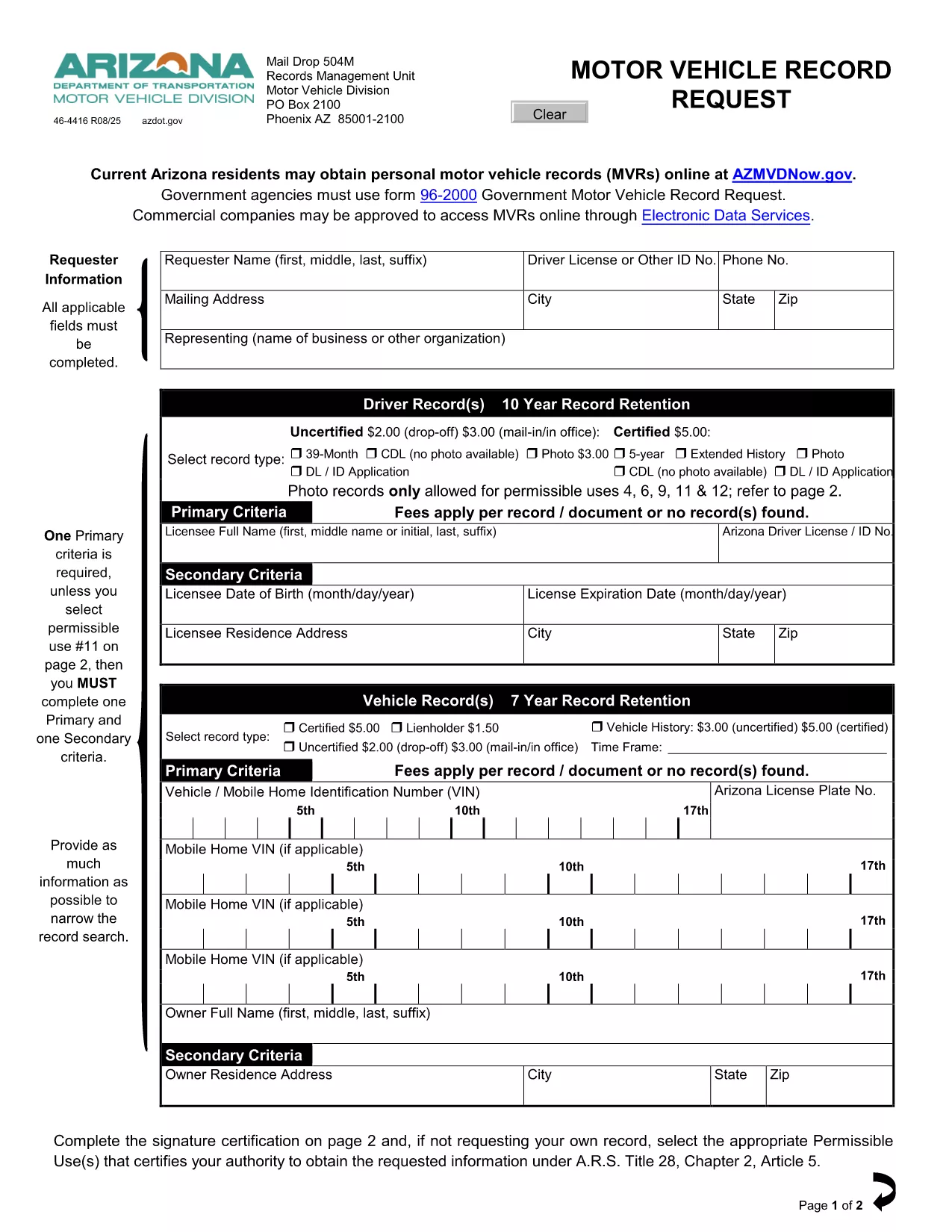
Driving Record Request Form – Fillable PDF

  1. Jazyk Angličtina
  2. Země USA
  3. Aktivita Driving Records
  4. oddělení Department of Motor Vehicles
Driving Record Request Form – Fillable PDF

A driving record (also called a Motor Vehicle Record or MVR) is the official summary of a driver’s licensing history, traffic violations, suspensions, and accidents. Employers, insurance companies, and individuals often need a certified copy for background checks, insurance quotes, or personal review.

This page provides the exact fillable PDF used by many state motor vehicle departments. Instead of printing, signing, and mailing the paper form, you can complete it instantly in your browser with Formize’s PDF Filler app.

The form complies with the Federal Driver’s Privacy Protection Act (DPPA) and lists all permissible uses, ensuring your request is legally valid.

Below you’ll find step‑by‑step instructions, tips to avoid common errors, and answers to the most frequently asked questions about driving record requests.

FAQ
  • What is a permissible use for a driving record?

    Permissible uses include employment screening, insurance underwriting, court orders, and personal review. The form lists all approved purposes per DPPA.

  • Do I need a notarized signature?

    For most states, a notarized signature is required only for certified copies. The fillable PDF lets you add a digital signature; you can still mail the form for notarization if needed.

  • How long does it take to receive the record?

    Processing time varies by state—typically 5‑10 business days for mailed requests and 2‑3 days for electronic submissions where available.

  • Can I request a record for someone else?

    Only if you have a documented permissible use and the person’s written consent. The form includes a consent section you must complete.

  • Is there a fee for the request?

    Yes. Most states charge a small fee (e.g., $3 for an uncertified three‑year record, $5 for a certified five‑year record). Check the form’s fee schedule for exact amounts.

  • What if I make a mistake on the form?

    With Formize you can edit any field before saving. If you’ve already submitted a paper copy, you’ll need to request a new form or contact the DMV for corrections.

  • Do I need to provide my Social Security number?

    Only the last four digits are required for identity verification. The form explains exactly what information is mandatory.

JAK

Jak zdarma vyplnit driving record request online v 4 jednoduchých krocích:

  1. 1
    Click the Fill‑out Button
    On this page, click the bright “Fill out this form” button. The Formize PDF Filler app will open in a new tab.
  2. 2
    Wait for the Formize PDF Filler to Load
    The app loads the fillable PDF instantly. You’ll see all fields highlighted and ready for input.
  3. 3
    Enter Your Information
    Type directly into each field—name, driver’s license number, address, and the purpose of the request. The app validates dates and formats for you.
  4. 4
    Save, Print, or Submit
    When you’re done, click “Save PDF” to download a completed copy, or print it for mailing. No extra software or printer driver is required.
Aplikace Formize PDF Filler
O

šablona driving record request

S tradiční sadou funkcí pro prohlížení a vyplňování dokumentu PDF v kombinaci s výhodami webové aplikace a responzivního rozvržení zvládnete driving record request dokončit během několika minut.

FUNKCE

PDF Filler

Nejjednodušší způsob, jak vyplnit driving record request online

  • Rychle vyplňte driving record request
    Hledáte způsob, jak rychle vyplnit driving record request online? S naším online bezplatným vyplňováním formulářů PDF budete vědět, jak upravit a vyplnit tento dokument PDF za méně než minutu.
  • Snadno použitelný online editor PDF
    Už vás nebaví tisknout soubory PDF, abyste je mohli upravovat, než je znovu naskenujete a odešlete zpět? Upravujte dokumenty PDF zdarma online. Použijte náš online editor PDF, abyste ušetřili čas a papír.
  • Skvělé nástroje, všechny platformy
    Zajímá vás, jak vyplnit driving record request na Macu, nebo možná jak používat PDF filler zdarma? Naše online nástroje PDF fungují na všech platformách.
  • Bezpečné ukládání souborů
    Dokončené soubory „driving record request“ jsou uloženy v zabezpečené databázi spravované hostingem Amazon Cloud. Své soubory můžete z našeho systému kdykoli smazat. V každém případě jsou tyto soubory po 24 hodinách automaticky smazány.
  • Chat s driving record request
    Chatujte s „driving record request“ na Chatize, což je bezplatný pomocník pro čtení PDF. Ptejte se a získejte odpovědi z „driving record request“. Stačí kliknout na tlačítko Chat with Document výše.

Smazat relaci plnění

Smazat vybranou relaci plnění? V takovém případě bude váš postup při vyplňování formuláře ztracen.

Smazat relaci úprav

Smazat vybranou relaci úprav? V tomto případě bude váš postup při vytváření a úpravách formuláře ztracen.