
Zvolte jazyk

Form 5285 – Skills Test Failure (Behind‑the‑Wheel) Fillable PDF

  1. Jazyk Angličtina
  2. Země USA
  3. Aktivita Řidičský průkaz
  4. Stát Missouri
Form 5285 – Skills Test Failure (Behind‑the‑Wheel) Fillable PDF

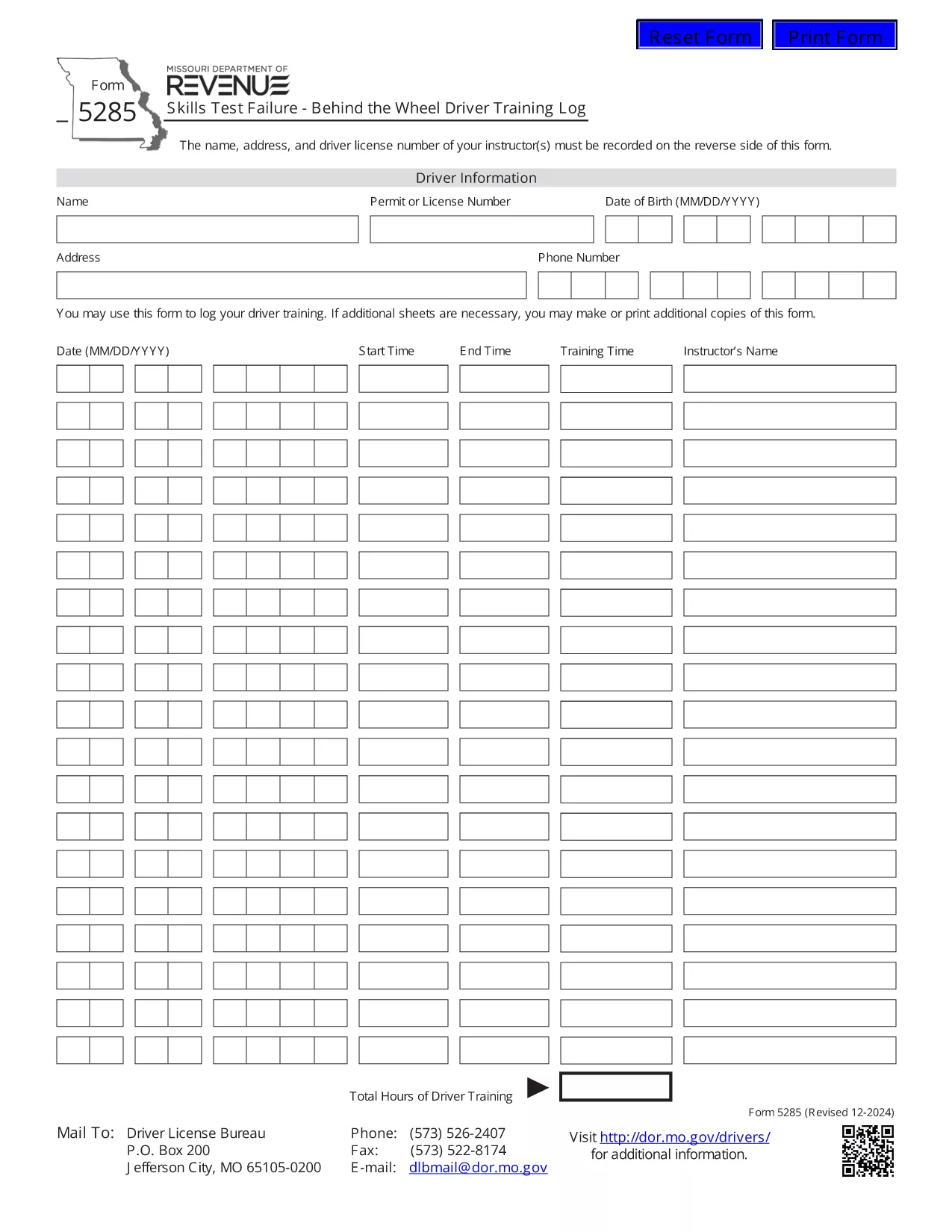
Form 5285 is the official Missouri Skills Test Failure – Behind the Wheel Driver Training Log. Instructors use this form to record a driver’s failure during a behind‑the‑wheel skills test, including instructor details, driver information, and the specific skills that were not met.

What Is Form 5285?

This form is required by the Missouri Department of Revenue – Driver Licensing Division. It captures:

  • Instructor name, address, and license number
  • Driver’s personal details
  • Date and location of the test
  • Specific skills that were failed
  • Signature of the instructor

How to Fill Out Form 5285 Online

Instead of printing, printing, and scanning, you can complete the form directly in your browser using Formize’s fillable PDF technology:

  1. Click the "Fill out this form" button on this page.
  2. Wait a few seconds while the Formize PDF Filler app loads the PDF.
  3. Enter the required information in each field. The form is fully interactive – just type or select from drop‑down menus.
  4. When you’re done, click Save to store a copy in your browser or download a completed PDF.
  5. Print the completed document if a hard copy is needed for submission.

Common Mistakes to Avoid

  • Leaving required fields blank: The PDF will highlight missing information before you can save.
  • Incorrect instructor license number: Double‑check the number on the instructor’s license.
  • Using the wrong date format: Missouri requires MM/DD/YYYY.
  • Submitting an unsigned form: The instructor’s signature is mandatory.

Where to Submit the Completed Form

After you have saved the filled form, submit it to the nearest Missouri Department of Revenue driver licensing office or mail it to the address listed on the form’s instructions. Some offices also accept electronic submissions via email – call your local office to confirm.

Download the Official PDF

If you prefer the original PDF for offline use, you can download it directly from the Missouri Department of Revenue:

Download Form 5285 (PDF)

FAQ
  • What is the purpose of Form 5285?

    Form 5285 records a driver’s failure on a behind‑the‑wheel skills test. It provides the Missouri Department of Revenue with details needed to issue a retest or take corrective action.

  • Can I fill out Form 5285 on a mobile device?

    Yes. The Formize fillable PDF works on smartphones and tablets. Just tap the "Fill out this form" button and complete the fields using your device’s keyboard.

  • Do I need to print the form after filling it online?

    Only if your local licensing office requires a hard copy. Many offices now accept a saved PDF sent by email or uploaded through their portal.

  • Is there a fee to use the Formize PDF Filler?

    No. Formize provides free, secure filling of Missouri state forms, including Form 5285.

  • What should I do if I make a mistake after saving?

    Open the saved PDF again with the Formize filler, edit the incorrect fields, and re‑save. The filler preserves all previously entered data.

  • Where can I find the official instructions for Form 5285?

    The official instructions are included on the last page of the PDF you download from the Missouri Department of Revenue website.

JAK

Jak zdarma vyplnit Form 5285 online v 4 jednoduchých krocích:

  1. 1
    Open the Fillable Form
    Click the "Fill out this form" button on the page. The Formize PDF Filler loads the Form 5285 directly in your browser.
  2. 2
    Enter the Required Information
    Type the instructor’s name, address, license number, driver details, test date, and failed skill items into the highlighted fields.
  3. 3
    Review and Save
    Use the built‑in validation to ensure all required fields are completed, then click "Save" to store a copy or download the completed PDF.
  4. 4
    Print or Submit Electronically
    Print the saved PDF for a hard‑copy submission, or follow your local office’s instructions for electronic delivery.
Aplikace Formize PDF Filler
O

Formuláře žádosti o řidičský průkaz

Ve většině zemí je povinné mít řidičský průkaz, než vyrazíte na silnici. Získání řidičského průkazu je důležitým milníkem pro každého, kdo chce řídit auto.

Form 5285 je jedním z formulářů žádosti o řidičský průkaz, což jsou dokumenty používané ke shromažďování informací od lidí, kteří chtějí požádat o řidičský průkaz. Obvykle obsahuje pole pro jméno žadatele, datum narození, IČO, kontaktní údaje a také historii a praxi jeho řidičského průkazu.

FUNKCE

PDF Filler

Nejjednodušší způsob, jak vyplnit Form 5285 online

  • Rychle vyplňte Form 5285
    Hledáte způsob, jak rychle vyplnit Form 5285 online? S naším online bezplatným vyplňováním formulářů PDF budete vědět, jak upravit a vyplnit tento dokument PDF za méně než minutu.
  • Snadno použitelný online editor PDF
    Už vás nebaví tisknout soubory PDF, abyste je mohli upravovat, než je znovu naskenujete a odešlete zpět? Upravujte dokumenty PDF zdarma online. Použijte náš online editor PDF, abyste ušetřili čas a papír.
  • Skvělé nástroje, všechny platformy
    Zajímá vás, jak vyplnit Form 5285 na Macu, nebo možná jak používat PDF filler zdarma? Naše online nástroje PDF fungují na všech platformách.
  • Bezpečné ukládání souborů
    Dokončené soubory „Form 5285“ jsou uloženy v zabezpečené databázi spravované hostingem Amazon Cloud. Své soubory můžete z našeho systému kdykoli smazat. V každém případě jsou tyto soubory po 24 hodinách automaticky smazány.
  • Chat s Form 5285
    Chatujte s „Form 5285“ na Chatize, což je bezplatný pomocník pro čtení PDF. Ptejte se a získejte odpovědi z „Form 5285“. Stačí kliknout na tlačítko Chat with Document výše.

Smazat relaci plnění

Smazat vybranou relaci plnění? V takovém případě bude váš postup při vyplňování formuláře ztracen.

Smazat relaci úprav

Smazat vybranou relaci úprav? V tomto případě bude váš postup při vytváření a úpravách formuláře ztracen.