
Zvolte jazyk

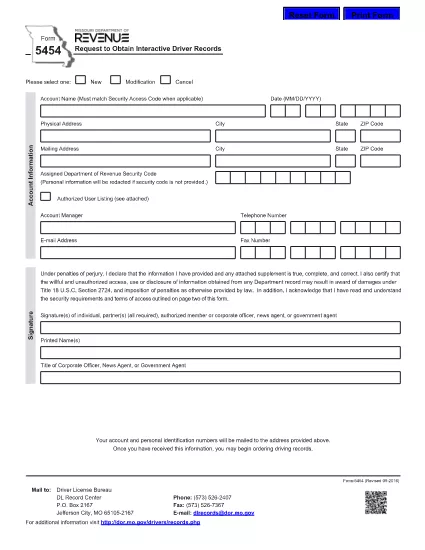
Form 5454 – Request for Interactive Driver Records (Fillable PDF)

  1. Jazyk Angličtina
  2. Země USA
  3. Aktivita Řidičský průkaz
  4. Stát Missouri
Form 5454 – Request for Interactive Driver Records (Fillable PDF)

Form 5454 is the official Missouri Department of Revenue document used to request interactive driver records. Whether you’re an employer, a background‑check provider, or an individual needing a personal driving history, this fillable PDF makes the process fast and error‑free.

Our online Formize PDF Filler loads the exact same form you would receive by mail, but with the convenience of digital entry, automatic validation, and instant download of the completed document.

Below you’ll find everything you need to know about the purpose of Form 5454, step‑by‑step instructions for filling it out, common pitfalls to watch for, and where to send the finished form.

FAQ
  • Who is required to use Form 5454?

    Any individual, employer, or agency that needs an official, interactive driver record from the Missouri Department of Revenue must submit Form 5454.

  • Is the PDF truly fillable online?

    Yes. After clicking the “Fill out this form” button, the Formize PDF Filler turns the static PDF into an interactive document you can complete directly in your browser.

  • Can I submit the form electronically?

    The Missouri Department of Revenue still requires a printed copy with a signature, but you can download the completed PDF, print it, sign it, and mail it in.

  • What fees are associated with requesting driver records?

    Fees vary based on the type of record requested. Refer to the fee schedule on the Missouri Department of Revenue website for the most current rates.

  • How long does it take to receive the records?

    Processing typically takes 5‑10 business days after the signed form is received, though expedited services may be available for an additional charge.

  • What common mistakes should I avoid?

    Do not leave required fields blank, ensure the driver’s license number is typed exactly as it appears, and double‑check the mailing address for accuracy.

JAK

Jak zdarma vyplnit Form 5454 online v 5 jednoduchých krocích:

  1. 1
    Click the Fill‑out Button
    On this page, click the bright “Fill out this form” button. The Formize PDF Filler app will open in a new tab.
  2. 2
    Wait for the Filler to Load
    The app automatically loads the exact Form 5454 PDF. A loading spinner appears for a few seconds – this ensures all fields are interactive.
  3. 3
    Enter Your Information
    Type directly into each field (name, address, driver’s license number, etc.). Required fields are highlighted in red if left blank.
  4. 4
    Review and Validate
    Use the built‑in validation to check for formatting errors (e.g., ZIP code, date of birth). Correct any warnings before proceeding.
  5. 5
    Save, Download, or Submit
    When the form is complete, click “Save PDF” to download a copy for your records, or use the “Email” button to send it directly to the Missouri Department of Revenue.
Aplikace Formize PDF Filler
O

Formuláře žádosti o řidičský průkaz

Ve většině zemí je povinné mít řidičský průkaz, než vyrazíte na silnici. Získání řidičského průkazu je důležitým milníkem pro každého, kdo chce řídit auto.

Form 5454 je jedním z formulářů žádosti o řidičský průkaz, což jsou dokumenty používané ke shromažďování informací od lidí, kteří chtějí požádat o řidičský průkaz. Obvykle obsahuje pole pro jméno žadatele, datum narození, IČO, kontaktní údaje a také historii a praxi jeho řidičského průkazu.

FUNKCE

PDF Filler

Nejjednodušší způsob, jak vyplnit Form 5454 online

  • Rychle vyplňte Form 5454
    Hledáte způsob, jak rychle vyplnit Form 5454 online? S naším online bezplatným vyplňováním formulářů PDF budete vědět, jak upravit a vyplnit tento dokument PDF za méně než minutu.
  • Snadno použitelný online editor PDF
    Už vás nebaví tisknout soubory PDF, abyste je mohli upravovat, než je znovu naskenujete a odešlete zpět? Upravujte dokumenty PDF zdarma online. Použijte náš online editor PDF, abyste ušetřili čas a papír.
  • Skvělé nástroje, všechny platformy
    Zajímá vás, jak vyplnit Form 5454 na Macu, nebo možná jak používat PDF filler zdarma? Naše online nástroje PDF fungují na všech platformách.
  • Bezpečné ukládání souborů
    Dokončené soubory „Form 5454“ jsou uloženy v zabezpečené databázi spravované hostingem Amazon Cloud. Své soubory můžete z našeho systému kdykoli smazat. V každém případě jsou tyto soubory po 24 hodinách automaticky smazány.
  • Chat s Form 5454
    Chatujte s „Form 5454“ na Chatize, což je bezplatný pomocník pro čtení PDF. Ptejte se a získejte odpovědi z „Form 5454“. Stačí kliknout na tlačítko Chat with Document výše.

Smazat relaci plnění

Smazat vybranou relaci plnění? V takovém případě bude váš postup při vyplňování formuláře ztracen.

Smazat relaci úprav

Smazat vybranou relaci úprav? V tomto případě bude váš postup při vytváření a úpravách formuláře ztracen.