
Zvolte jazyk

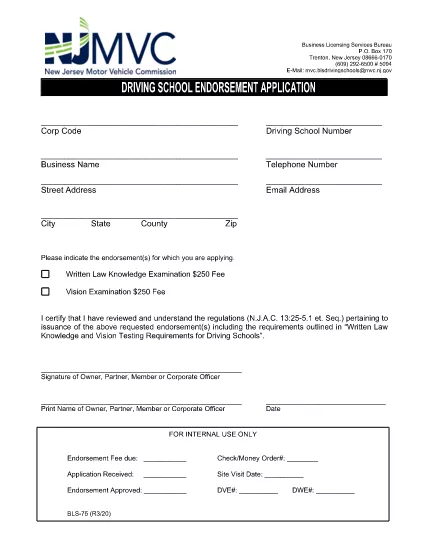
BLS‑75 Driving School Endorsement Application – Fillable PDF

  1. Jazyk Angličtina
  2. Země USA
  3. Aktivita Řidičský průkaz
  4. Stát New Jersey
BLS‑75 Driving School Endorsement Application – Fillable PDF

What Is the BLS‑75 Form?

The BLS‑75 is the official New Jersey Motor Vehicle Commission (MVC) application used by driving schools to request endorsement approval. It verifies that the school meets all state‑required regulations before issuing a commercial driving‑school endorsement.

Who Must Complete the BLS‑75?

Any individual or organization that operates a driving school in New Jersey and wishes to receive the MVC endorsement must submit a completed BLS‑75. This includes new schools, schools renewing their endorsement, and schools adding new locations.

How to Fill Out the BLS‑75 Online

Instead of downloading the PDF and editing it with a separate editor, simply click the "Fill out this form" button on this page. The Formize PDF Filler app will load directly in your browser, allowing you to:

  • Enter information into each field with auto‑save.
  • Validate signatures and dates instantly.
  • Preview the completed form before submission.

Common Mistakes to Avoid

  • Leaving required fields blank. The filler highlights missing information before you can submit.
  • Using an outdated version of the form. The link on this page always points to the current BLS‑75 PDF.
  • Incorrectly formatting phone numbers or dates. Follow the sample formats shown in each field.

Where to Submit the Completed Form

After you finish, you can either:

  • Download the signed PDF and mail it to the New Jersey MVC, Division of Motor Vehicles, 124 Halsey St., Trenton, NJ 08625.
  • Upload the PDF directly through the MVC online portal (if you have an account).

For any questions about eligibility or submission, contact the New Jersey MVC Business Services Division at (609) 292‑6500.

FAQ
  • Do I need Adobe Acrobat to complete the BLS‑75?

    No. The Formize PDF Filler works in any modern browser, so you can fill out the form without installing additional software.

  • Is the online filler secure?

    Yes. All data is processed locally in your browser and transmitted over HTTPS. Formize does not store your personal information.

  • Can I save my progress and return later?

    Absolutely. Use the "Save Draft" button to download a partially completed PDF, then re‑upload it later to continue editing.

  • What if I make a mistake after submitting?

    Contact the NJ MVC Business Services Division. They will advise whether you need to submit a corrected BLS‑75 or if an amendment can be made.

  • Is there a filing fee for the BLS‑75?

    Yes, the MVC charges a processing fee. Check the latest fee schedule on the NJ MVC website or the form’s instruction page.

  • How long does the endorsement approval take?

    Processing typically takes 10‑15 business days after the MVC receives a complete and accurate BLS‑75.

JAK

Jak zdarma vyplnit BLS-75 online v 4 jednoduchých krocích:

  1. 1
    Click the Fill‑out Button
    Press the "Fill out this form" button on the page. The Formize PDF Filler will open in a new browser tab.
  2. 2
    Wait for the Filler to Load
    The app loads the BLS‑75 PDF automatically. All fields become editable, and a progress bar shows the loading status.
  3. 3
    Complete Each Section
    Enter your information, upload required signatures, and double‑check the auto‑validation messages. The filler saves your work every few seconds.
  4. 4
    Save or Submit
    When finished, click "Download" to save a copy for your records or use the built‑in "Submit" button to send the PDF directly to the NJ MVC portal.
Aplikace Formize PDF Filler
O

Formuláře žádosti o řidičský průkaz

Ve většině zemí je povinné mít řidičský průkaz, než vyrazíte na silnici. Získání řidičského průkazu je důležitým milníkem pro každého, kdo chce řídit auto.

BLS-75 je jedním z formulářů žádosti o řidičský průkaz, což jsou dokumenty používané ke shromažďování informací od lidí, kteří chtějí požádat o řidičský průkaz. Obvykle obsahuje pole pro jméno žadatele, datum narození, IČO, kontaktní údaje a také historii a praxi jeho řidičského průkazu.

FUNKCE

PDF Filler

Nejjednodušší způsob, jak vyplnit BLS-75 online

  • Rychle vyplňte BLS-75
    Hledáte způsob, jak rychle vyplnit BLS-75 online? S naším online bezplatným vyplňováním formulářů PDF budete vědět, jak upravit a vyplnit tento dokument PDF za méně než minutu.
  • Snadno použitelný online editor PDF
    Už vás nebaví tisknout soubory PDF, abyste je mohli upravovat, než je znovu naskenujete a odešlete zpět? Upravujte dokumenty PDF zdarma online. Použijte náš online editor PDF, abyste ušetřili čas a papír.
  • Skvělé nástroje, všechny platformy
    Zajímá vás, jak vyplnit BLS-75 na Macu, nebo možná jak používat PDF filler zdarma? Naše online nástroje PDF fungují na všech platformách.
  • Bezpečné ukládání souborů
    Dokončené soubory „BLS-75“ jsou uloženy v zabezpečené databázi spravované hostingem Amazon Cloud. Své soubory můžete z našeho systému kdykoli smazat. V každém případě jsou tyto soubory po 24 hodinách automaticky smazány.
  • Chat s BLS-75
    Chatujte s „BLS-75“ na Chatize, což je bezplatný pomocník pro čtení PDF. Ptejte se a získejte odpovědi z „BLS-75“. Stačí kliknout na tlačítko Chat with Document výše.

Smazat relaci plnění

Smazat vybranou relaci plnění? V takovém případě bude váš postup při vyplňování formuláře ztracen.

Smazat relaci úprav

Smazat vybranou relaci úprav? V tomto případě bude váš postup při vytváření a úpravách formuláře ztracen.