
Zvolte jazyk

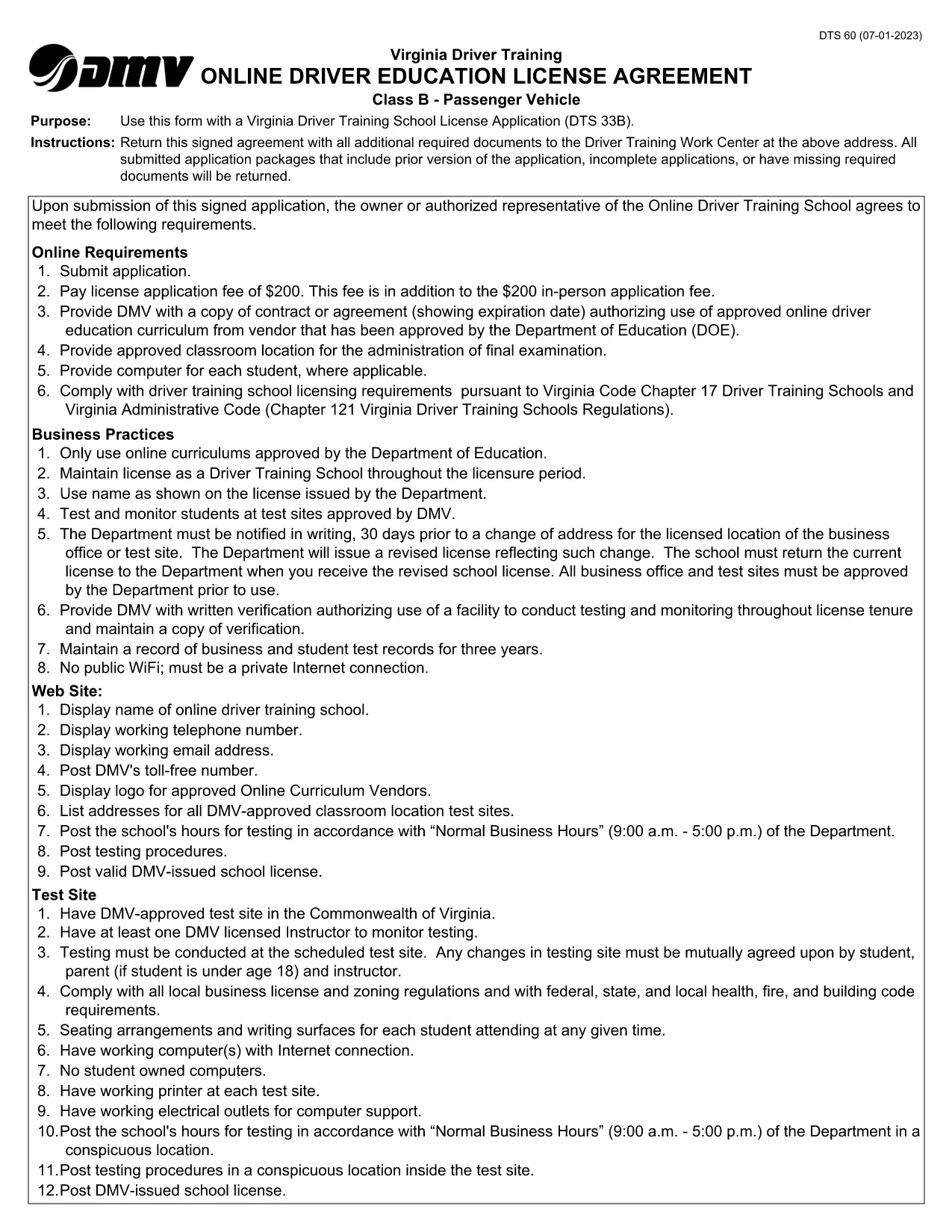
Fillable DTS-60 Driver Training School Agreement PDF

  1. Země USA
  2. Jazyk Angličtina
  3. Aktivita Řidičský průkaz
  4. Stát Virginie
Fillable DTS-60 Driver Training School Agreement PDF

The DTS-60 Driver Training School Agreement is required by the Virginia Department of Motor Vehicles (DMV) when a student enrolls in a driver‑education program. This fillable PDF lets you complete the form online, print it, and submit it without manual paperwork.

What is the DTS-60 Form?

The DTS-60 captures essential details about the student, parent/guardian, and the driving school. It confirms that the student meets eligibility criteria and that the school agrees to provide the required curriculum.

How to Fill the DTS-60 Online with Formize

Instead of downloading and editing the PDF in a separate editor, simply click the “Fill out this form” button below. Formize’s PDF Filler loads instantly, allowing you to type directly into each field.

Key Sections and Required Information

  • Student Information: Name, date of birth, Virginia driver’s license number (if any).
  • Parent/Guardian Consent: Signature, contact phone, and email.
  • Driving School Details: School name, address, instructor certification.
  • Course Completion Dates: Start and end dates of the driver‑education program.

Common Mistakes to Avoid

  • Leaving any required field blank – the form will not submit.
  • Using an illegible handwritten signature – type your name or use a digital signature.
  • Entering an incorrect driver’s license number – double‑check the digits.
  • Submitting the form before the school signs – both parties must sign.

When you’re ready, click the button, fill the form, download the completed PDF, and submit it to your local Virginia DMV office.

FAQ
  • What is the purpose of the DTS-60 form?

    The DTS-60 confirms that a student is enrolled in an approved driver‑education program and records parental consent and school information for the Virginia DMV.

  • Can I fill out the DTS-60 on a mobile device?

    Yes. Formize’s PDF Filler works on smartphones and tablets, letting you complete the form on any modern browser.

  • Do I need a PDF editor to use this form?

    No. Simply click the “Fill out this form” button and the Formize app provides a fully fillable interface.

  • Is the completed form accepted electronically?

    Most Virginia DMV offices require a printed copy with signatures, but check with your driving school – some accept the digital PDF.

  • How long does it take to complete the DTS-60?

    Typical completion takes 5‑10 minutes if you have all required information on hand.

  • What if I make a mistake after downloading?

    Open the downloaded PDF again with Formize’s filler to edit, or re‑fill the form from the start using the online version.

JAK

Jak zdarma vyplnit DTS-60 online v 5 jednoduchých krocích:

  1. 1
    Start the Fillable Form
    Click the “Fill out this form” button on this page. Formize’s PDF Filler will open in a new tab.
  2. 2
    Enter All Required Data
    Type directly into each field – student details, parent consent, and school information. The interface validates required fields in real time.
  3. 3
    Add Your Signature
    Use the built‑in signature tool to type or draw your signature. No need for a scanned image.
  4. 4
    Download and Print
    When the form is complete, click “Download PDF”. Print a hard copy if your DMV requires a physical submission.
  5. 5
    Submit to the DMV
    Bring the printed form to your local Virginia DMV office or follow any electronic submission instructions provided by your driving school.
Aplikace Formize PDF Filler
O

Formuláře žádosti o řidičský průkaz

Ve většině zemí je povinné mít řidičský průkaz, než vyrazíte na silnici. Získání řidičského průkazu je důležitým milníkem pro každého, kdo chce řídit auto.

DTS-60 je jedním z formulářů žádosti o řidičský průkaz, což jsou dokumenty používané ke shromažďování informací od lidí, kteří chtějí požádat o řidičský průkaz. Obvykle obsahuje pole pro jméno žadatele, datum narození, IČO, kontaktní údaje a také historii a praxi jeho řidičského průkazu.

FUNKCE

PDF Filler

Nejjednodušší způsob, jak vyplnit DTS-60 online

  • Rychle vyplňte DTS-60
    Hledáte způsob, jak rychle vyplnit DTS-60 online? S naším online bezplatným vyplňováním formulářů PDF budete vědět, jak upravit a vyplnit tento dokument PDF za méně než minutu.
  • Snadno použitelný online editor PDF
    Už vás nebaví tisknout soubory PDF, abyste je mohli upravovat, než je znovu naskenujete a odešlete zpět? Upravujte dokumenty PDF zdarma online. Použijte náš online editor PDF, abyste ušetřili čas a papír.
  • Skvělé nástroje, všechny platformy
    Zajímá vás, jak vyplnit DTS-60 na Macu, nebo možná jak používat PDF filler zdarma? Naše online nástroje PDF fungují na všech platformách.
  • Bezpečné ukládání souborů
    Dokončené soubory „DTS-60“ jsou uloženy v zabezpečené databázi spravované hostingem Amazon Cloud. Své soubory můžete z našeho systému kdykoli smazat. V každém případě jsou tyto soubory po 24 hodinách automaticky smazány.
  • Chat s DTS-60
    Chatujte s „DTS-60“ na Chatize, což je bezplatný pomocník pro čtení PDF. Ptejte se a získejte odpovědi z „DTS-60“. Stačí kliknout na tlačítko Chat with Document výše.

Smazat relaci plnění

Smazat vybranou relaci plnění? V takovém případě bude váš postup při vyplňování formuláře ztracen.

Smazat relaci úprav

Smazat vybranou relaci úprav? V tomto případě bude váš postup při vytváření a úpravách formuláře ztracen.