Zvolte jazyk

Wisconsin MV3112 Driver Instructor Application – Fillable PDF

  1. Jazyk Angličtina
  2. Země USA
  3. Aktivita Řidičský průkaz
  4. Stát Wisconsin
Wisconsin MV3112 Driver Instructor Application – Fillable PDF

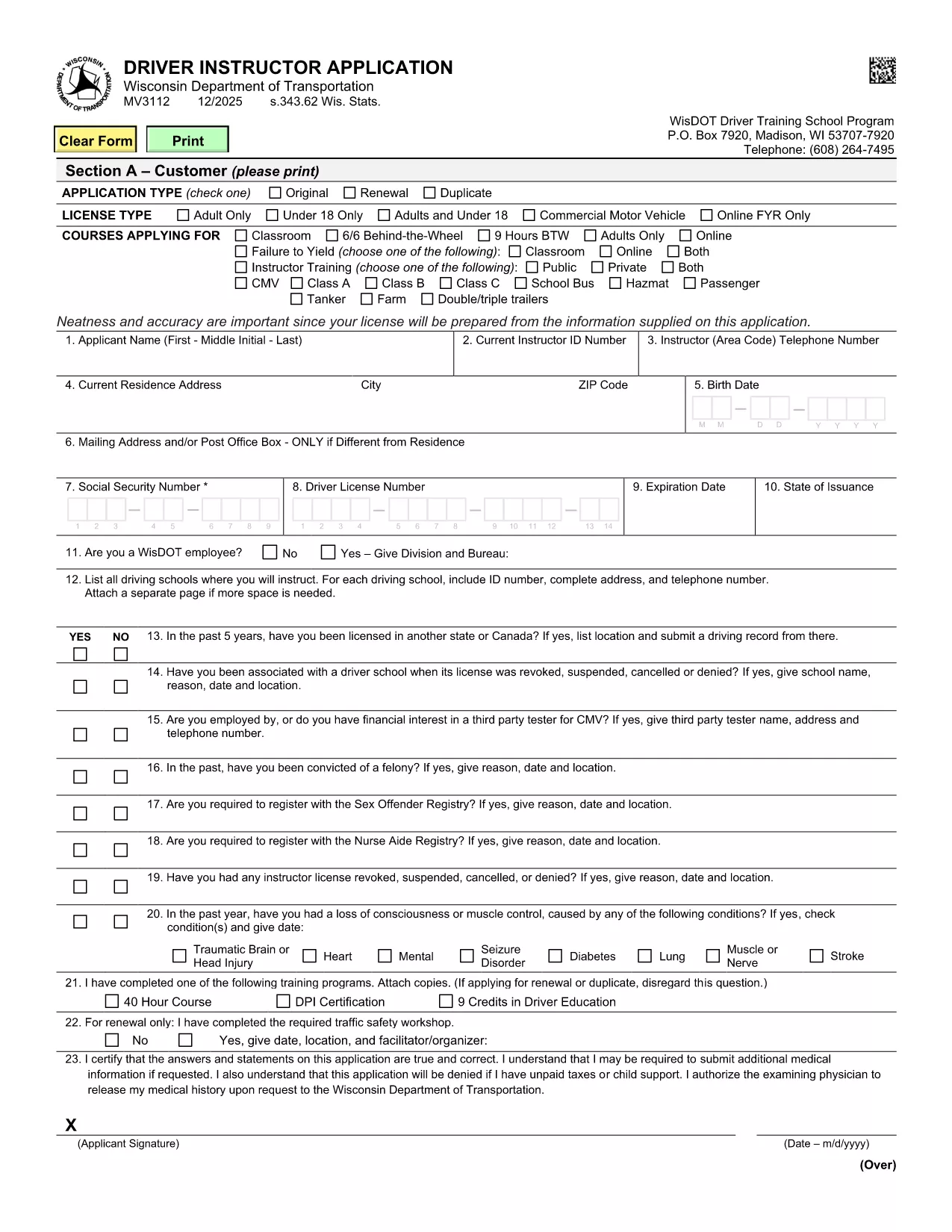
The MV3112 is the official Driver Instructor Application required by the Wisconsin Department of Transportation (WisDOT). Whether you’re starting a new driver‑training school or adding an instructor to an existing program, this form must be completed, signed, and submitted before you can begin teaching.

Formize makes the MV3112 completely fillable online. No more printing, scanning, or hand‑writing. Simply click the “Fill out this form” button, enter your information, and download a completed PDF ready for submission.

What Is the MV3112 Form?

The MV3112 collects personal data, driving history, medical qualifications, and background information about the applicant. It also includes a certification section where you attest that all statements are true and that you meet WisDOT’s eligibility criteria.

How to Complete the MV3112 Online

Follow these quick steps to fill the form using Formize’s PDF Filler:

  • Click the Fill out this form button on this page.
  • Wait for the Formize PDF Filler to load (a few seconds).
  • Enter all required information in the highlighted fields.
  • Upload any supporting documents (e.g., medical clearance, driver record).
  • Save the completed PDF, print it, sign where required, and mail it to WisDOT.

Common Mistakes to Avoid

Even a small error can delay your application. Keep these tips in mind:

  • Missing signatures: Every signature box must be signed in ink after printing.
  • Incomplete medical info: Attach the most recent medical examination if requested.
  • Incorrect fee amount: Verify the current fee on WisDOT’s website before mailing.
  • Out‑of‑date driver record: Use a driver record dated within the last 90 days.

Submission Guidelines & Fees

After you’ve filled and printed the form, mail it to:

Wisconsin Department of Transportation
Division of Driver Services
P.O. Box 7448
Madison, WI 53707‑7448

Include the application fee (check the latest WisDOT fee schedule) and any required medical documentation. Processing typically takes 10‑14 business days.

Need Help? Frequently Asked Questions

Below are answers to the most common questions about the MV3112.

FAQ
  • Who is eligible to use the MV3112 form?

    Any individual who wishes to become a licensed driver instructor in Wisconsin, including those starting a new school or joining an existing one.

  • Do I need a medical examination?

    A medical exam is required only if WisDOT requests it. Attach a current medical report (within 60 days) when requested.

  • What is the application fee?

    The fee varies; check WisDOT’s current fee schedule on their website before submitting the form.

  • Can I submit the MV3112 electronically?

    WisDOT currently requires a printed, signed copy. The online filler speeds up data entry, but you must mail the final PDF.

  • How long does processing take?

    Standard processing is 10‑14 business days after WisDOT receives the complete, signed application.

  • What should I do if I make a mistake on the form?

    Correct any errors before printing. If you discover a mistake after mailing, contact WisDOT to request a replacement form.

  • Is there a deadline for submitting the MV3112?

    There is no fixed deadline, but you should submit the application before you begin any instructor activities to avoid penalties.

  • Where can I find additional guidance?

    Visit the WisDOT Driver Services website for detailed instructions, fee information, and contact details for further assistance.

JAK

Jak zdarma vyplnit MV3112 online v 5 jednoduchých krocích:

  1. 1
    Open the Fillable Form
    Click the “Fill out this form” button on this page. The Formize PDF Filler will open in a new tab.
  2. 2
    Enter Your Information
    Type your details into each highlighted field. Use the drop‑down menus where available for easy selection.
  3. 3
    Upload Supporting Documents
    Attach required files such as medical clearance or a recent driver record using the upload icons.
  4. 4
    Save and Print
    When every field is completed, click “Save PDF”. Print the document, sign the required sections in ink, and prepare it for mailing.
  5. 5
    Submit to WisDOT
    Mail the signed PDF along with the application fee to the WisDOT address listed on the form.
Aplikace Formize PDF Filler
O

Formuláře žádosti o řidičský průkaz

Ve většině zemí je povinné mít řidičský průkaz, než vyrazíte na silnici. Získání řidičského průkazu je důležitým milníkem pro každého, kdo chce řídit auto.

MV3112 je jedním z formulářů žádosti o řidičský průkaz, což jsou dokumenty používané ke shromažďování informací od lidí, kteří chtějí požádat o řidičský průkaz. Obvykle obsahuje pole pro jméno žadatele, datum narození, IČO, kontaktní údaje a také historii a praxi jeho řidičského průkazu.

FUNKCE

PDF Filler

Nejjednodušší způsob, jak vyplnit MV3112 online

  • Rychle vyplňte MV3112
    Hledáte způsob, jak rychle vyplnit MV3112 online? S naším online bezplatným vyplňováním formulářů PDF budete vědět, jak upravit a vyplnit tento dokument PDF za méně než minutu.
  • Snadno použitelný online editor PDF
    Už vás nebaví tisknout soubory PDF, abyste je mohli upravovat, než je znovu naskenujete a odešlete zpět? Upravujte dokumenty PDF zdarma online. Použijte náš online editor PDF, abyste ušetřili čas a papír.
  • Skvělé nástroje, všechny platformy
    Zajímá vás, jak vyplnit MV3112 na Macu, nebo možná jak používat PDF filler zdarma? Naše online nástroje PDF fungují na všech platformách.
  • Bezpečné ukládání souborů
    Dokončené soubory „MV3112“ jsou uloženy v zabezpečené databázi spravované hostingem Amazon Cloud. Své soubory můžete z našeho systému kdykoli smazat. V každém případě jsou tyto soubory po 24 hodinách automaticky smazány.
  • Chat s MV3112
    Chatujte s „MV3112“ na Chatize, což je bezplatný pomocník pro čtení PDF. Ptejte se a získejte odpovědi z „MV3112“. Stačí kliknout na tlačítko Chat with Document výše.

Smazat relaci plnění

Smazat vybranou relaci plnění? V takovém případě bude váš postup při vyplňování formuláře ztracen.

Smazat relaci úprav

Smazat vybranou relaci úprav? V tomto případě bude váš postup při vytváření a úpravách formuláře ztracen.