
Zvolte jazyk

Parent Authorization Form for Driver License (Fillable PDF)

  1. Jazyk Angličtina
  2. Země USA
  3. Aktivita Driver Licensing
  4. oddělení Motor Vehicle Commission
Parent Authorization Form for Driver License (Fillable PDF)

When a teen under 18 applies for a driver’s permit or license, most state motor vehicle agencies require a signed Parent or Guardian Consent Form. This form proves that a parent or legal guardian authorizes the minor to obtain driving privileges and acknowledges responsibility for the teen’s safe operation of the vehicle.

What Is the Parent or Guardian Consent Form?

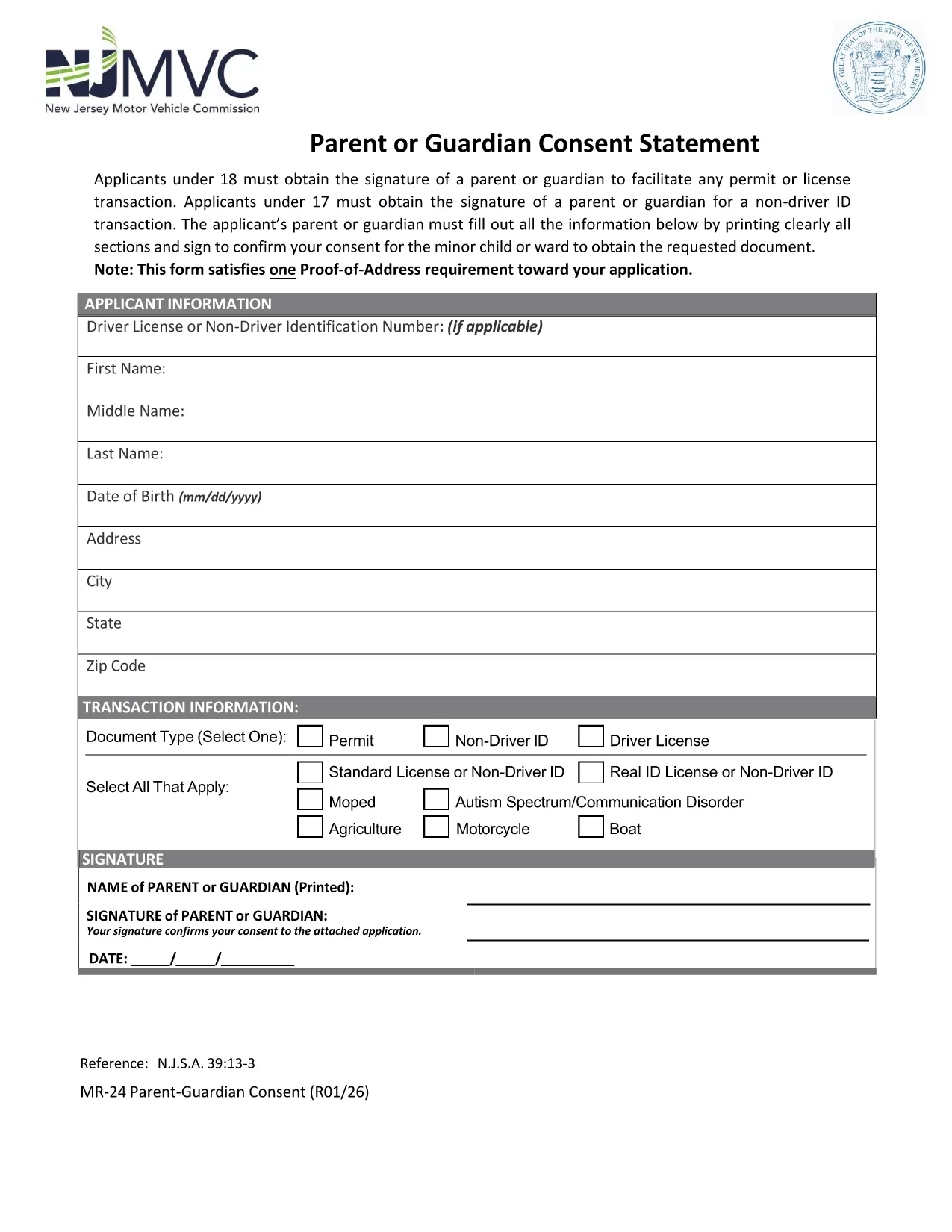
The consent form is a simple one‑page PDF that captures the minor’s personal information, the parent’s contact details, and the parent’s signature. It is used by the Department of Motor Vehicles (DMV) or Motor Vehicle Commission (MVC) to verify that a responsible adult has given permission.

How to Complete the Form Online with Formize

Instead of printing, scanning, or using a PDF editor, you can fill out the form directly on our site. Follow these steps:

  1. Click the "Fill out this form" button below.
  2. Wait a moment while the Formize PDF Filler app loads securely in your browser.
  3. Enter the required information in each field – the interface highlights mandatory sections.
  4. Use the built‑in signature pad to add the parent’s signature (or type the name and select the "Typed Signature" option).
  5. When you’re done, click Save & Download to get a completed PDF you can print or submit electronically.

Common Mistakes to Avoid

  • Illegible handwriting: Even though you can type, many still hand‑write. Use clear, block letters to prevent processing delays.
  • Missing signatures: Both the parent/guardian and, in some states, the minor must sign. The Formize app will warn you if a signature is missing.
  • Incorrect dates: Use the current date; an expired date may cause the form to be rejected.
  • Wrong address: Verify the address matches the one on file with the DMV.

Where to Submit the Completed Form

After you download the filled PDF, you can:

  • Bring it to your local DMV/MVC office when applying for the permit or license.
  • Mail it to the address listed on the form (if your state allows mail‑in submissions).
  • Upload it through the online driver‑license portal, if your state provides that option.

Download the Official PDF

The form below is the official New Jersey Motor Vehicle Commission (MVC) Parent or Guardian Consent Form. It is fully compatible with the Formize PDF Filler.

Download the PDF

FAQ
  • Do I need a notarized signature on the parent consent form?

    No. Most states, including New Jersey, only require a regular signature from the parent or legal guardian. A notarized signature is not necessary.

  • Can I submit the form electronically?

    Yes, if your state’s DMV/MVC offers an online portal. The filled PDF can be uploaded directly after you save it from Formize.

  • What if my teen is 17 and applying for a learner’s permit?

    A parent or guardian must still sign the consent form. Some states also require a separate “Non‑Driver ID” consent; the same PDF covers both purposes.

  • Is the Formize PDF Filler secure?

    Absolutely. All data is processed locally in your browser; nothing is stored on our servers unless you choose to save the file.

  • Can I edit the form after I’ve downloaded it?

    Yes. The saved PDF remains fillable, so you can reopen it in Formize or any standard PDF editor to make corrections before final submission.

  • What if I make a mistake while filling the form?

    Simply click the "Clear" button next to the field, re‑enter the correct information, and continue. The app prevents accidental submission of incomplete or incorrect data.

  • Do I need to provide proof of relationship with the minor?

    The consent form itself serves as proof. However, some DMVs may request additional documentation (birth certificate, custody papers) during the in‑person visit.

  • Is there a fee to use the Formize PDF Filler?

    No. The fillable PDF and online filler are completely free for users.

JAK

Jak zdarma vyplnit parent authorization driver license online v 5 jednoduchých krocích:

  1. 1
    Open the Fillable Form
    Click the "Fill out this form" button on the page. The Formize PDF Filler loads directly in your browser—no download needed.
  2. 2
    Enter All Required Information
    Type the minor’s name, date of birth, address, and the parent’s contact details into the highlighted fields.
  3. 3
    Add the Parent’s Signature
    Use the signature pad to draw a signature or select the "Typed Signature" option. The app validates that the signature field is completed.
  4. 4
    Save and Download
    When every required field is filled, click "Save & Download". A completed PDF will be saved to your device for printing or electronic submission.
  5. 5
    Submit to Your DMV/MVC
    Take the printed copy to your local motor vehicle office, mail it, or upload it through the state’s online portal as instructed.
Aplikace Formize PDF Filler
O

šablona parent authorization driver license

S tradiční sadou funkcí pro prohlížení a vyplňování dokumentu PDF v kombinaci s výhodami webové aplikace a responzivního rozvržení zvládnete parent authorization driver license dokončit během několika minut.

FUNKCE

PDF Filler

Nejjednodušší způsob, jak vyplnit parent authorization driver license online

  • Rychle vyplňte parent authorization driver license
    Hledáte způsob, jak rychle vyplnit parent authorization driver license online? S naším online bezplatným vyplňováním formulářů PDF budete vědět, jak upravit a vyplnit tento dokument PDF za méně než minutu.
  • Snadno použitelný online editor PDF
    Už vás nebaví tisknout soubory PDF, abyste je mohli upravovat, než je znovu naskenujete a odešlete zpět? Upravujte dokumenty PDF zdarma online. Použijte náš online editor PDF, abyste ušetřili čas a papír.
  • Skvělé nástroje, všechny platformy
    Zajímá vás, jak vyplnit parent authorization driver license na Macu, nebo možná jak používat PDF filler zdarma? Naše online nástroje PDF fungují na všech platformách.
  • Bezpečné ukládání souborů
    Dokončené soubory „parent authorization driver license“ jsou uloženy v zabezpečené databázi spravované hostingem Amazon Cloud. Své soubory můžete z našeho systému kdykoli smazat. V každém případě jsou tyto soubory po 24 hodinách automaticky smazány.
  • Chat s parent authorization driver license
    Chatujte s „parent authorization driver license“ na Chatize, což je bezplatný pomocník pro čtení PDF. Ptejte se a získejte odpovědi z „parent authorization driver license“. Stačí kliknout na tlačítko Chat with Document výše.

Smazat relaci plnění

Smazat vybranou relaci plnění? V takovém případě bude váš postup při vyplňování formuláře ztracen.

Smazat relaci úprav

Smazat vybranou relaci úprav? V tomto případě bude váš postup při vytváření a úpravách formuláře ztracen.