
Zvolte jazyk

VP 275 Fillable PDF – Nevada DMV Form

  1. Země USA
  2. Jazyk Angličtina
  3. oddělení Nevada DMV
  4. Aktivita Registrace vozidla
VP 275 Fillable PDF – Nevada DMV Form

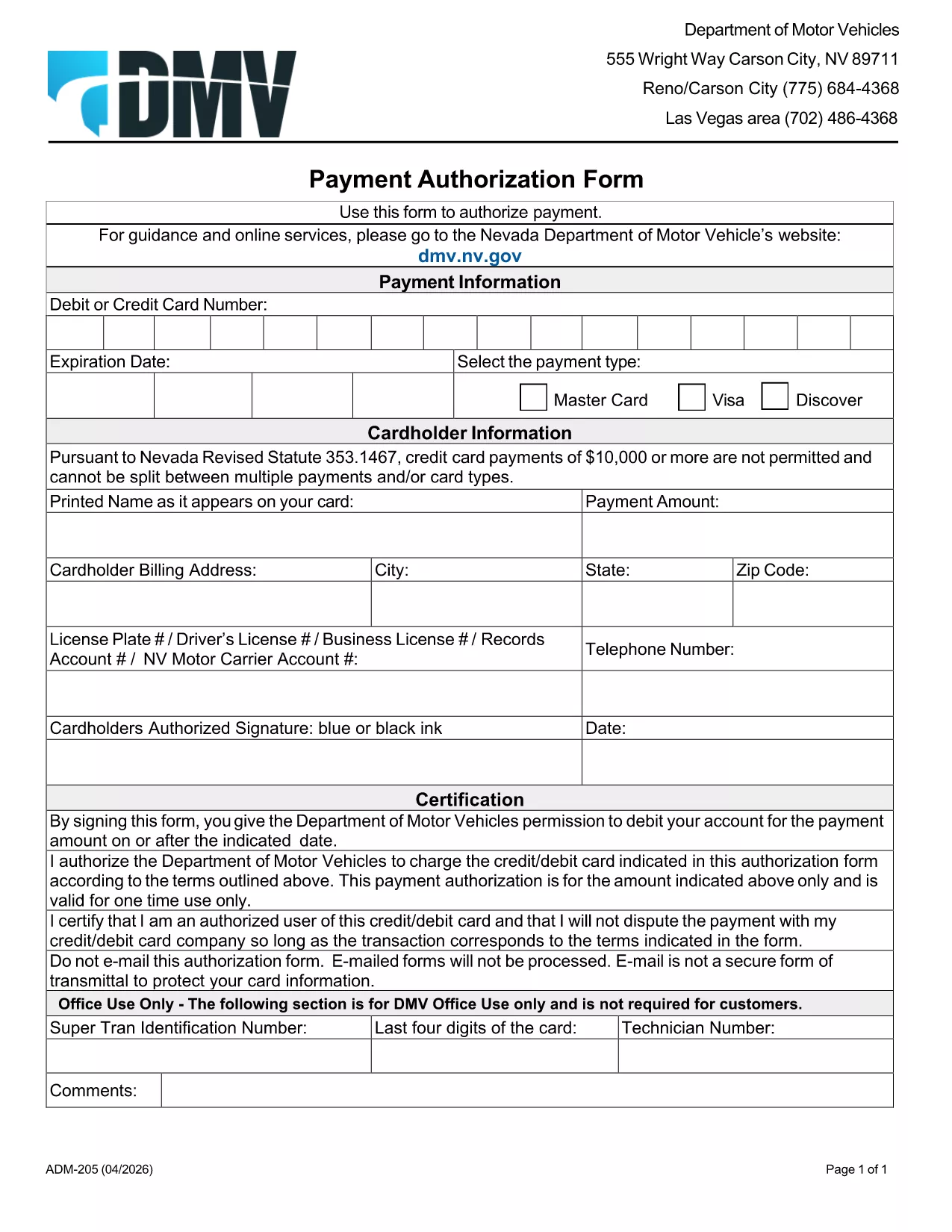
The VP 275 is the Nevada Department of Motor Vehicles (DMV) form used to authorize payment for vehicle‑related fees, such as registration renewals, title transfers, and specialty plates. This form is available as a fillable PDF, so you can complete it on any computer, tablet, or smartphone before you head to the DMV.

Formize.com hosts a secure, browser‑based PDF filler that lets you edit the VP 275 directly on our site – no extra software required. Simply click the "Fill out this form" button below, make your entries, and download the finished document ready for signature.

What Is the VP 275 Form?

VP 275 is the official Payment Authorization Form for the Nevada DMV. It captures:

  • Vehicle identification details (VIN, plate number)
  • Owner’s contact information
  • Amount to be charged to a credit or debit card
  • Authorization signature (added after printing)

Using the fillable PDF saves you time at the DMV counter and reduces the risk of errors.

How to Complete the VP 275 Online with Formize

Follow these simple steps to fill out the form instantly:

  1. Click the "Fill out this form" button on this page.
  2. Wait a few seconds while the Formize PDF Filler app loads.
  3. Enter the required information in each field – the interface highlights required fields.
  4. Click Save to store a copy in your browser or download the completed PDF.
  5. Print the form, sign it in person, and bring it to your nearest Nevada DMV office.

Common Mistakes to Avoid When Filling VP 275

  • Leaving required fields blank: The filler will warn you, but double‑check before saving.
  • Incorrect card information: Verify the card number, expiration date, and CVV to prevent payment rejections.
  • Using an outdated VIN: Ensure the VIN matches the vehicle you are registering.
  • Signing the PDF before printing: The DMV requires a handwritten signature on the physical copy.

Where to Submit the Completed VP 275

After printing and signing, you can:

  • Mail the form to your local DMV office (address listed on the form).
  • Bring it in person during your appointment.
  • Attach it to any online submission portal that accepts scanned PDFs.

Having a correctly completed VP 275 speeds up processing and helps you avoid extra visits.

FAQ
  • Is the VP 275 form available for free?

    Yes. The fillable PDF is provided at no cost. You only need an internet connection to use Formize’s online filler.

  • Can I submit the VP 275 electronically?

    The Nevada DMV still requires a physical signature, so you must print, sign, and mail or bring the form in person.

  • What if I make a mistake after saving?

    You can reopen the saved PDF in the Formize filler, correct the error, and re‑download the updated version.

  • Do I need Adobe Acrobat to fill out VP 275?

    No. Formize’s browser‑based filler works with any modern browser—no additional software is needed.

  • How long does the Formize filler take to load?

    Typically less than 5 seconds on a standard broadband connection.

  • Is my personal and payment information secure?

    Yes. Formize uses SSL encryption, and no data is stored on our servers after you download the completed PDF.

  • Can I use the VP 275 for a vehicle owned by a business?

    Absolutely. Just enter the business name and tax ID in the appropriate fields.

  • What should I do if the form won’t save?

    Refresh the page, ensure your browser allows pop‑ups, and try again. If the issue persists, try a different browser.

JAK

Jak zdarma vyplnit VP 275 form online v 4 jednoduchých krocích:

  1. 1
    Open the Fillable Form
    Click the "Fill out this form" button on this page. The Formize PDF Filler will open in a new browser tab.
  2. 2
    Enter Your Information
    Type directly into each highlighted field. Required fields are marked with an asterisk.
  3. 3
    Save and Download
    When all data is entered, click the Save button, then download the completed PDF to your device.
  4. 4
    Print and Sign
    Print the downloaded file, add your handwritten signature, and submit it to the Nevada DMV as instructed.
Aplikace Formize PDF Filler
O

Registrační formuláře vozidla

Pokud vlastníte nebo si pronajímáte motorové vozidlo, přívěs nebo loď, musíte splnit určité povinnosti, aby bylo vaše vozidlo legálně registrované a bezpečné.

VP 275 form je jeden z registračních formulářů vozidla, což jsou dokumenty, které se používají k registraci motorového vozidla u příslušného státního nebo provinčního úřadu. Tyto formuláře jsou obvykle vyžadovány, když si osoba koupí nové nebo ojeté vozidlo nebo když se s vozidlem přestěhuje do nového státu nebo provincie.

Přesné požadavky a formuláře potřebné pro registraci vozidla se mohou lišit podle místa, ale obecně tento proces zahrnuje poskytnutí informací o vozidle, vlastníkovi a případných zástavních právech k vozidlu.

Po předložení registračních formulářů a poplatků vydá státní nebo provinční úřad majiteli vozidla osvědčení o registraci nebo SPZ. Tato registrace umožňuje legální provoz vozidla na veřejných komunikacích a dálnicích.

FUNKCE

PDF Filler

Nejjednodušší způsob, jak vyplnit VP 275 form online

  • Rychle vyplňte VP 275 form
    Hledáte způsob, jak rychle vyplnit VP 275 form online? S naším online bezplatným vyplňováním formulářů PDF budete vědět, jak upravit a vyplnit tento dokument PDF za méně než minutu.
  • Snadno použitelný online editor PDF
    Už vás nebaví tisknout soubory PDF, abyste je mohli upravovat, než je znovu naskenujete a odešlete zpět? Upravujte dokumenty PDF zdarma online. Použijte náš online editor PDF, abyste ušetřili čas a papír.
  • Skvělé nástroje, všechny platformy
    Zajímá vás, jak vyplnit VP 275 form na Macu, nebo možná jak používat PDF filler zdarma? Naše online nástroje PDF fungují na všech platformách.
  • Bezpečné ukládání souborů
    Dokončené soubory „VP 275 form“ jsou uloženy v zabezpečené databázi spravované hostingem Amazon Cloud. Své soubory můžete z našeho systému kdykoli smazat. V každém případě jsou tyto soubory po 24 hodinách automaticky smazány.
  • Chat s VP 275 form
    Chatujte s „VP 275 form“ na Chatize, což je bezplatný pomocník pro čtení PDF. Ptejte se a získejte odpovědi z „VP 275 form“. Stačí kliknout na tlačítko Chat with Document výše.

Smazat relaci plnění

Smazat vybranou relaci plnění? V takovém případě bude váš postup při vyplňování formuláře ztracen.

Smazat relaci úprav

Smazat vybranou relaci úprav? V tomto případě bude váš postup při vytváření a úpravách formuláře ztracen.