Zvolte jazyk

Fillable I-485 Form – Keep Your Permanent Residence Permit

  1. Jazyk Angličtina
  2. Země USA
  3. Aktivita Přistěhovalectví
  4. oddělení USCIS
Fillable I-485 Form – Keep Your Permanent Residence Permit

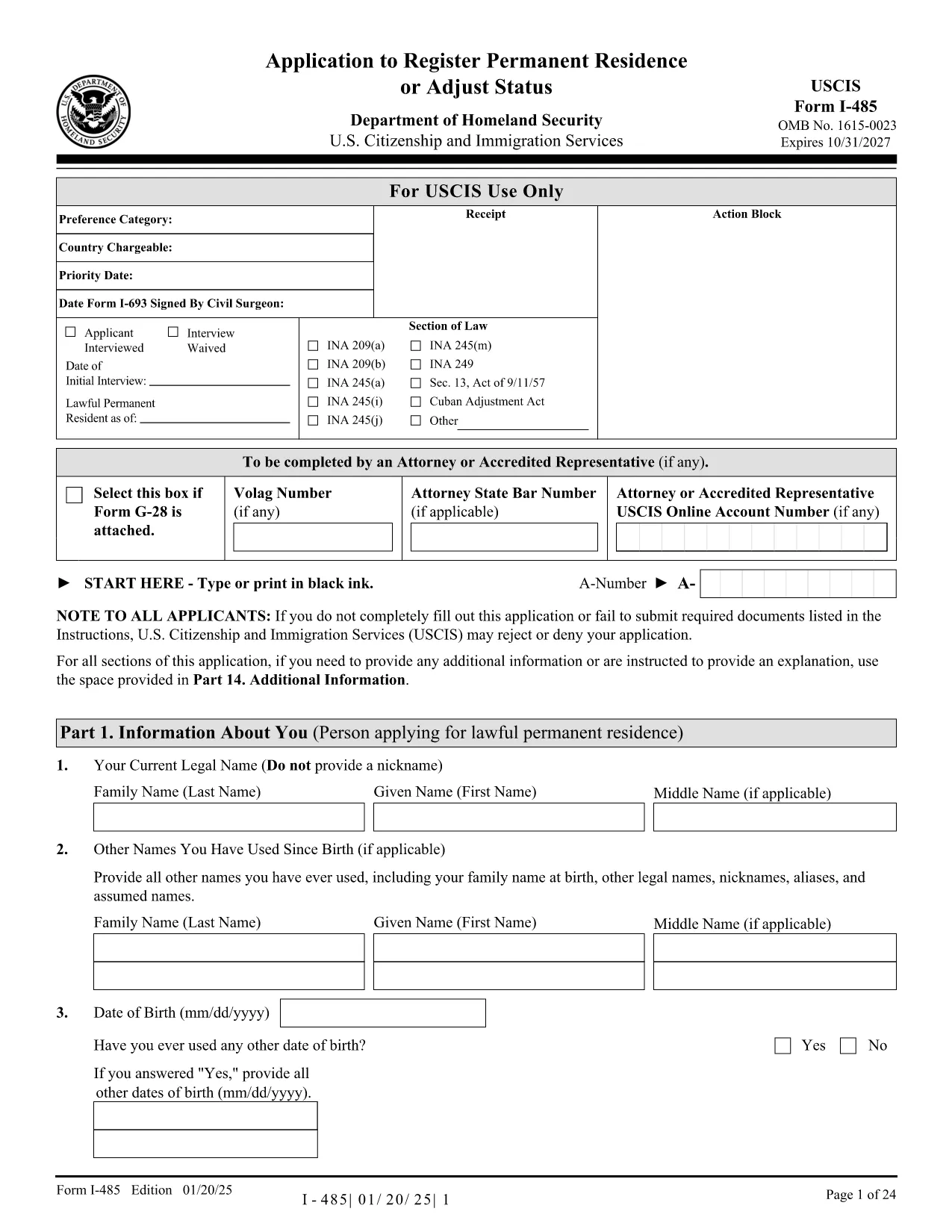
The I-485, Application to Register Permanent Residence or Adjust Status is the official USCIS form used to apply for a green card (lawful permanent resident status) while you are already in the United States. Our fillable PDF version lets you complete the entire application directly in your browser, save time, and reduce errors.

What Is the I-485 Form?

The I-485 collects personal information, immigration history, and supporting documents required to prove eligibility for permanent residence. It is used by family‑based, employment‑based, and other eligible categories.

How to Complete the Form Online

With Formize’s PDF Filler you can:

  • Open the form instantly – no download needed.
  • Fill each field with keyboard input or dropdowns.
  • Save a draft and return later.
  • Download a completed, printable PDF ready for USCIS submission.

Common Mistakes to Avoid

  • Leaving required fields blank.
  • Using the wrong date format (MM/DD/YYYY).
  • Submitting an unsigned form.
  • Uploading an outdated version of the I-485 (check the edition date at the bottom of each page).

Submission Checklist

  • Completed I-485 form (PDF).
  • Signed Form I-485 (hand‑signed).
  • Form I-693 (medical exam) in a sealed envelope.
  • Copy of your I-797 approval notice (if applicable).
  • Filing fee payment receipt.

Need Help?

Visit the USCIS I-485 page for official instructions, fee details, and filing addresses. For technical assistance with the Formize filler, consult the on‑screen help tips or the FAQ section below.

FAQ
  • Do I need to print the I-485 after filling it out online?

    Yes. USCIS requires a printed, hand‑signed copy for submission. The online version is for convenience and accuracy.

  • Can I submit the I-485 electronically?

    Electronic filing is limited to certain employment‑based categories. Most applicants must file a paper copy by mail.

  • What edition of the I-485 should I use?

    Always use the latest edition. The PDF linked on this page shows the current edition date at the bottom of each page.

  • How do I know if I entered a required field correctly?

    Formize highlights incomplete required fields in red and validates date formats and numeric entries in real time.

  • What should I do if I make a mistake after downloading the PDF?

    Return to the Formize filler, correct the error, and download a new PDF. Do not alter the printed form with ink corrections.

  • Is there a fee for using the Formize PDF Filler?

    No. The filler is free to use. You only pay the USCIS filing fee when you submit the completed form.

  • Where can I find the filing address for my I-485?

    The USCIS website provides specific mailing addresses based on your eligibility category. Check the "Where to File" section in the form instructions.

JAK

Jak zdarma vyplnit I-485 online v 4 jednoduchých krocích:

  1. 1
    Open the Fillable Form
    Click the "Fill out this form" button on the page. The Formize PDF Filler loads the I-485 PDF directly in your browser.
  2. 2
    Enter Your Information
    Type into each field, select options from dropdowns, and upload required supporting documents. All changes are saved automatically.
  3. 3
    Review and Sign
    Use the built‑in review tool to check for missing or incorrect entries. When finished, add your electronic signature or print to sign by hand.
  4. 4
    Download and Submit
    Click "Download PDF" to save the completed form. Print, sign (if required), and mail it to the USCIS address listed in the instructions.
Aplikace Formize PDF Filler
O

šablona I-485

S tradiční sadou funkcí pro prohlížení a vyplňování dokumentu PDF v kombinaci s výhodami webové aplikace a responzivního rozvržení zvládnete I-485 dokončit během několika minut.

FUNKCE

PDF Filler

Nejjednodušší způsob, jak vyplnit I-485 online

  • Rychle vyplňte I-485
    Hledáte způsob, jak rychle vyplnit I-485 online? S naším online bezplatným vyplňováním formulářů PDF budete vědět, jak upravit a vyplnit tento dokument PDF za méně než minutu.
  • Snadno použitelný online editor PDF
    Už vás nebaví tisknout soubory PDF, abyste je mohli upravovat, než je znovu naskenujete a odešlete zpět? Upravujte dokumenty PDF zdarma online. Použijte náš online editor PDF, abyste ušetřili čas a papír.
  • Skvělé nástroje, všechny platformy
    Zajímá vás, jak vyplnit I-485 na Macu, nebo možná jak používat PDF filler zdarma? Naše online nástroje PDF fungují na všech platformách.
  • Bezpečné ukládání souborů
    Dokončené soubory „I-485“ jsou uloženy v zabezpečené databázi spravované hostingem Amazon Cloud. Své soubory můžete z našeho systému kdykoli smazat. V každém případě jsou tyto soubory po 24 hodinách automaticky smazány.
  • Chat s I-485
    Chatujte s „I-485“ na Chatize, což je bezplatný pomocník pro čtení PDF. Ptejte se a získejte odpovědi z „I-485“. Stačí kliknout na tlačítko Chat with Document výše.

Smazat relaci plnění

Smazat vybranou relaci plnění? V takovém případě bude váš postup při vyplňování formuláře ztracen.

Smazat relaci úprav

Smazat vybranou relaci úprav? V tomto případě bude váš postup při vytváření a úpravách formuláře ztracen.