
Zvolte jazyk

Form 2305 – Affidavit to Establish Title to Exempt Property (Fillable PDF)

  1. Jazyk Angličtina
  2. Země USA
  3. Aktivita Registrace vozidla
  4. Stát Missouri
Form 2305 – Affidavit to Establish Title to Exempt Property (Fillable PDF)

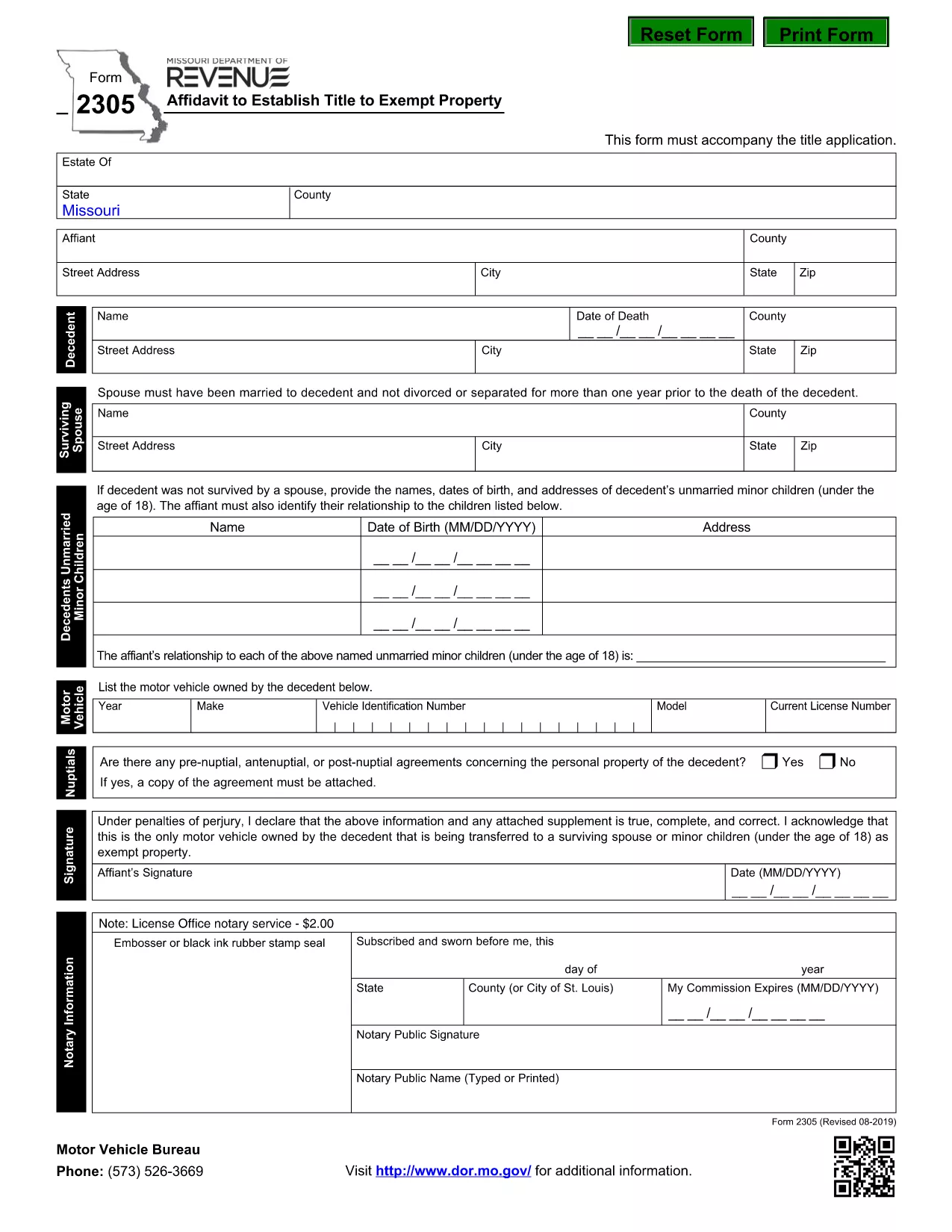
The Missouri Form 2305 – Affidavit to Establish Title to Exempt Property – is used when a deceased person’s estate needs to prove ownership of property that is exempt from certain taxes. This form must accompany the title application and include details such as the motor vehicle or other exempt items owned by the decedent.

What Is Form 2305 and When Is It Required?

Form 2305 is required by the Missouri Department of Revenue whenever you are applying for a title transfer of property that is exempt from the state's personal property tax. Typical scenarios include:

  • Vehicle owned by a deceased family member.
  • Equipment or machinery that qualifies for a tax exemption.
  • Any other personal property listed as exempt under Missouri law.

How to Complete Form 2305 Online with Formize

Instead of downloading the PDF and editing it manually, you can fill the form directly on our page:

  1. Click the "Fill out this form" button below.
  2. Wait a few seconds while the Formize PDF Filler app loads.
  3. Enter the required information in each fillable field.
  4. Review your entries, then click Save & Download to get a completed PDF.

All data stays secure, and you’ll have a printable, ready‑to‑submit document in minutes.

Common Mistakes to Avoid on Form 2305

  • Incorrect Decedent Information: Double‑check the name, Social Security number, and date of death.
  • Missing Vehicle Details: Provide the VIN, make, model, and year for every vehicle listed.
  • Signature Errors: The affidavit must be signed by the executor or personal representative; unsigned forms are rejected.
  • Leaving Blank Fields: If a field does not apply, write “N/A” rather than leaving it empty.

Download the Official Fillable PDF

For a hard‑copy version or offline use, you can download the official Missouri form directly from the Department of Revenue:

Download Form 2305 (PDF)

FAQ
  • What is the purpose of Form 2305?

    Form 2305 is an affidavit used to establish legal title to property that is exempt from Missouri personal property tax, typically required during a title transfer after a death.

  • Do I need a notary for Form 2305?

    The Missouri Department of Revenue does not require notarization, but the form must be signed by the executor or personal representative of the estate.

  • Can I submit the form electronically?

    Yes. After completing the fillable PDF with Formize, you can print the signed copy and mail it with your title application. Some counties also accept scanned PDFs.

  • What if I make a mistake after submitting?

    Contact the Missouri Department of Revenue to request a corrected affidavit. You will need to submit a new Form 2305 with the accurate information.

  • Is there a filing fee for Form 2305?

    No separate fee is charged for the affidavit itself, but standard title transfer fees may apply.

  • How long does it take to process the affidavit?

    Processing time varies by county, but once the completed Form 2305 is received with the title application, it is usually reviewed within 5‑10 business days.

  • Can I use the same form for multiple exempt items?

    Yes. List each exempt vehicle or property on a separate line within the form’s schedule section.

  • Where can I get help if I have questions?

    Visit the Missouri Department of Revenue website or call their customer service line for assistance with Form 2305.

JAK

Jak zdarma vyplnit Form 2305 online v 4 jednoduchých krocích:

  1. 1
    Open the Fillable Form
    Click the "Fill out this form" button on the page. The Formize PDF Filler will open in your browser.
  2. 2
    Enter Required Information
    Complete each field with the decedent’s details, vehicle information, and any exempt property data. Use "N/A" for non‑applicable sections.
  3. 3
    Review and Sign
    Double‑check all entries for accuracy. Add the executor’s signature electronically if the form supports it, or print to sign later.
  4. 4
    Save and Download
    When finished, click "Save & Download" to obtain a completed PDF that you can print and submit to the Missouri Department of Revenue.
Aplikace Formize PDF Filler
O

Registrační formuláře vozidla

Pokud vlastníte nebo si pronajímáte motorové vozidlo, přívěs nebo loď, musíte splnit určité povinnosti, aby bylo vaše vozidlo legálně registrované a bezpečné.

Form 2305 je jeden z registračních formulářů vozidla, což jsou dokumenty, které se používají k registraci motorového vozidla u příslušného státního nebo provinčního úřadu. Tyto formuláře jsou obvykle vyžadovány, když si osoba koupí nové nebo ojeté vozidlo nebo když se s vozidlem přestěhuje do nového státu nebo provincie.

Přesné požadavky a formuláře potřebné pro registraci vozidla se mohou lišit podle místa, ale obecně tento proces zahrnuje poskytnutí informací o vozidle, vlastníkovi a případných zástavních právech k vozidlu.

Po předložení registračních formulářů a poplatků vydá státní nebo provinční úřad majiteli vozidla osvědčení o registraci nebo SPZ. Tato registrace umožňuje legální provoz vozidla na veřejných komunikacích a dálnicích.

FUNKCE

PDF Filler

Nejjednodušší způsob, jak vyplnit Form 2305 online

  • Rychle vyplňte Form 2305
    Hledáte způsob, jak rychle vyplnit Form 2305 online? S naším online bezplatným vyplňováním formulářů PDF budete vědět, jak upravit a vyplnit tento dokument PDF za méně než minutu.
  • Snadno použitelný online editor PDF
    Už vás nebaví tisknout soubory PDF, abyste je mohli upravovat, než je znovu naskenujete a odešlete zpět? Upravujte dokumenty PDF zdarma online. Použijte náš online editor PDF, abyste ušetřili čas a papír.
  • Skvělé nástroje, všechny platformy
    Zajímá vás, jak vyplnit Form 2305 na Macu, nebo možná jak používat PDF filler zdarma? Naše online nástroje PDF fungují na všech platformách.
  • Bezpečné ukládání souborů
    Dokončené soubory „Form 2305“ jsou uloženy v zabezpečené databázi spravované hostingem Amazon Cloud. Své soubory můžete z našeho systému kdykoli smazat. V každém případě jsou tyto soubory po 24 hodinách automaticky smazány.
  • Chat s Form 2305
    Chatujte s „Form 2305“ na Chatize, což je bezplatný pomocník pro čtení PDF. Ptejte se a získejte odpovědi z „Form 2305“. Stačí kliknout na tlačítko Chat with Document výše.

Smazat relaci plnění

Smazat vybranou relaci plnění? V takovém případě bude váš postup při vyplňování formuláře ztracen.

Smazat relaci úprav

Smazat vybranou relaci úprav? V tomto případě bude váš postup při vytváření a úpravách formuláře ztracen.