
Zvolte jazyk

MVR-181 Damage Disclosure Statement – Fillable PDF

  1. Jazyk Angličtina
  2. Země USA
  3. Aktivita Registrace vozidla
  4. Stát Severní Karolina
MVR-181 Damage Disclosure Statement – Fillable PDF

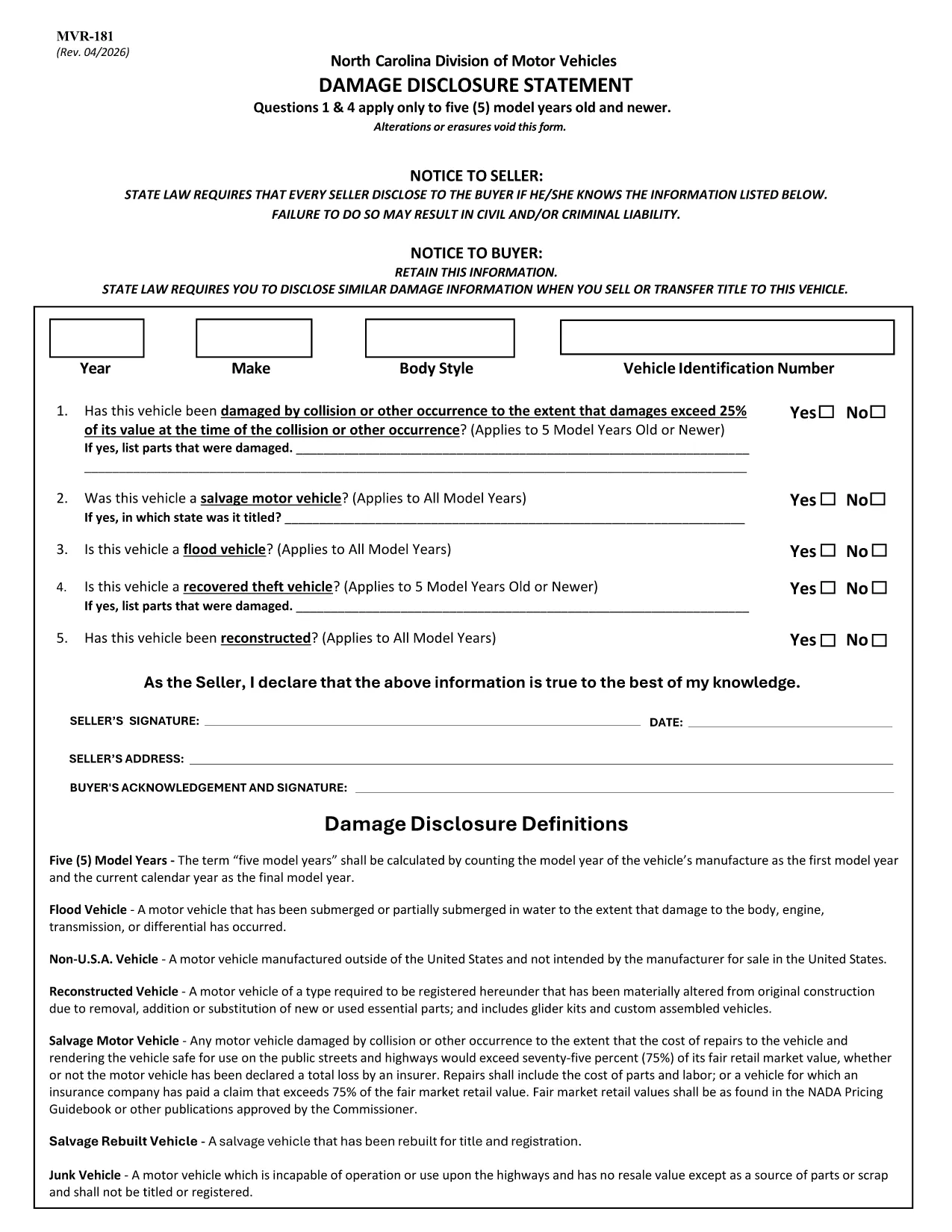
The MVR-181 Damage Disclosure Statement is a legally required form in North Carolina that sellers must complete to disclose any known damage, salvage status, or alterations to a motor vehicle before a sale. Providing accurate information protects both the seller and the buyer from future disputes.

What Is the MVR-181 Damage Disclosure Statement?

The form asks for details such as:

  • Vehicle identification (VIN, make, model, year)
  • Any prior collision or flood damage
  • Whether the vehicle has been declared a total loss or salvaged
  • Signatures of both seller and buyer confirming the information is true

Questions 1 & 4 only apply to vehicles that are five model years old or newer.

Why Choose a Fillable PDF for MVR-181?

Using a fillable PDF saves time, eliminates illegible handwriting, and ensures every required field is completed before submission. With Formize’s online editor you can:

  • Enter data directly on the form
  • Add a legally binding electronic signature
  • Validate the form instantly
  • Download or email the completed PDF in seconds

How to Complete the MVR-181 Online

Follow the simple steps below to fill out the form without leaving your browser.

Common Mistakes to Avoid

  • Leaving any required checkbox unchecked – the form will not validate.
  • Altering or erasing printed text – any changes void the statement.
  • Forgetting both signatures – an unsigned form is not enforceable.

Download the Official NC MVR-181 PDF

Click the button below to open the official North Carolina MVR‑181 PDF in Formize’s secure filler. No software download is required.

FAQ
  • Who is required to complete the MVR-181?

    Any private seller or dealer transferring ownership of a motor vehicle in North Carolina must complete the Damage Disclosure Statement.

  • Is an electronic signature accepted on the MVR-181?

    Yes. North Carolina law recognizes ESIGN‑compliant electronic signatures as valid for the MVR‑181.

  • Can I use the same MVR-181 for multiple vehicles?

    No. Each vehicle requires its own completed form with the specific VIN and damage details.

  • What happens if I leave a required box unchecked?

    The form will not validate, and the transaction could be considered non‑compliant, exposing both parties to liability.

  • Do I need to submit the form to a government agency?

    The completed MVR‑181 is kept with the vehicle’s title paperwork. It is not filed with the DMV, but it must be presented at the time of sale.

  • Can I edit the form after I’ve signed it?

    Once an electronic signature is applied, the document is locked to preserve integrity. If changes are needed, create a new form.

  • Is the PDF provided by Formize the official version?

    Yes. The download link points to the official North Carolina Department of Transportation version of MVR‑181.

  • Do I need special software to fill out the PDF?

    No. Formize’s online filler works in any modern browser – no additional software is required.

JAK

Jak zdarma vyplnit MVR-181 online v 5 jednoduchých krocích:

  1. 1
    Open the Fillable Form
    Click the “Fill out this form” button on the page. The Formize PDF Filler app loads the MVR‑181 directly in your browser.
  2. 2
    Enter the Required Information
    Type into each fillable field – VIN, make, model, damage details, etc. The form highlights any missing required fields.
  3. 3
    Add Your Electronic Signature
    Use the built‑in e‑sign tool to sign as the seller and the buyer. The signature is legally binding and compliant with ESIGN.
  4. 4
    Review and Validate
    Click “Validate” to let Formize check for incomplete sections or unchecked boxes. Correct any issues before proceeding.
  5. 5
    Download or Email the Completed PDF
    When validation passes, choose “Download” to save a copy or “Email” to send the completed form directly to the other party.
Aplikace Formize PDF Filler
O

Registrační formuláře vozidla

Pokud vlastníte nebo si pronajímáte motorové vozidlo, přívěs nebo loď, musíte splnit určité povinnosti, aby bylo vaše vozidlo legálně registrované a bezpečné.

MVR-181 je jeden z registračních formulářů vozidla, což jsou dokumenty, které se používají k registraci motorového vozidla u příslušného státního nebo provinčního úřadu. Tyto formuláře jsou obvykle vyžadovány, když si osoba koupí nové nebo ojeté vozidlo nebo když se s vozidlem přestěhuje do nového státu nebo provincie.

Přesné požadavky a formuláře potřebné pro registraci vozidla se mohou lišit podle místa, ale obecně tento proces zahrnuje poskytnutí informací o vozidle, vlastníkovi a případných zástavních právech k vozidlu.

Po předložení registračních formulářů a poplatků vydá státní nebo provinční úřad majiteli vozidla osvědčení o registraci nebo SPZ. Tato registrace umožňuje legální provoz vozidla na veřejných komunikacích a dálnicích.

FUNKCE

PDF Filler

Nejjednodušší způsob, jak vyplnit MVR-181 online

  • Rychle vyplňte MVR-181
    Hledáte způsob, jak rychle vyplnit MVR-181 online? S naším online bezplatným vyplňováním formulářů PDF budete vědět, jak upravit a vyplnit tento dokument PDF za méně než minutu.
  • Snadno použitelný online editor PDF
    Už vás nebaví tisknout soubory PDF, abyste je mohli upravovat, než je znovu naskenujete a odešlete zpět? Upravujte dokumenty PDF zdarma online. Použijte náš online editor PDF, abyste ušetřili čas a papír.
  • Skvělé nástroje, všechny platformy
    Zajímá vás, jak vyplnit MVR-181 na Macu, nebo možná jak používat PDF filler zdarma? Naše online nástroje PDF fungují na všech platformách.
  • Bezpečné ukládání souborů
    Dokončené soubory „MVR-181“ jsou uloženy v zabezpečené databázi spravované hostingem Amazon Cloud. Své soubory můžete z našeho systému kdykoli smazat. V každém případě jsou tyto soubory po 24 hodinách automaticky smazány.
  • Chat s MVR-181
    Chatujte s „MVR-181“ na Chatize, což je bezplatný pomocník pro čtení PDF. Ptejte se a získejte odpovědi z „MVR-181“. Stačí kliknout na tlačítko Chat with Document výše.

Smazat relaci plnění

Smazat vybranou relaci plnění? V takovém případě bude váš postup při vyplňování formuláře ztracen.

Smazat relaci úprav

Smazat vybranou relaci úprav? V tomto případě bude váš postup při vytváření a úpravách formuláře ztracen.