
Zvolte jazyk

MVR-9 Farmer Affidavit – Fillable PDF Form

  1. Jazyk Angličtina
  2. Země USA
  3. Aktivita Registrace vozidla
  4. Stát Severní Karolina
MVR-9 Farmer Affidavit – Fillable PDF Form

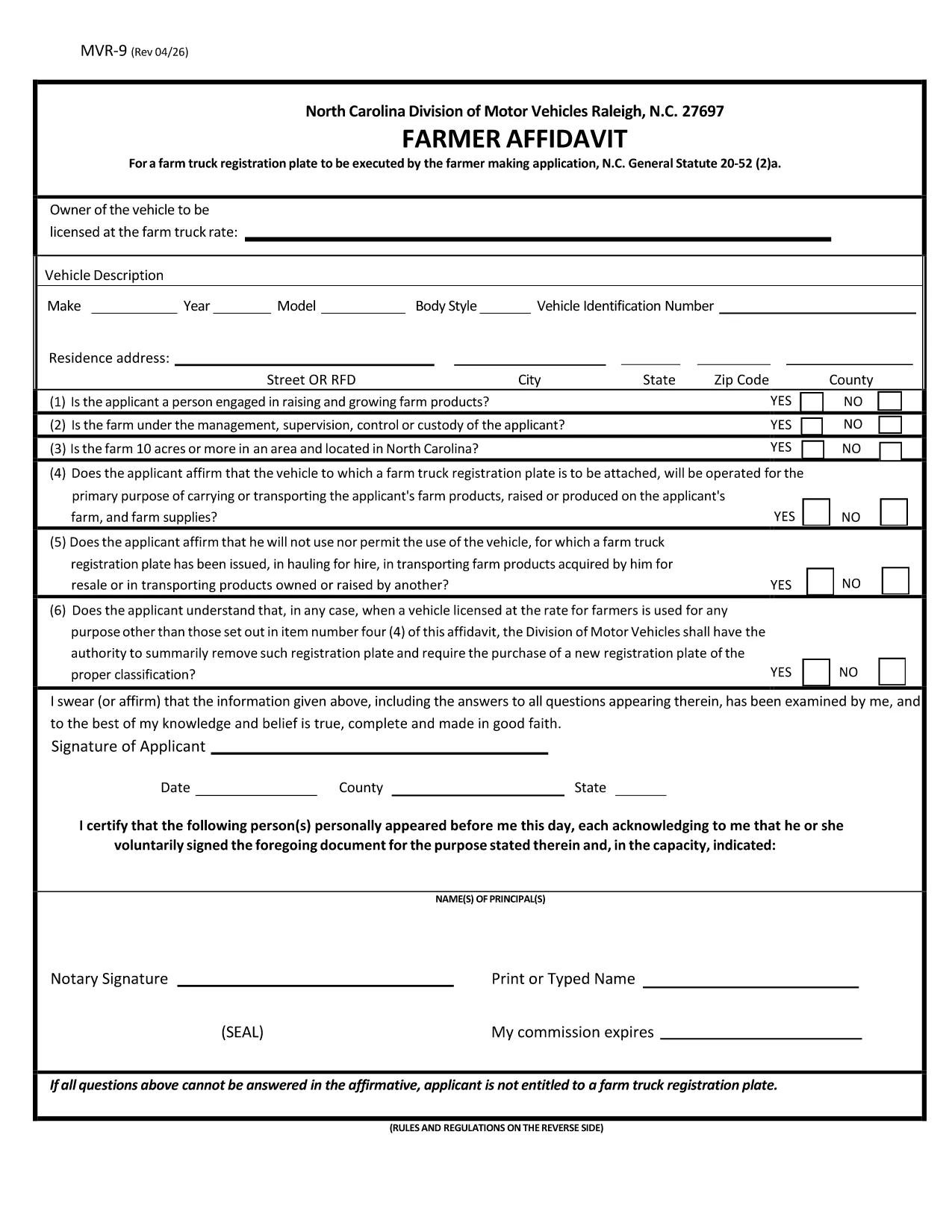
The MVR-9 Farmer Affidavit is a North Carolina Department of Transportation (NCDOT) form required for obtaining a special farm‑truck registration plate. It verifies that the vehicle is used primarily for agricultural purposes, as defined by N.C. General Statute 20‑52(2)(a).

Traditionally, applicants had to print the PDF, fill it by hand, and mail or deliver it to a local DMV office. With Formize’s online PDF filler, you can complete the form directly in your browser, save a digital copy, and print only the final version you need.

What Is the MVR-9 Farmer Affidavit?

The MVR-9 collects essential information about the vehicle, the farmer, and the farm operation. Key sections include:

  • Owner and farmer details
  • Vehicle identification (VIN, make, model)
  • Proof of farm ownership or lease
  • Signature of the farmer and, if applicable, a notary

How to Complete the MVR-9 Online with Formize

Instead of downloading the PDF and opening it in a separate editor, simply click the "Fill out this form" button on this page. The Formize PDF Filler will load automatically. Follow the on‑screen prompts to enter your information, save progress, and download the completed document.

Common Mistakes to Avoid on the MVR-9

  • Leaving fields blank: Every required field must be completed; otherwise the DMV will reject the application.
  • Incorrect VIN: Double‑check the Vehicle Identification Number; a single digit error can delay processing.
  • Missing notarization: If a notary is required, ensure the signature and seal are present before submitting.
  • Outdated farm ownership documents: Provide current proof of ownership or lease.

Where to Submit Your Completed MVR-9

After filling out and printing the form, submit it to any North Carolina DMV office or mail it to the address listed on the form. Keep a copy for your records.

FAQ
  • What is the purpose of the MVR-9 form?

    The MVR-9 Farmer Affidavit verifies that a vehicle is used primarily for agricultural purposes, allowing owners to obtain a special farm‑truck registration plate in North Carolina.

  • Can I file the MVR-9 completely online?

    You can fill out the form online using Formize, but the final submission still requires a printed, signed (and possibly notarized) copy to be handed to the DMV.

  • Do I need a notary for the MVR-9?

    A notary is required only if the affidavit states that the farmer is not the vehicle owner. Check the specific box on the form to see if notarization is needed.

  • How long does it take for the DMV to process the MVR-9?

    Processing times vary by office, but most locations complete the farm‑truck plate issuance within 7‑10 business days after receiving a complete, correctly signed form.

  • What documents should I attach with the MVR-9?

    Attach a copy of the vehicle title, proof of farm ownership or lease (such as a deed or lease agreement), and any required notarization.

  • Is there a fee to file the MVR-9?

    Yes, there is a standard fee for a farm‑truck registration plate, which varies by vehicle weight and type. Check the latest fee schedule on the NCDOT website.

  • Can I edit the MVR-9 after I download it?

    Once you download the completed PDF, you can re‑open it in Formize to make edits before final submission, as long as the form has not been signed and notarized.

JAK

Jak zdarma vyplnit MVR-9 online v 4 jednoduchých krocích:

  1. 1
    Open the Fillable Form
    Click the "Fill out this form" button on the page. The Formize PDF Filler app will open in a new tab.
  2. 2
    Enter Your Information
    Use the on‑screen fields to type in your farmer details, vehicle information, and farm ownership proof. All fields are searchable and auto‑save.
  3. 3
    Review & Sign
    Check each section for accuracy, then use the digital signature tool to sign. If a notary is required, print the completed form for notarization.
  4. 4
    Download & Submit
    Once satisfied, click "Download PDF" to save a copy. Print the final document and submit it to your local NCDOT DMV office or mail it as instructed.
Aplikace Formize PDF Filler
O

Registrační formuláře vozidla

MVR-9 je jeden z registračních formulářů vozidla, což jsou dokumenty používané k registraci motorového vozidla u příslušného vládního orgánu, obvykle ministerstva pro motorová vozidla (DMV) nebo obdobného úřadu. Tyto formuláře jsou vyžadovány, když si osoba koupí nové nebo ojeté vozidlo, převede vlastnictví vozidla nebo se s vozidlem přestěhuje do nové jurisdikce.

Konkrétní registrační formuláře vozidla se mohou lišit podle jurisdikce, ale obecně vyžadují následující informace:

Informace o vozidle: Zahrnuje podrobnosti o vozidle, jako je značka, model, rok, identifikační číslo vozidla (VIN) a stav počítadla kilometrů.

Informace o vlastníkovi: Formulář bude vyžadovat informace o vlastníkovi vozidla, včetně jeho jména, adresy, kontaktních údajů a čísla řidičského průkazu.

Doklad o vlastnictví: V závislosti na okolnostech může být vyžadován doklad o vlastnictví, jako je osvědčení o vlastnictví, prodejní doklad nebo osvědčení výrobce o původu (u nových vozidel).

Informace o pojištění: Obvykle je vyžadován doklad o platném pojištění vozidla. To může zahrnovat poskytnutí čísla pojistné smlouvy, data krytí a údajů o pojišťovně.

Platba poplatků: Registrace vozidla zahrnuje platbu různých poplatků, jako jsou registrační poplatky, daně a případně další poplatky specifické pro jurisdikci.

Kromě těchto základních požadavků mohou mít některé jurisdikce další požadavky na formuláře nebo dokumentaci. V určitých oblastech mohou být například nezbytné výsledky testů emisí, bezpečnostní kontroly nebo prokázání trvalého pobytu.

Po vyplnění a odeslání registračních formulářů vozidla vydá státní úřad osvědčení o registraci, SPZ a registrační nálepky. Tyto doklady ukazují, že vozidlo je legálně registrováno a oprávněno k provozu na veřejných komunikacích.

Je důležité poznamenat, že požadavky na registraci vozidel se mohou výrazně lišit podle jurisdikce. Proto se doporučuje konzultovat s místním DMV nebo ekvivalentním úřadem konkrétní formuláře a postupy platné pro vaši lokalitu.

FUNKCE

PDF Filler

Nejjednodušší způsob, jak vyplnit MVR-9 online

  • Rychle vyplňte MVR-9
    Hledáte způsob, jak rychle vyplnit MVR-9 online? S naším online bezplatným vyplňováním formulářů PDF budete vědět, jak upravit a vyplnit tento dokument PDF za méně než minutu.
  • Snadno použitelný online editor PDF
    Už vás nebaví tisknout soubory PDF, abyste je mohli upravovat, než je znovu naskenujete a odešlete zpět? Upravujte dokumenty PDF zdarma online. Použijte náš online editor PDF, abyste ušetřili čas a papír.
  • Skvělé nástroje, všechny platformy
    Zajímá vás, jak vyplnit MVR-9 na Macu, nebo možná jak používat PDF filler zdarma? Naše online nástroje PDF fungují na všech platformách.
  • Bezpečné ukládání souborů
    Dokončené soubory „MVR-9“ jsou uloženy v zabezpečené databázi spravované hostingem Amazon Cloud. Své soubory můžete z našeho systému kdykoli smazat. V každém případě jsou tyto soubory po 24 hodinách automaticky smazány.
  • Chat s MVR-9
    Chatujte s „MVR-9“ na Chatize, což je bezplatný pomocník pro čtení PDF. Ptejte se a získejte odpovědi z „MVR-9“. Stačí kliknout na tlačítko Chat with Document výše.

Smazat relaci plnění

Smazat vybranou relaci plnění? V takovém případě bude váš postup při vyplňování formuláře ztracen.

Smazat relaci úprav

Smazat vybranou relaci úprav? V tomto případě bude váš postup při vytváření a úpravách formuláře ztracen.